Getting Started
14 Comdial August, 03
Above the HOLD button:
• (Non-SCS Series models) Flashing/Fluttering red = message
waiting.
• Winking green = a line is on hold at your station (DXP, DXP
Plus, FXS and FXT Systems only).
Next to the MESSAGE button (SCS Series Models only):
• Winking green = message awaits pick up.
Above the SPEAKER button:
• On steady (with the telephone on hook and busy) =
speakerphone mode
• On steady (with telephone on hook and idle) = background
music is turned on.
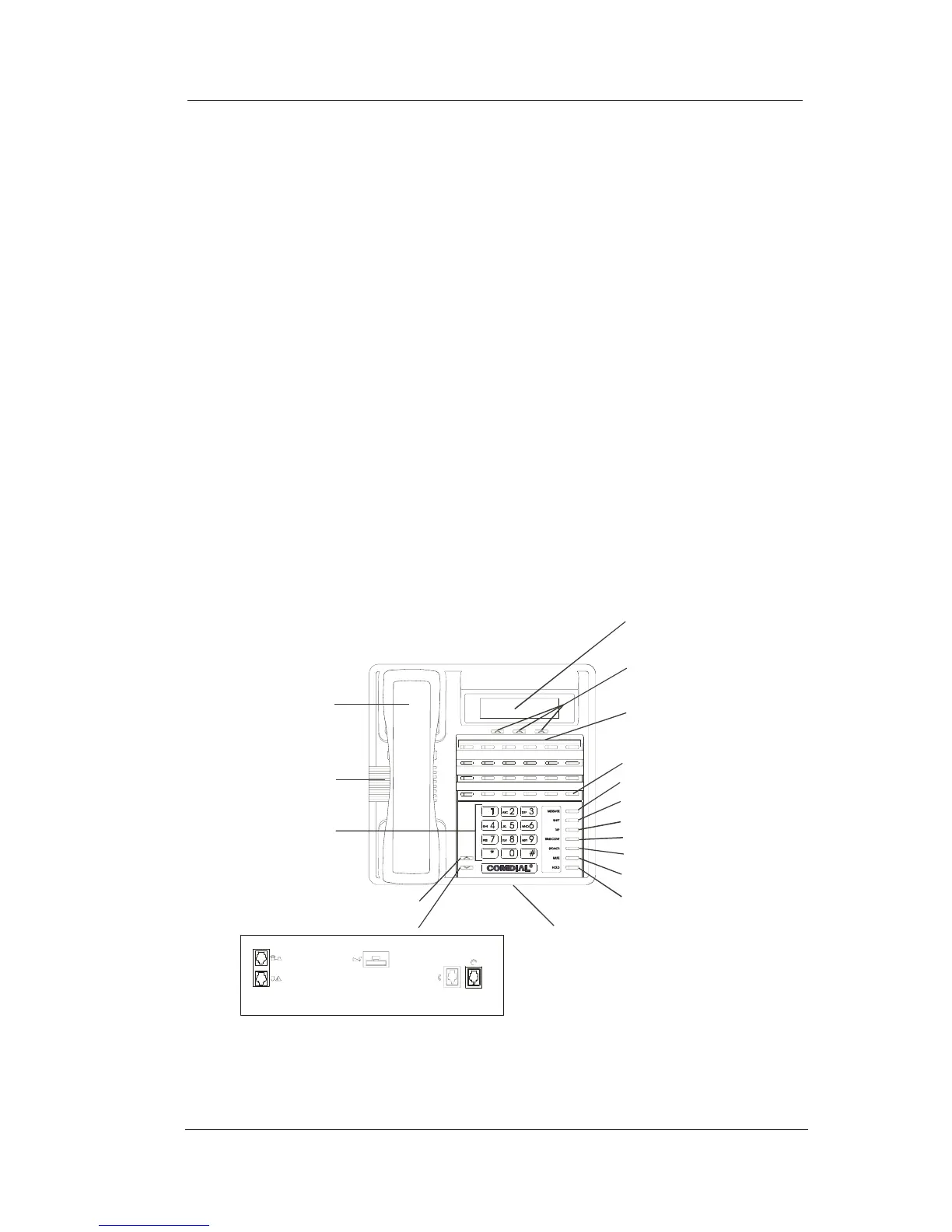
Telephone Speaker
Dialpad
Handset
Programmable
Buttons
Speaker Button*
Microphone Opening
Intercom Button*
SCS02
LCD Alphanumeric
Display
Interactive Buttons
(NOT programmable)
Shift Button*
Mute Button*
Hold Button*
Message Waiting Light*
TAP Button*
Transfer/Conference Button*
R
Vo l u me U p
Volume Down
Connectors On Bottom Of Telephone
Optional IMIST Module
Handset Headset
Optional Console-Top
Line Cord-Bottom
* NOTE: These may be default button locations.
Your system may allow installer
reprogramming of these buttons to
better suit your applications.
Impact SCS 8324F-** and Impact SCS 8324S-**












 To Next Page