Atena Easy Addressable Fire Alarm Panel – Installation and Programming Manual
33
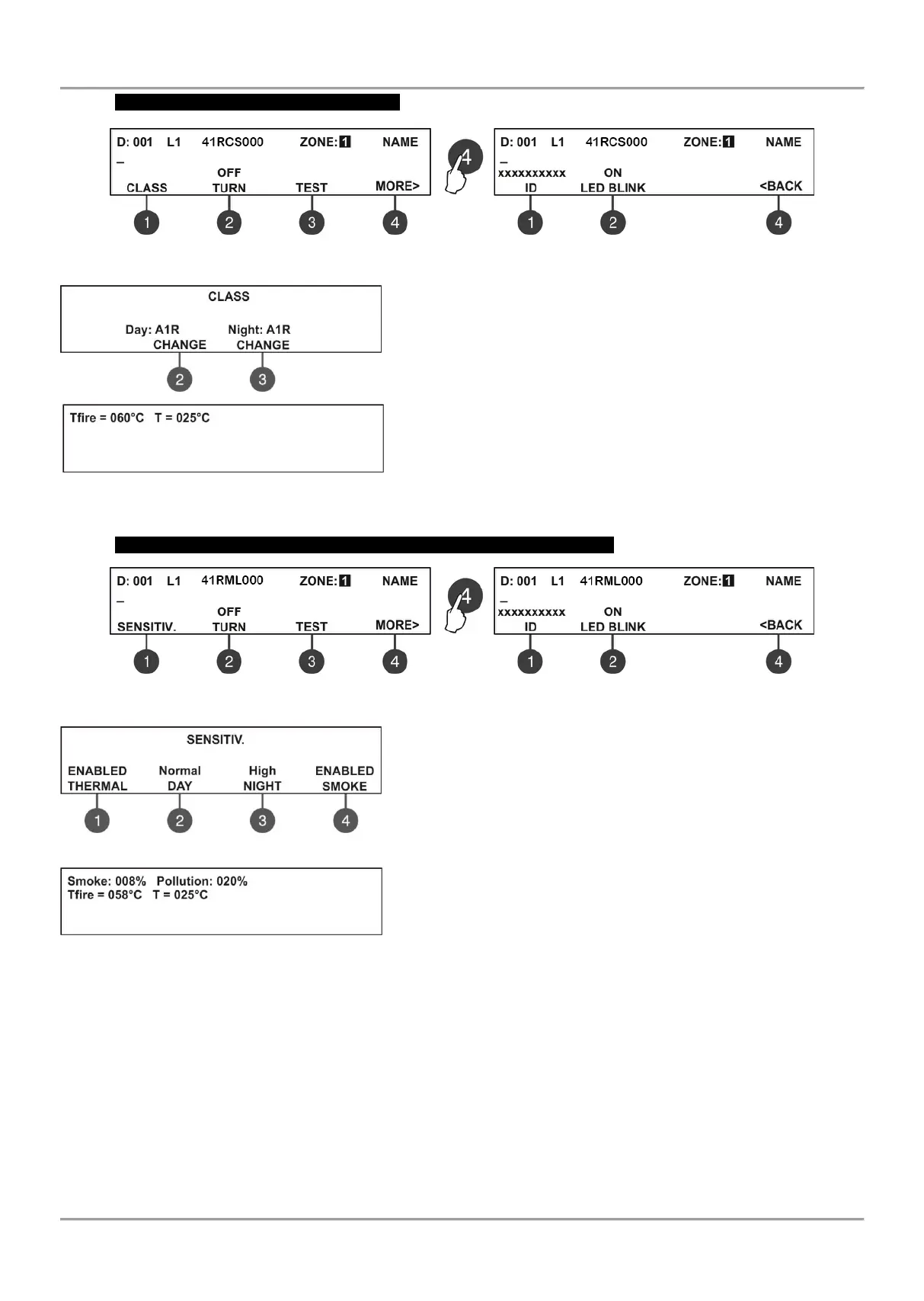
41RCS000 – Heat Detector with isolator
Use the functional buttons to set the following specialized parameters:
(1) CLASS – Press the button to enter the submenu for setting the
class for DAY and NIGHT alarm mode. Use the functional buttons (2)
and (3) to select the class: A1R/ A2S/ BS. The selected class is
confirmed with ENTER button.
(3) TEST - Press the button to enter in a new screen for checking of
the following current parameters:
- T fire – Shows the operating temperature of the detector, in
degrees centigrade.
- Т – Shows the current temperature in the room, in degrees
centigrade. The selected class is confirmed with ENTER button.
The exit to the main screen is with pressing the CANCEL button.
41RML000 – Combined optical-smoke and heat detector with isolator
Use the functional buttons to set the following specialized parameters:
(1) SENSITIV. – Press the button to access the following additional
setting menus:
(1) – Enabling/ Disabling the operation of the thermal part of the
detector. Every pressing of the button changes alternatively the
parameter.
(2) – Setting the sensitivity level in DAY operation mode: Normal/
Middle/ Low/ High. Press the button until reaching the desired
sensitivity level.
(3) - Setting the sensitivity level in NIGHT operation mode: Normal/
Middle/ Low/ High. Press the button until reaching the desired
sensitivity level.
(4) - Enabling/ Disabling the operation of the smoke part of the
detector. Every pressing of the button changes alternatively the parameter.
(3) TEST – Press the button to enter in a new screen for checking of the following current parameters:
- Smoke: Shows in percent the current level of smoke in the detector’s smoke chamber.
- Pollution: Shows in percent the current level of pollution in the detector’s smoke chamber.
- T fire: Shows the operating temperature of the detector, in degrees centigrade.
- Т: Shows the current temperature in the room, in degrees centigrade. The selected class is confirmed with ENTER
button.
The class for 41RMLXXX is fixed to A1R and could not be changed.
The exit to the main screen is with pressing the CANCEL button.



 To Next Page