Atena Easy Addressable Fire Alarm Panel – Installation and Programming Manual
37
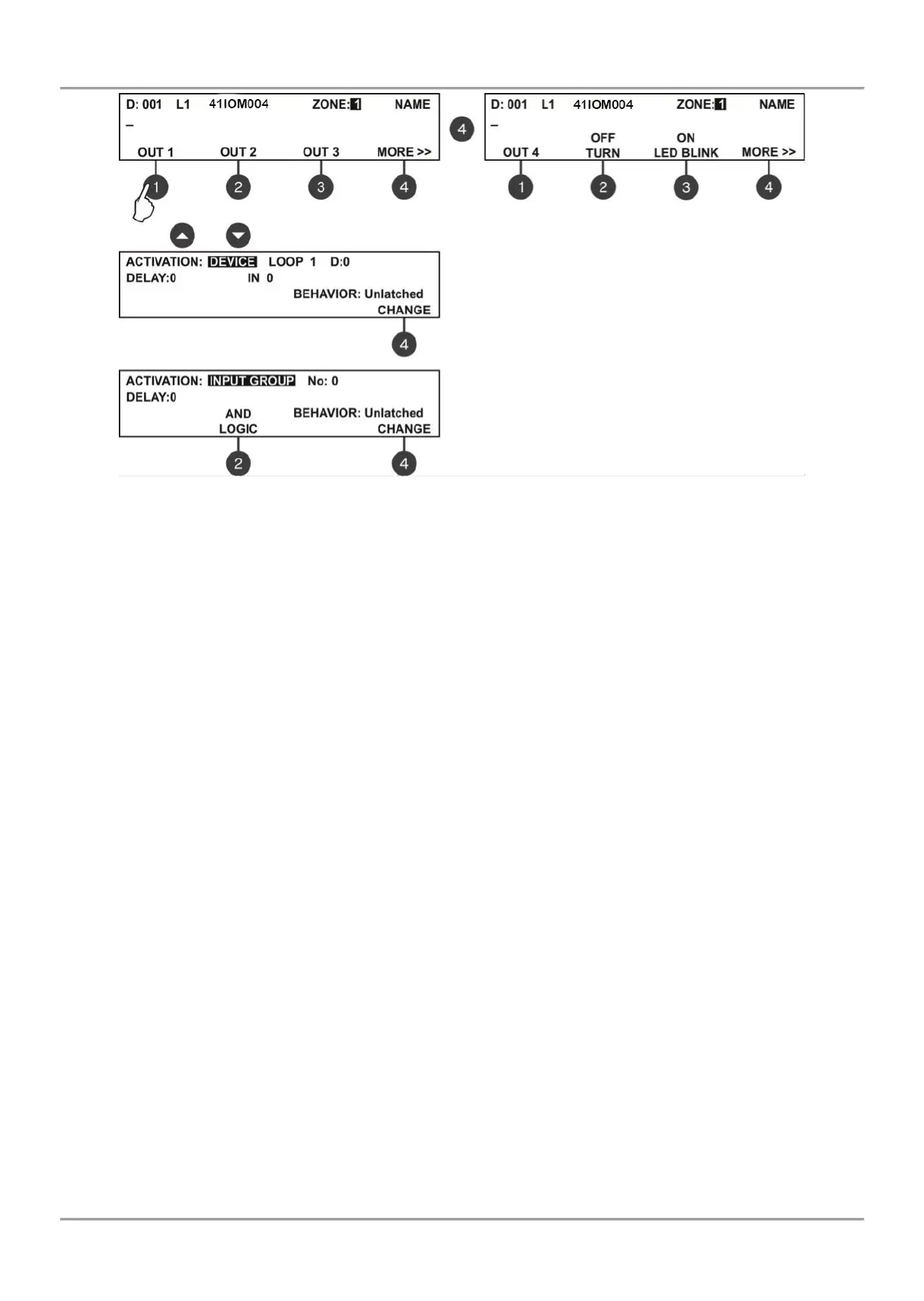
The installer has to choose an activation event using the up and down arrows. Use the left and right arrows to switch
over the editable fields.
DEVICE - Activation from a device. Set the loop number and device address. The ‘INPUT’ field refers only to
MIO modules.
INPUT GROUP - Activation from a device in group. Set the group number. The functional button (2) switches
alternatively between the AND and OR logic operation.
FIRE ZONE - Activation from a zone in fire alarm. Set a zone number. In the ‘ALARMS’ field you can enter a
number of registered fire alarms, when after reaching their count the output will be activated.
FIRE ZONE GROUP - Activation from a zone in fire alarm included in a group. Set a group number.
FIRE (common) - Activation in case of fire alarm event in the system.
FAULT ZONE - Activation from a zone in fault. Set a zone number.
FAULT ZONE GROUP - Activation from a zone in fault included in a group. Set a group number.
FAULT (common) - Activation in case of fault event in the system.
FAULT SYSTEM - Activation in case of fault system event in the system.
PREALARM - Activation in case of preliminary alarm fire alarm event.
DISABLE (common) - Activation in case of disablement in the system.
SOUNDER ON - Activation in case of sounder activation in the system.
RESET - Activation in case of reset in the system.
EVACUATE - Activation in case of evacuation event in the system.
EVACUATE ZONE GROUP – Activation in case of “Evacuation” and “Fire Alarm” in the respective group.
SILENCE BUZZER - Activation in case of silence buzzer in the system.
SILENCE ALARM - Activation in case of silence alarm in the system.
TEST - Activation in case of test in the system.
VOICE CYCLE – Activation in case starting “EVAC. CYCLE ON” time and deactivation in case starting “EVAC.
CYCLE OFF” time (the ON and OFF parameters are set in the EVAC. CYCLE submenu in the EVACUATION
SETTINGS menu – see item 7.6.6.
SOUNDER ON (zonal) – The output is used for activation of conventional sounders connected to 41IOM000
module – for details see description of 41IOM000 on following pages.
In addition the following fields are accessible for editing:
DELAY - The setting is common for all activation types. Enter time delay 0-600 sec. Use the left and right arrows to
switch over the ACTIVATION and DELAY fields.
LOGIC - Press the functional button (2) to switch over AND - OR logic for operation.
BEHAVIOR CHANGE - Press the functional button (4) to set the behavior Latched or Unlatched.
The set activation event is confirmed with ENTER button. Exit to the main screen for device setup is done with
CANCEL button.
Use buttons and to select an activation event.



 To Next Page