16
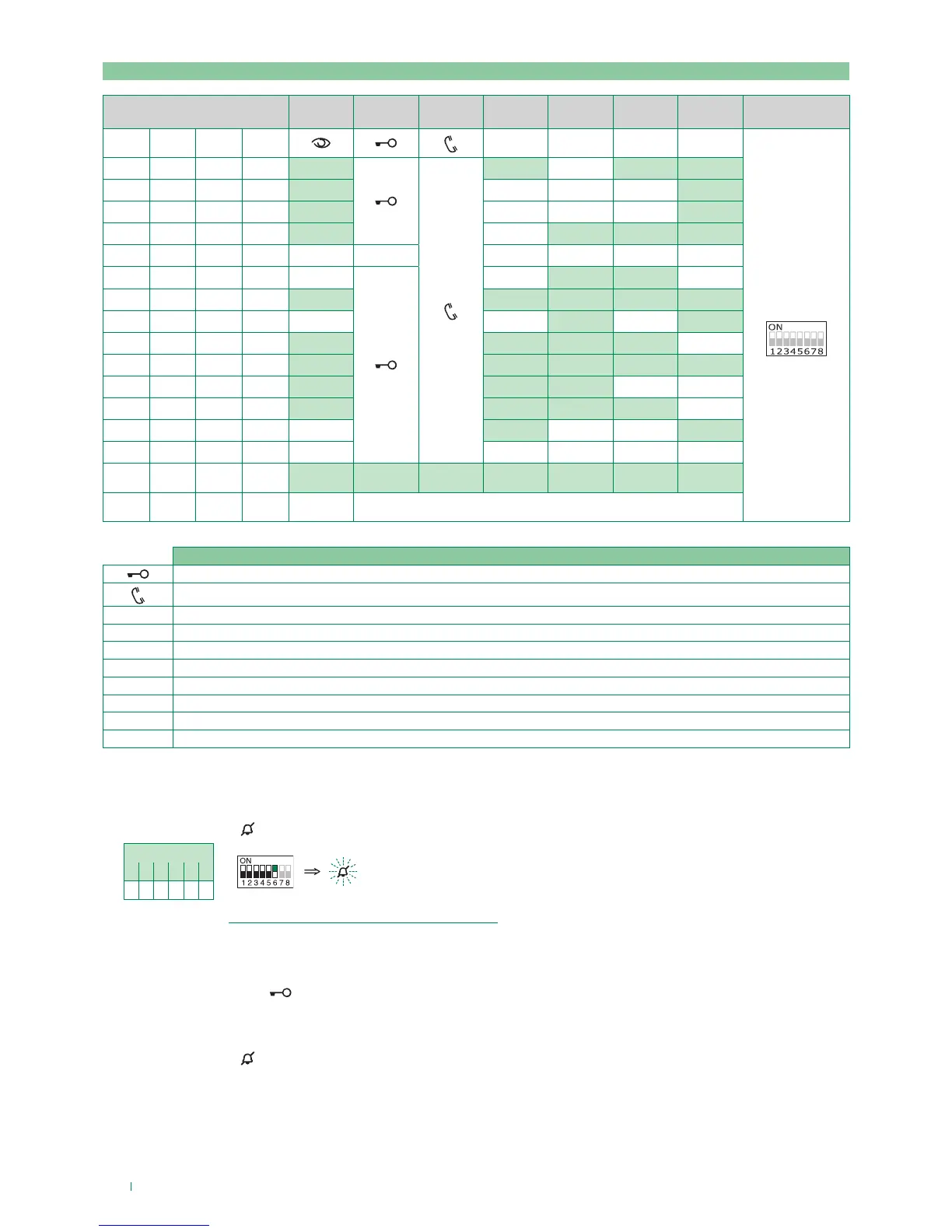
Programming buttons for other functions
Example:
on a monitor with user code 5, P4 programming = self-ignition, P1 = Doctor.
1. Set S2 DIP switches 6 to the combination 1.
» the privacy LED
flashes.
S2 DIP
1 2 3 4 5 6
0 0 0 0 0 1
S2
2. Refer to the table “Programming buttons for other functions” and select a combination in which the desired/necessary
functions are listed for the buttons you wish to program.
E.g.: for P4= self-ignition, P1 = Doctor, set S2 DIP switches 1-2-3-4 to the combination 0011 (P4=AI, P1=D).
3. Press and release the keys to which you wish to assign the functions
» the lock-release LED
flashes 4 times.
» one confirmation tone is emitted.
4. To exit programming mode, set S2 DIP switches 5-6 to the combination 00
» the privacy LED
switches o.
5. When programming is complete, set S2 DIP switches 1-2-3-4 to the combination 1111.
Legend
Lock- release
Audio
AI Self-ignition
CCP Main switchboard call – not for use in systems with KIT
CCS Secondary switchboard call – not for use in systems with KIT
K Guardian doorentry phone call
D Doctor
PAN Panic – not for use in systems with KIT
NULL No function
PROG Programmed functions
DIP S2 DIP S1
DIP 1 DIP 2 DIP 3 DIP 4
P1 P2 P3 P4
ADDRESS
0 0 0 0 AI CCS D PAN
1 0 0 0 AI D
0 1 0 0 AI CCS
1 1 0 0 CCS CCP PAN K
0 0 1 0
1 0 1 0
CCS CCP
0 1 1 0 D AI K CCS CCP
1 1 1 0 AI PAN
0 0 0 1 PAN CCS D AI
1 0 0 1 CCS K PAN CCP AI
0 1 0 1 K CCP PAN
1 1 0 1 CCP PAN CCS K
0 0 1 1 D AI
1 0 1 1
0 1 1 1 NULL NULL NULL NULL NULL NULL
1 1 1 1 PROG



 To Next Page