4
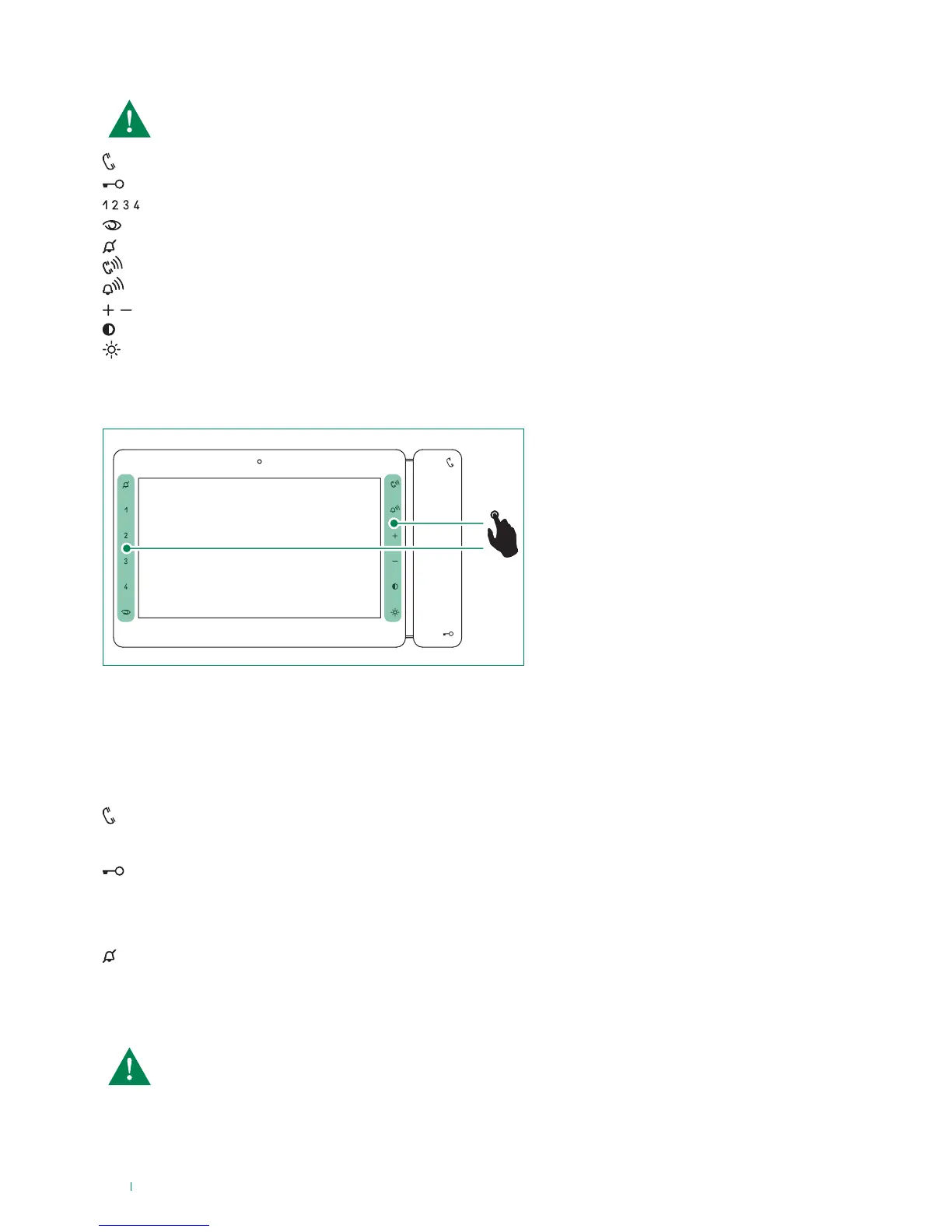
Soft-touch key activation
Indicator LED description
f Touch to activate the function keys
f Press the desired key once to activate the function associated with it
Audio LED
steady = audio enabled/hands-free function
continuous flashing = call received
Lock-release LED
1 flash = confirm lock-release
4 flashes = programming successful
10 flashes = programming error
continuous flashing = door open
Privacy LED - Doctor
4 flashes = device engaged
slow flashing = programming
3 flashes (every 5 s.) = Doctor function enabled
steady = privacy function enabled
Audio key
Lock-release key
Keys 1-2-3-4 (programmable)
Self-ignition key (programmable)
Privacy key
Audio volume key
Ringtone volume key
Value 'Up/Down' key
Contrast key
Brightness key
The monitor Art. 6801W is designed for use in colour systems, in the SB2 section downstream of Art. 4888C, or in
systems without mixer, such as the system with 2-wire KIT or Art. 1210.
Soft-touch key description
Wait for approximately 1 sec. before pressing the same key again. Pressing the same key several times in quick
succession will cancel the command.



 To Next Page