1.6.
Connecting wireless network
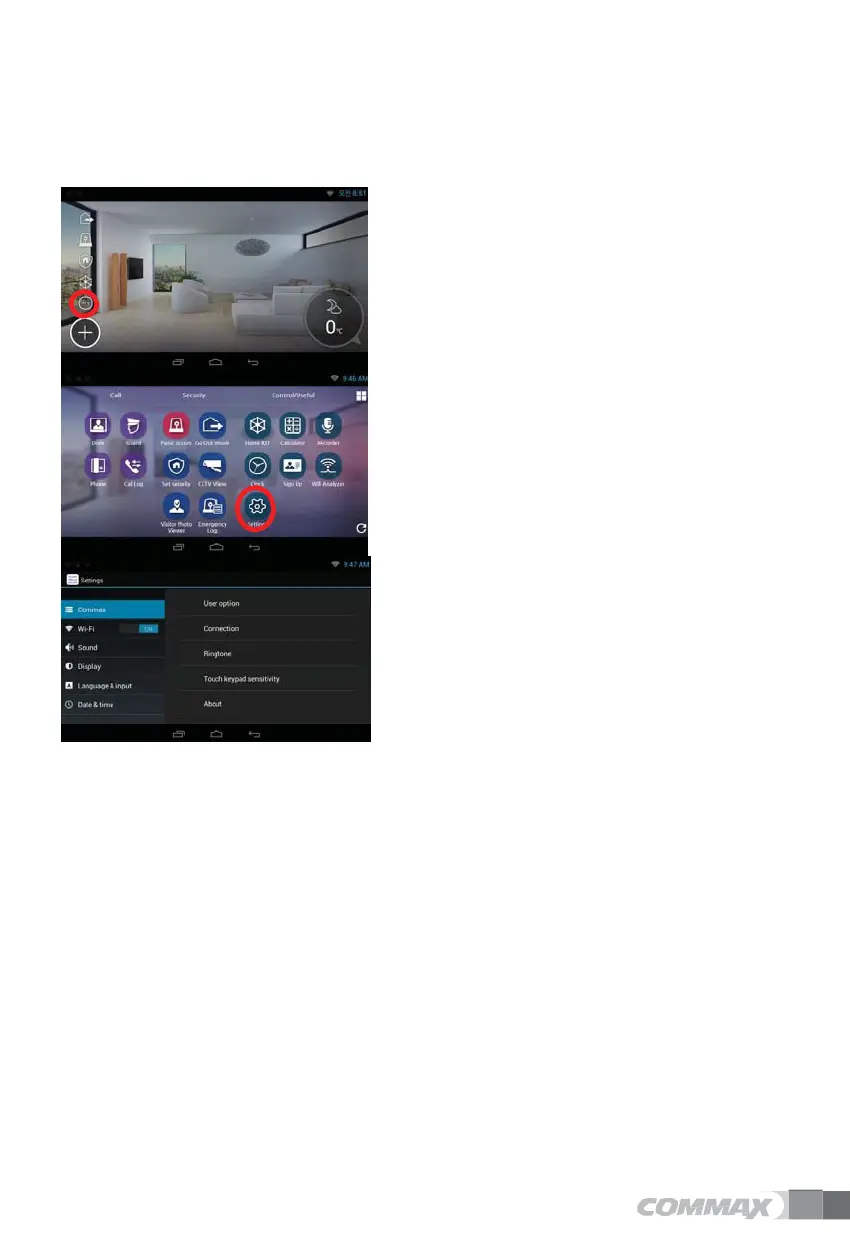
When put 'setting’, proper screen is shown.
1)
Press 'all APPs’ icon on Home screen.
2)
Press 'setting’ button.
3)
You can turn on/off by put 'Wi-Fi’ button.
Turn on/off Wi-Fi
Setting → Wireless or Network → Wi-Fi
If you check in check-box, you can turn on/off Wi-Fi.
Wi-Fi Connection
Setting → Wireless or Network → Wi-Fi
You can search and connect wireless network around.
Press connection button after selecting Wi-Fi on Wireless Network ist.
(If necessary, password is required).
Add Wi-Fi manually
If Wi-Fi which you want to use is not listed, you can add Wi-Fi information directly.
Select 'adding Wi-Fi network’.
Put network data and press connection button.


 To Next Page