Basic user – Web interface Symphony BF
16 1.4/0222
Erase pre-recorded audio files from memory
Click on the button Use default of the respective pre-recorded audio file to erase this file from the
memory (the respective state will then be reset to the default settings).
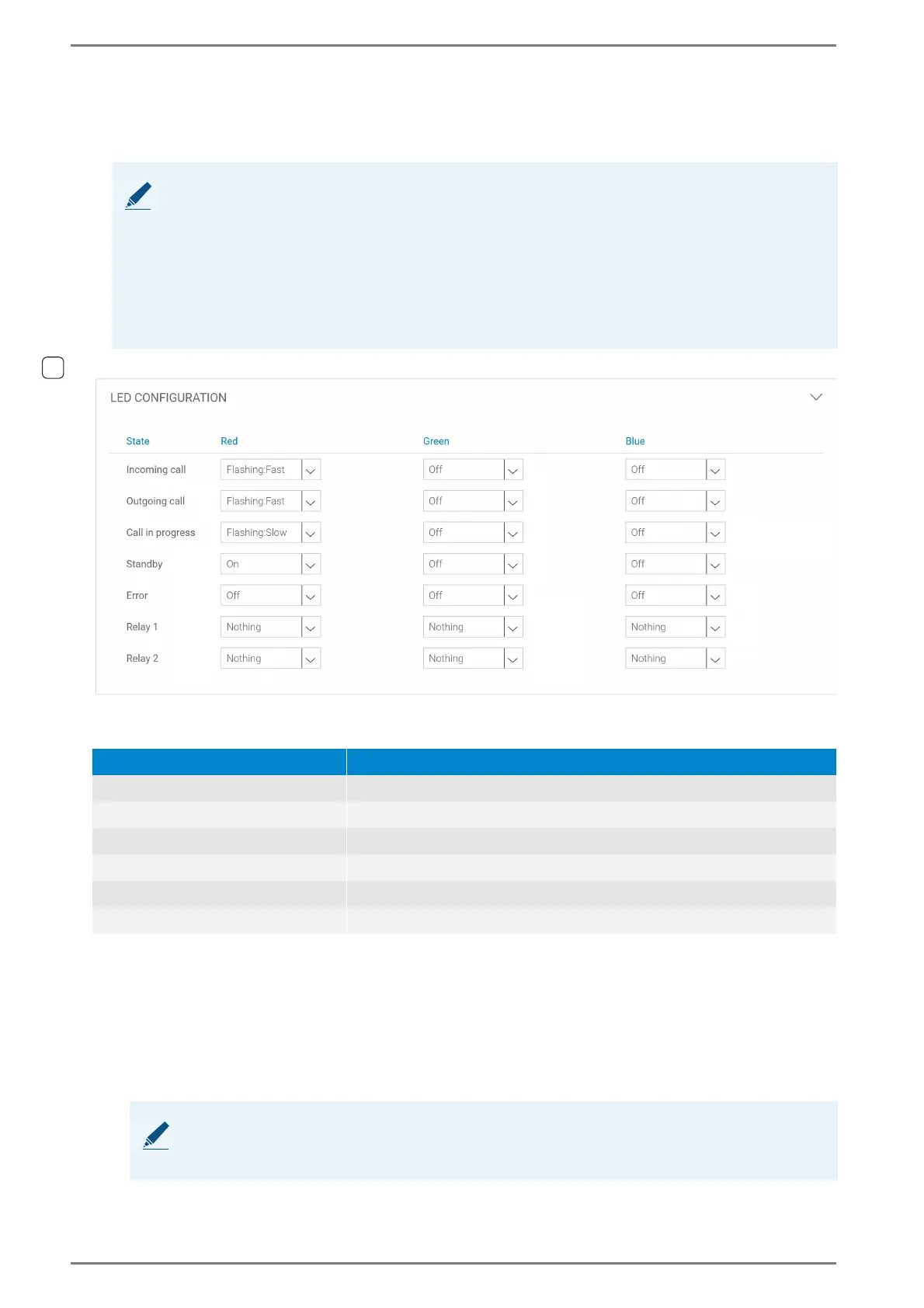
LED Configuration
State
Here the settings of the RGB LED can be configured for the following call states:
Red, Green and Blue: In these drop-down lists, the following settings regarding to the LED behav-
iour can be selected for the call states listed above:
Nothing: No action is carried out. Current status of the LED is maintained.
On: LED is permanently on.
Off: LED is off.
Flashing:Fast: LED blinks in a fast rhythm.
Flashing:Slow: LED blinks in a slow rhythm.
NOTES:
Default setting for the states “Incoming Call”, “Outgoing Call” and “Error” means that the factory
default tones will be used.
Default setting for the state “Location Message” means that no signal tones will be put out.
Default setting for the state “Sequence Audio” used for a multicast send action means that the de-
fault pregong will be used. Do not erase the file if it is configured as part of a sequence.
Default setting for the state “Sequence Audio” used for a play action means that the error tone will
be used. Do not erase the file if it is configured as part of a sequence.
Call state Description
Incoming Call Incoming call from the Symphony BF device
Outgoing call Outgoing call from the Symphony BF device
Call in Progress Active conversation between two SIP stations
Standby Idle state (inactivity) of the Symphony BF device
1)
Error Error in connection to SIP server, signalling or other problems
Relay 1 / 2 State of the relay
1)
Idle state = registered at SIP server or in case of registrarless operation: “ready for operation”
NOTE:
If the same setting (e.g. “Flashing:Fast”) is configured for two or three colours, the LED will blink
in mixed colour.













 To Next Page