EasyManua.ls Logo

Commodore 1541 - Page 28

Commodore 1541
80 pages
Print Icon
To Next Page IconTo Next Page
To Previous Page IconTo Previous Page
Loading...
When
using
the
INPUT*/
to
read
in
data,
the
disk
drive can't
tell
that
it's
not
supposed
10
be
one
long
string.
You
need
something
in
the
file
10
act
as
a
separator.
Characters
to
use
as
separators
include
the
CR,
a
comma
or a
semicolon.
The
CR
can
be
added
easily
by
just
using
one
variable
per
line
on
the
PRINT/*
statement,
and
the
system
puls
one
there
automatically.
The
statement
PRINTS
5,
AS:
PRINTS
5,
BS:
PRINT#
5,
CS
puts
a
CR
after
every
variable
being
written,
providing
the
proper
separation
for
a
statement
like
INPUT05,
AS,
B$,
CS.
Or
else
a
line
like
Z$=
",":PRINTS
5,
AS
Z$ BS Z$
CS
will
do
ihe
job
as
well,
and
in
less
space.
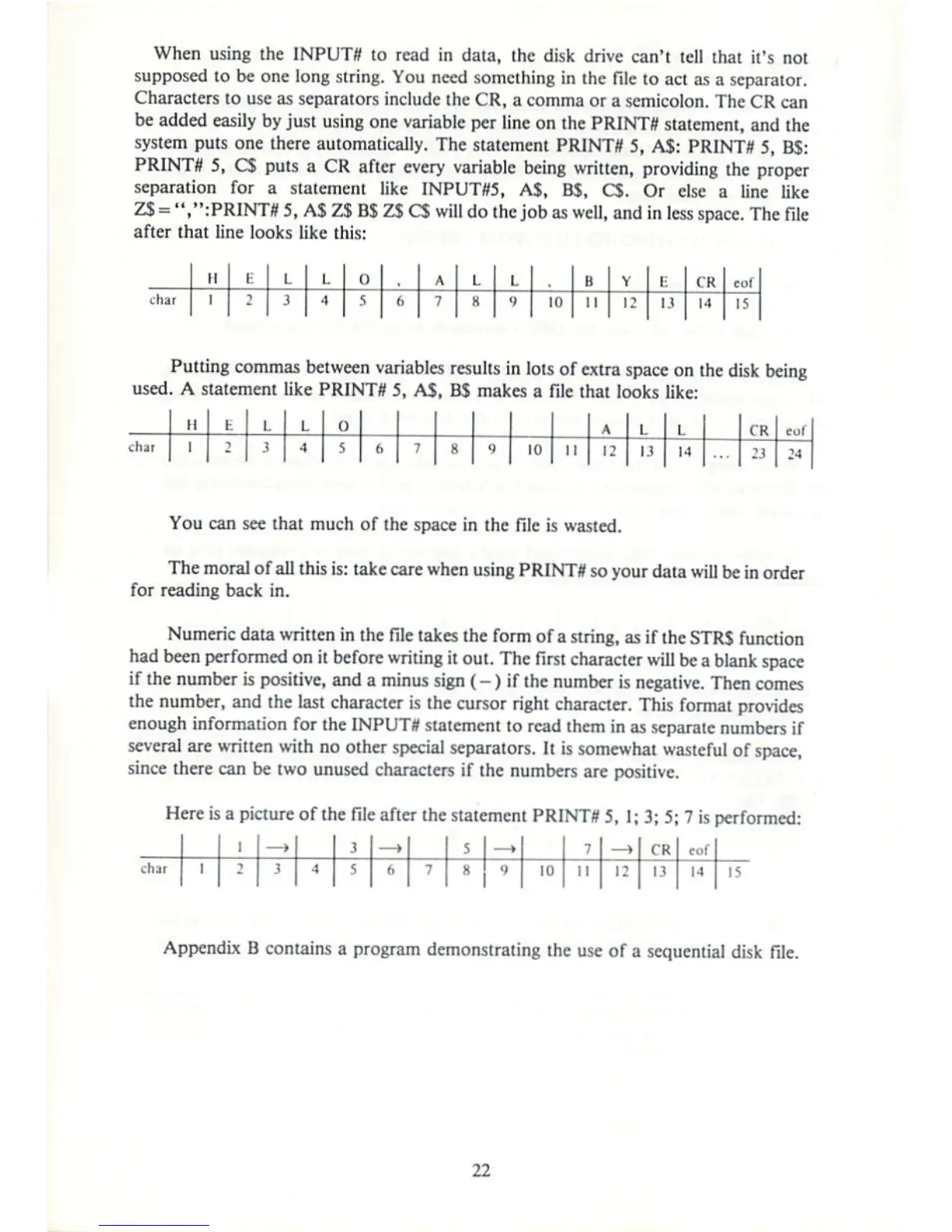
The
file
after
that
line
looks
like
this:
char
M
1
E
2
L
3
L
A
0
S
6
\
;
L
H
L
1
ID
B
11
V
12
E
1)
TR
14
r.ll
15
Putting
commas
between
variables
resulls
in
lots
of
extra
space
on
the
disk
being
used.
A
statement
like
PRINTS
5,
AS,
BS
makes
a
file
that
looks
like:
char
II
1
fc
L
j
L
4
0
s
6 7 8
')
10
11
A
12
1
13
1
14
rp
:j
You
can
see
that
much
of
the
space
in
the
file
is
wasted.
The
moral
of
all
this
is:
take
care
when
using
PRINTS
so
your
data
will
be
in
order
for
reading
back
in.
Numeric
data
written
in
the
file
takes
the
form
of
a
string,
as
if
the
STRS
function
had
been performed
on
it
before
writing
it
out.
The
first
character
will
be
a
blank space
if
the
number
is
positive,
and
a
minus
sign
(-)
if
the
number
is
negative.
Then
comes
ihe
number,
and
the
last
character
is
the
cursor
right
character.
This
format
provides
enough
information
for the
INPUTS
statement
lo
read
them
in
as
separate
numbers
if
several
are
written
with
no
other
special
separators.
It is
somewhat
wasteful
of
space,
since
there
can
be
two
unused
characters
if
the
numbers
arc
positive.
Here
is
a
picture
of
the
file
after
the
statement
PRINT**
5,
1;
3; 5;
7
is
performed:
CK
of
10
M
I
1
Appendix
B
contains
a
program
demonstrating
the
use
of
a
sequential
disk
file.
22

Other manuals for Commodore 1541

Related product manuals