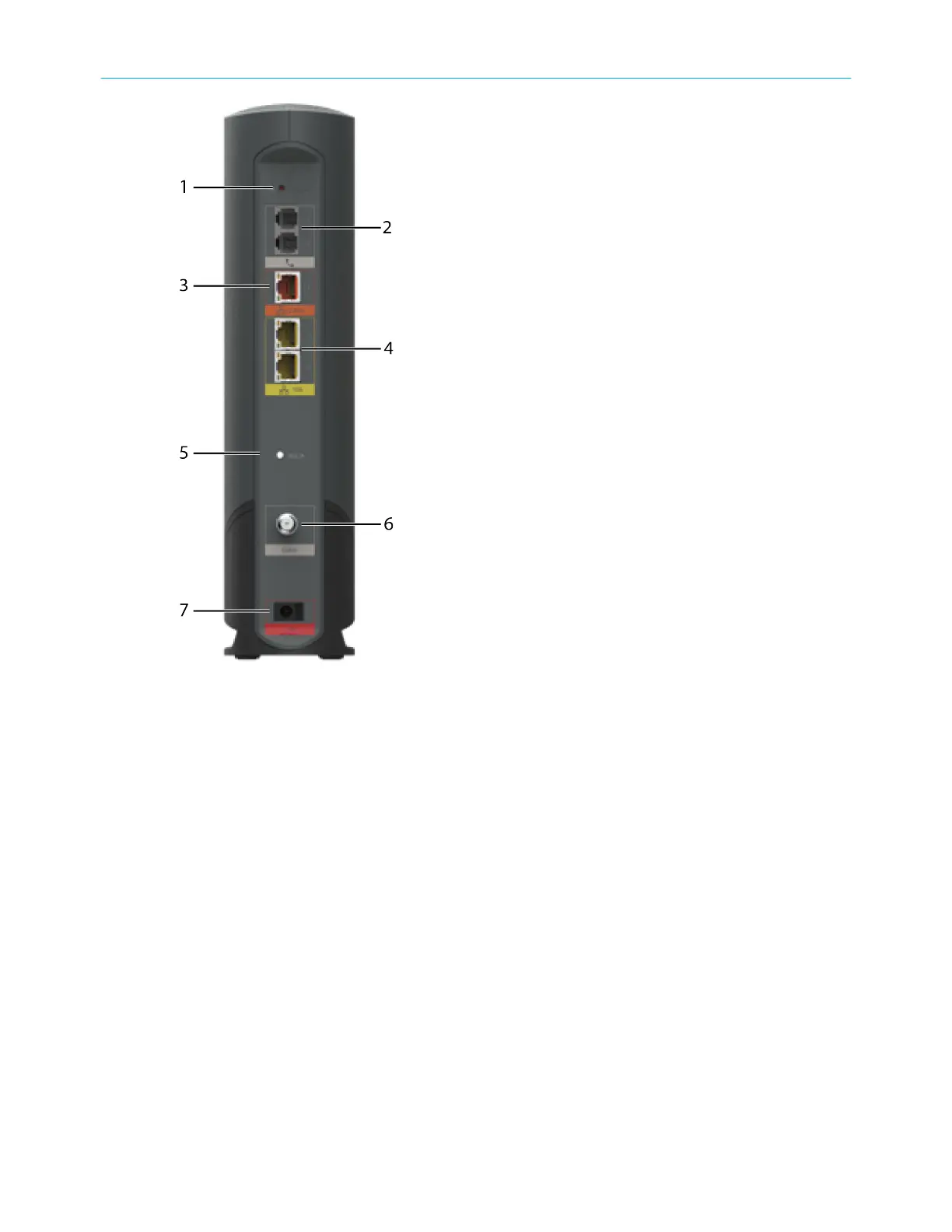
1. Reset buon: Resets the Telephony Gateway as if you power cycled the device. Use a
pointed non-metallic object to press this buon.
2. Tel (1 - 2): Connectors for the phone lines.
3. 2.5GigE Ethernet connector: 2.5GigE connector for use with a computer LAN port.
4. 1GigE Ethernet connectors: 1GigE connectors for use with a computer LAN port.
5. MoCA: Indicates connecvity between the Telephony Gateway and other home devices
connected via the MoCA network.
6. Cable: Connector for the coaxial cable.
7. Power: Connector for the power cord.
Select an installaon locaon
There are a number of factors to consider when choosing a locaon to install your Telephony
Gateway:
■ Is an AC outlet available nearby? For best results, the outlet should not be switched and
should be close enough to the Telephony Gateway that extension cords are not required.
■ Is a cable jack available? For best performance, keep the number of spliers between
the jack and cable drop to a minimum. Each splier aenuates (reduces) the signal
Chapter 3: Install and connect your Telephony Gateway
Touchstone TG6452 Telephony Gateway User Guide DRAFT Revision 2.3 20


 To Next Page