M900 GNSS Receiver User Guide
20
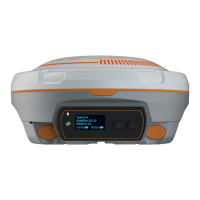
4.3.5 WIFI and bluetooth
Click Start to active WIFI or Bluetooth function. It allows you to customize the name,
you can check the name and status in the screen.
4.3.6 Ethernet config
Use the Ethernet Config menu to set IP address, subnet mask, default gateway and
DNS of M900. After changing those settings, you need to change your computer’s IP
address and re-login configuration webpage based on the new IP address.


 To Next Page