M900 GNSS Receiver User Guide
25
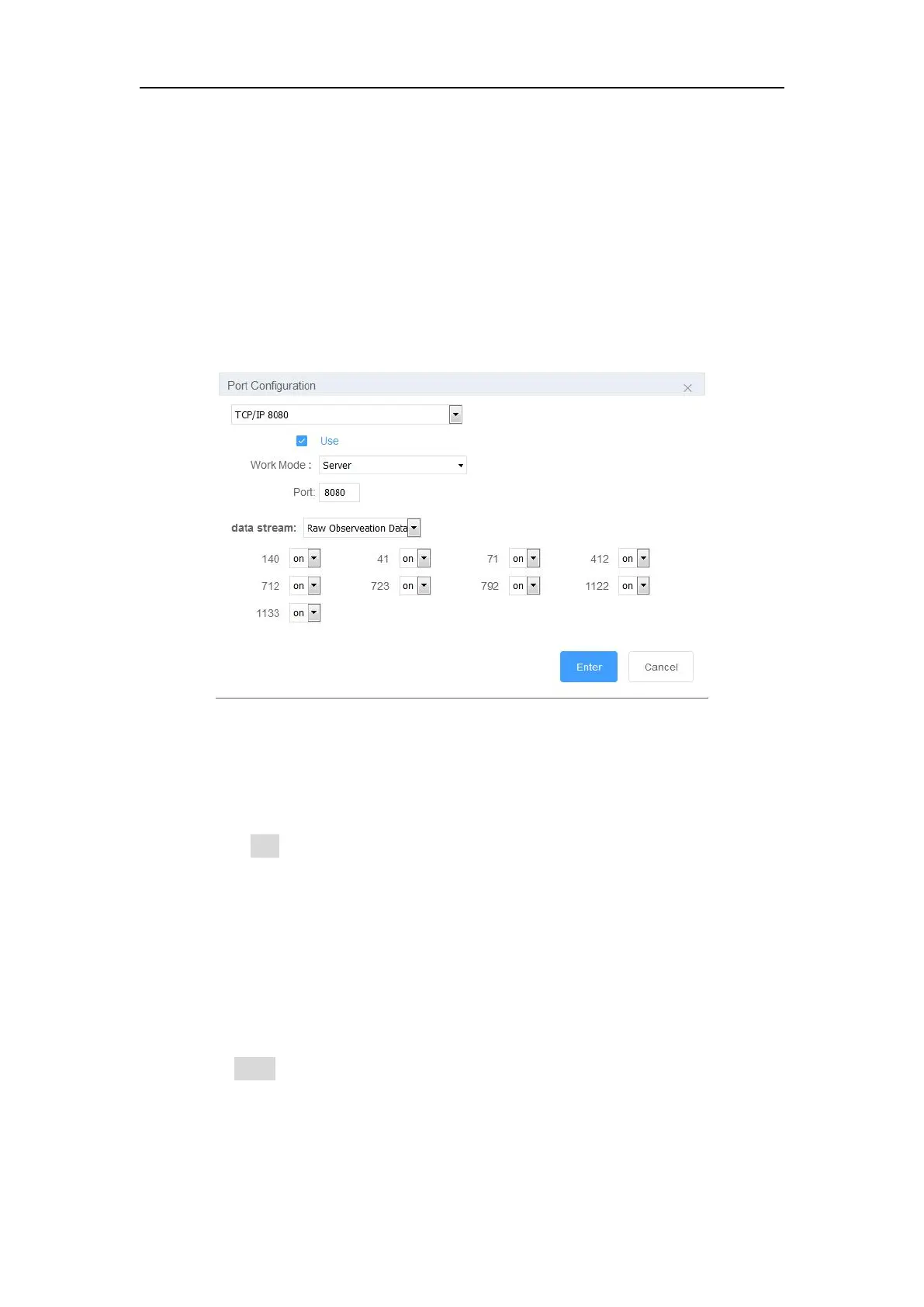
Dataflow can be transferred via the internet by using TCP Server or TCP clients.
TCP Server: Any user can receive the data through TCP Clients protocol
TCP Clients: Send data to the specified IP address and port
For data flow:
Raw observation data: ComNav binary format raw data
Navigation data: Some standard NMEA messages and custom messages
RTCM2.3, RTCM3.0, RTCM3.2
Differential mode: Correction data
4.4.1.3 Ntrip server
Before setting the Ntrip Server, you should configure the receiver as Base mode, also
select correction data format as RTCM3.2 (recommended). Then start Ntrip Server
configuration:
Enable Use button
Enter the server IP address as Ntrip Caster address and Ntrip Caster port. As
the example showed above, our company’s server is under running:
211.144.120.104: 8888
Set custom username and password (Username and password of our server
can be anything you choose).
Mount point: Ntrip caster mount point
Data stream: format and the corresponding message
Click Enter button, you will transmit the correction data to server.


 To Next Page