M900 GNSS Receiver User Guide
29
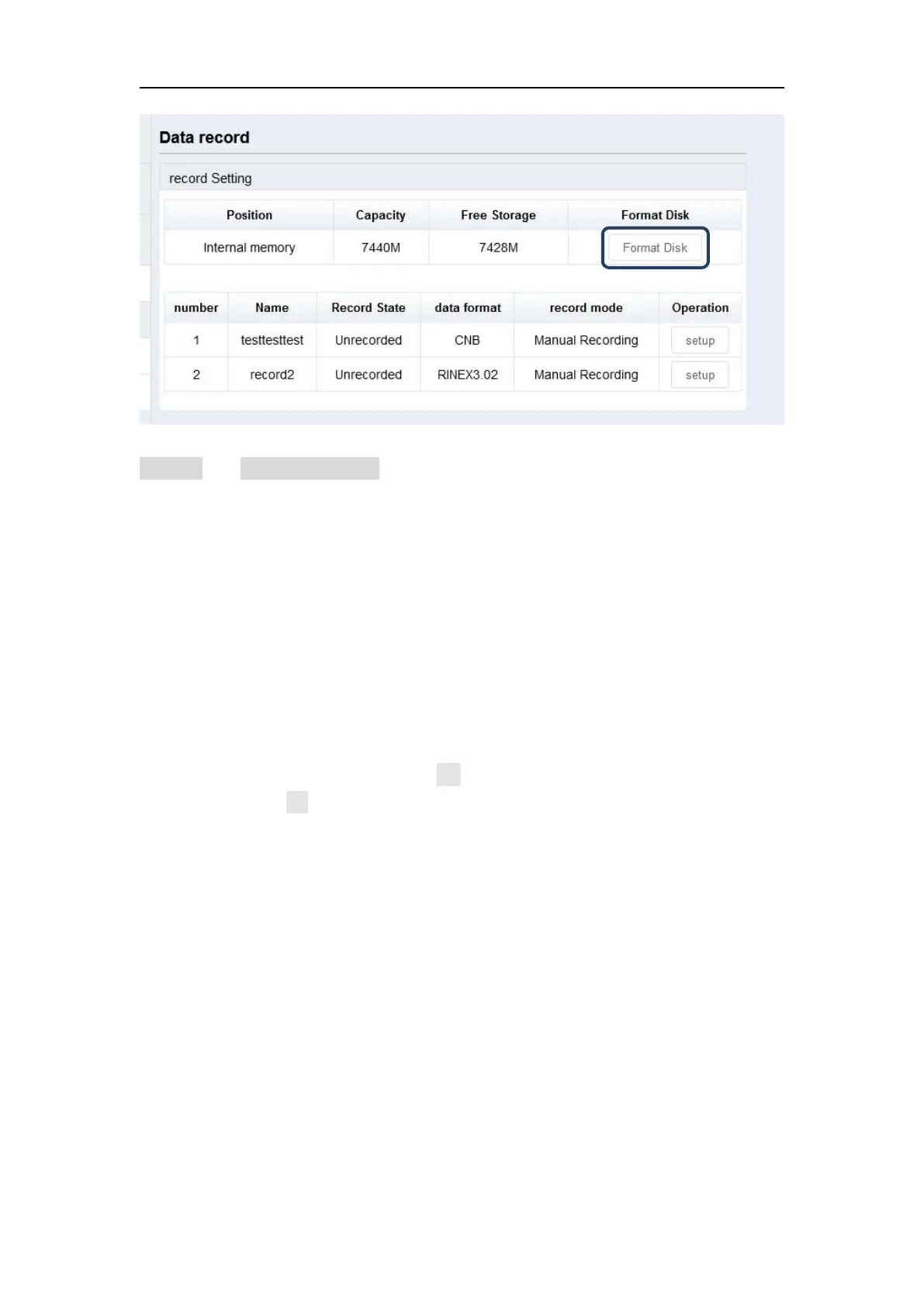
To configure the data recording settings, please make sure that recording mode is on
manual with unrecorded status.
Setting options are shown below:
Name: Support only number or letter
Sample Interval: Choose sample frequency, support 0.05\0.1\0.2\0.5\1\2\5
\15\30\60s.
File Split: Choose file split, support every 15 minutes or 1\2\4\24 hours to
save a file. If you select 24 as file split, it will create two data files when it
occurs to 24 o'clock (UTC Time). One is from start time to 24 o’clock, another
is from 0 o’clock to end time.
Data Format: Support CNB \Rinex3.02\ Rinex2.10(excluding BeiDou)
Loop: When storage is full, Yes means delete earliest data and store
continually, No means stop recording
Storage Space: Separate storage space in internal memory
Record mode: Support manually and automatically recording mode.


 To Next Page