EasyManua.ls Logo

Compur Monitors Statox 506 - Page 23

Compur Monitors Statox 506
34 pages
Print Icon
To Next Page IconTo Next Page
To Previous Page IconTo Previous Page
Loading...
23
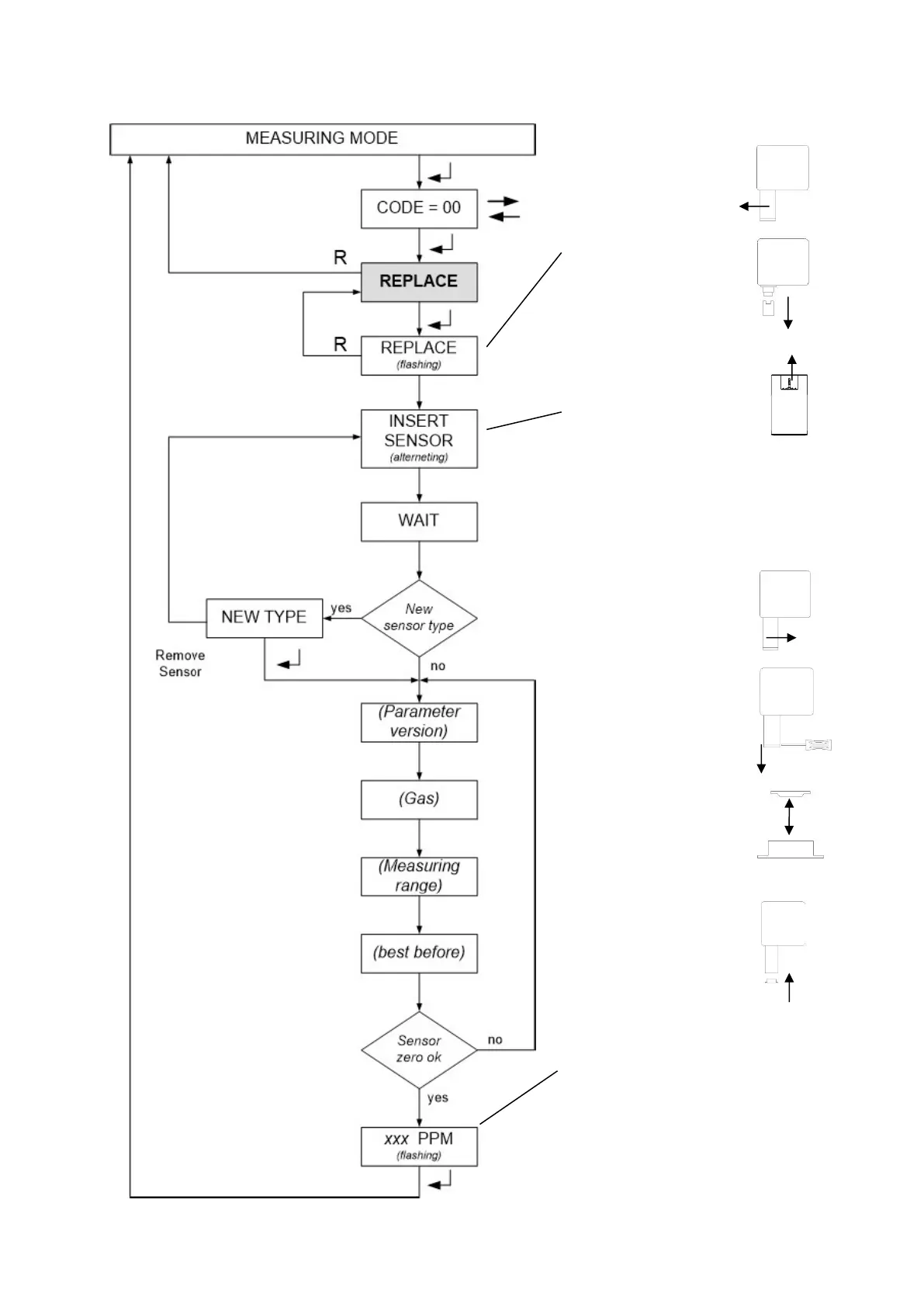
Unscrew the sensor cover
counter-clockwise.
Do not ravel the safety
strap.
Unplug the old sensor.
Remove the shortcircuit
of the new sensor, if there
is any.
Install the new sensor.
The booting process is
described in chapter 5.
If you insert a different
sensor type, confirm the
message NEW TYPE
with ENTER.
The Statox 506 displays the actual
concentration, even when it is still in the
service mode.
Push ENTER to return into the measuring
mode. Timeout is 30 min.
1 hour after installation a zero adjust should
be done (chapter 6.4).
Fasten the sensor cover.
Take care not to wedge
the safety strap.
Loosen the filter holder
with a small screw driver.
Remove used dust filter.
A fresh filter comes with
the new sensor. Before
installing the new filter
clean the filter holder and
the O-ring.
Insert the filter as shown
in the picture.
Reinstall the filter
holder.
Instructions: