Technical Information on On-board Flash Programmer FP-40 Aug. 31, 2023 (Second edition)
26
C-Flash Settings
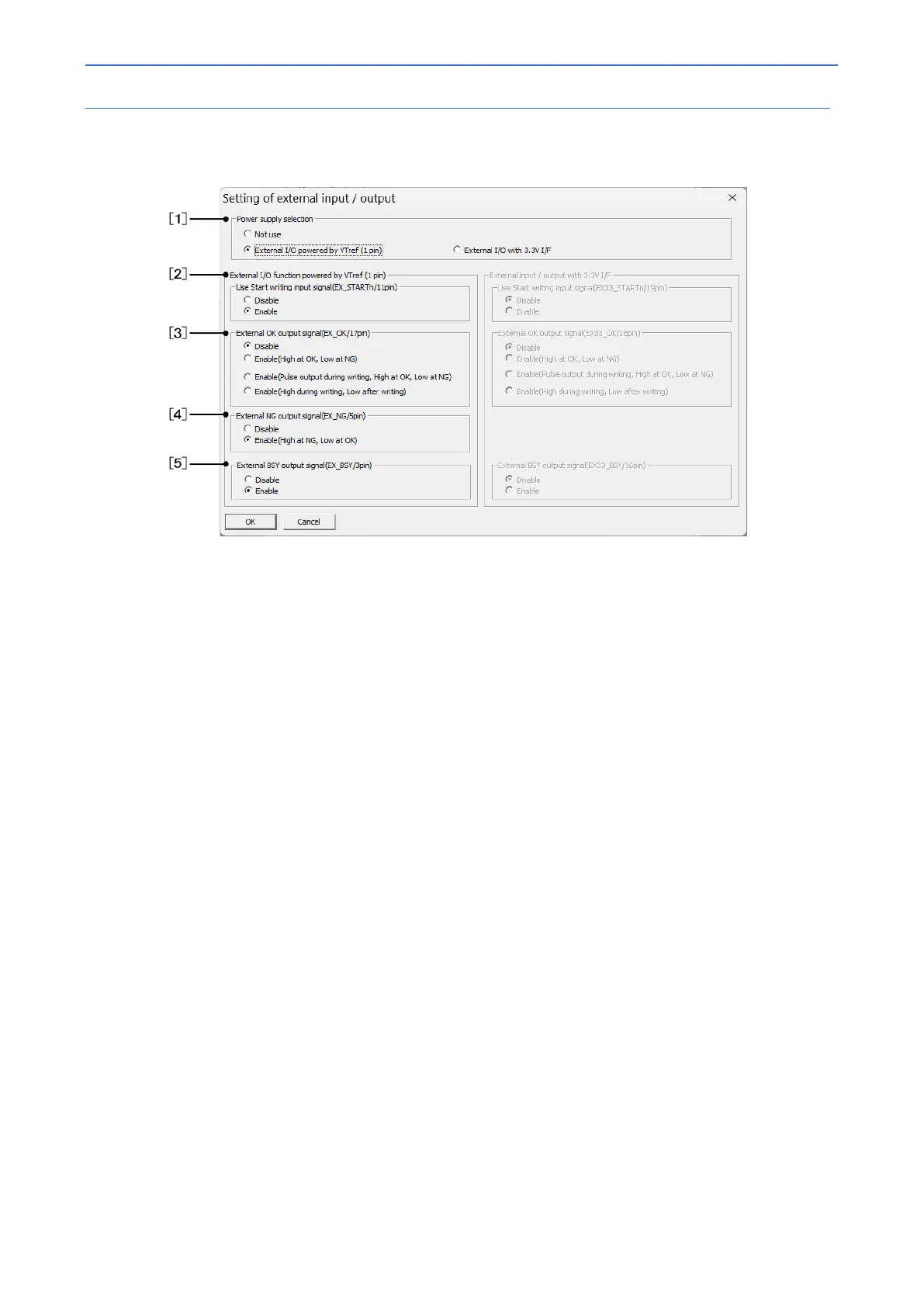
Navigate to [Target system setting] [Set Initial value] tab. On clicking the [External I/O Setting] button, the following
setting screen will be displayed:
[1] Power supply selection
Select whether to use VTref or 3.3V I/F. Both cannot be used simultaneously.
When [Do not use] is selected, each signal is automatically set to [Do not use/output].
[2] Use Start writing input signal
Input signal to FP-40 to start the Write procedure.
[Enable] is automatically selected if the power supply is set to enable in the power supply selection.
[3] External OK output signal
Select the output format of the OK signal.
[4] External NG output signal
Selects the output of the NG signal. Note that the 3.3V I/F does not provide a signal equivalent to EX_NG.
[Enable] is automatically selected if the power supply is set to enable in the power supply selection.
[5] External BSY output signal
Select the output format of the BSY signal.
[Enable] is automatically selected if the power supply is set to enable in the power supply selection.



 To Next Page