29
5.3 Alarm
In this section, you can configure the alarm parameters.
5.3.1 Exception
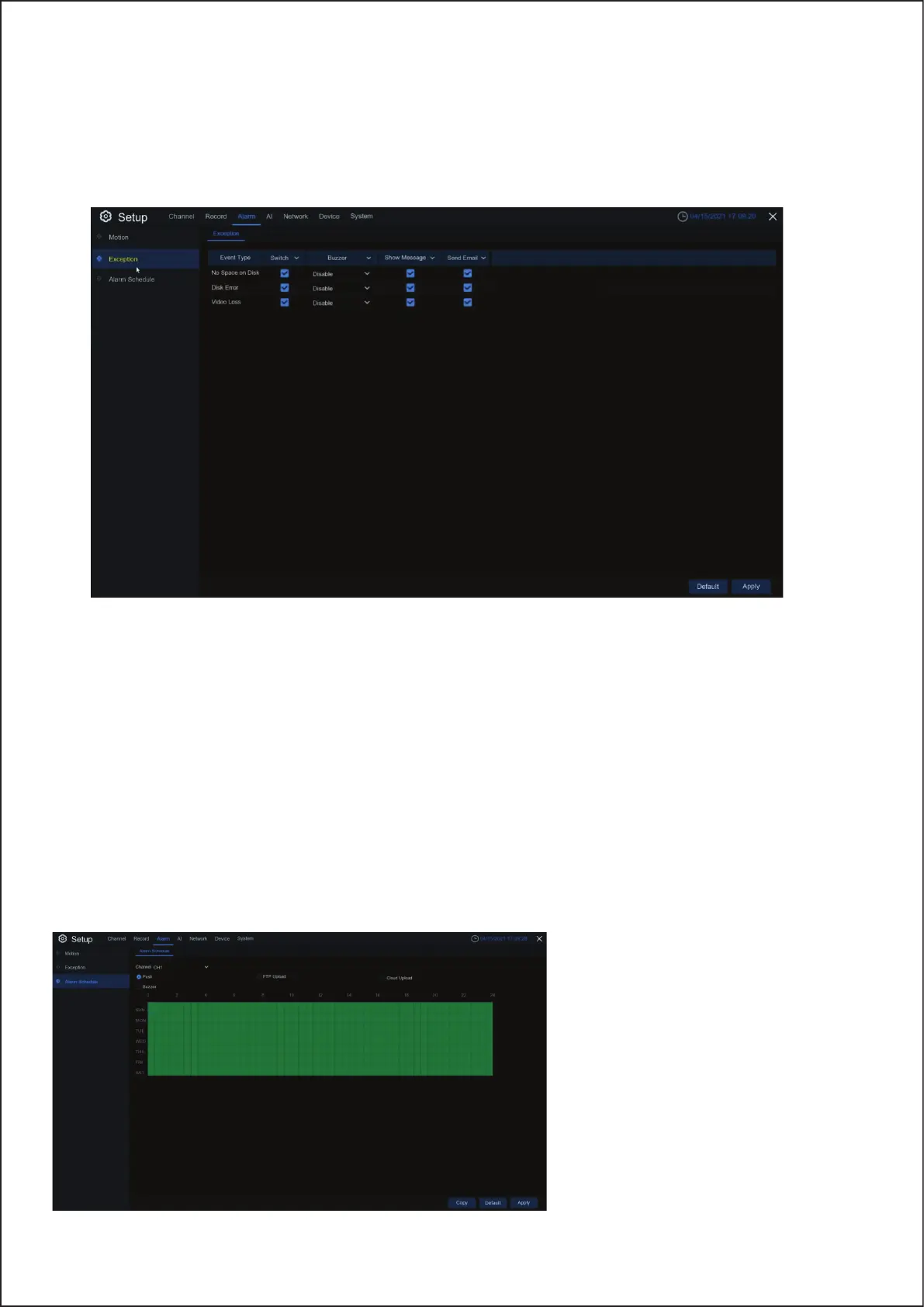
This menu allows you to set the type of events that you want the Wireless NVR to inform you.
5.3.2 Alarm Schedule
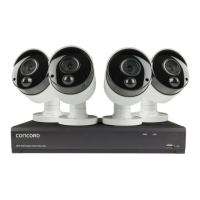
In this menu, you can set the alarm schedule for alarm output, push notification,
FTP upload, cloud upload, buzzer and other functions.
Event Type: Select the event type from below options:
• No Space on Disk: When an HDD is full.
• Disk Error: If the HDD is not detected properly.
• Video Loss: If a camera is not connected properly.
Switch: Check the box to enable the monitoring of the event.
Buzzer: Set the buzzer duration when the event occurs (Off/10s/20s/40s/60s). To disable buzzer, select OFF.
Show Message: Check the box to display a message on the screen when No Space on Disk, Disk Error, or Video Loss
event happens.
Send Email: Let the Wireless NVR send you an auto-email when an event occurs.
Channel: Select the channel
and set up its capture
parameters. When the time
period is marked as green, it
means that the function of the
channel is enabled during
the time period.
27


 To Next Page