Operating Manual PG11 / PGE11 Page 20
3.7 Mosquito net
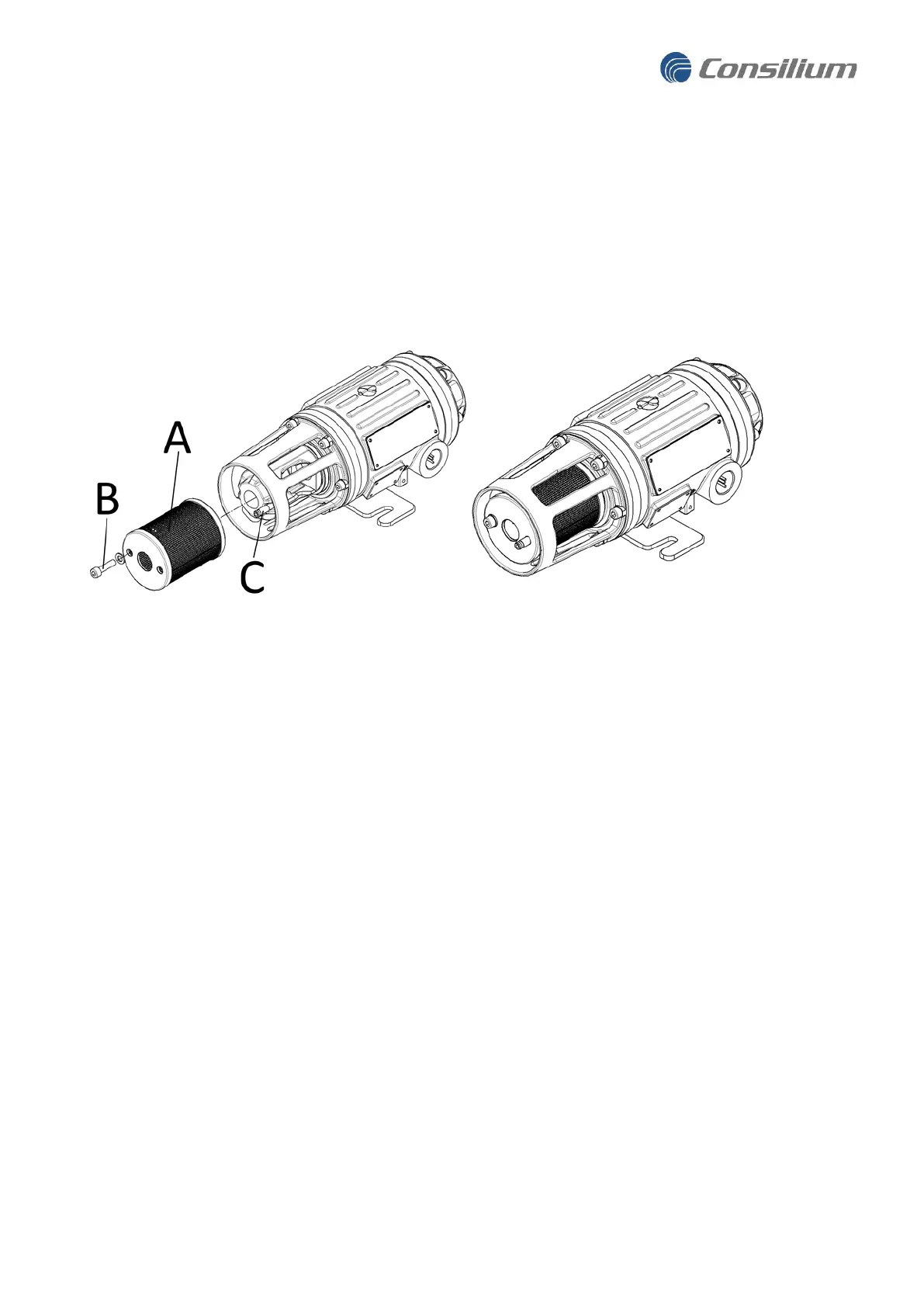
The accessory Mosquito net can be fitted to the Gas Detector to prevent insects from blocking the optics.
The Mosquito net (A) is fitted on the outside of the detector nose and secured with the screw (B). It is
recommended to use the accessory Gas nozzle (C) for easier access when performing Function tests with
gas. The Mosquito net can also be used in combination with the Environment Shield for a combined splash
and insect protection.
4 Commissioning the Gas Detector
Below is the recommended procedure for commissioning the detector PG11:
1. Turn on power to the Gas Detector. The Detector will run self-diagnostics and warm up as described
in section “3.4.1 Booting up the Gas Detector”
2. Verify Status indicator light alarm levels, and change if necessary. The default settings might be
different from site alarm levels. Light indicator described in chapter 7.2 Light indicator.
3. Perform the
Gas Detector Safety Function test
as described in “5.1 Function test”.
4. Verify that the Site Safety System is receiving the gas signal from the Gas Detector.
5. With all steps passed this concludes commissioning of the Gas Detector.


 To Next Page