90 91
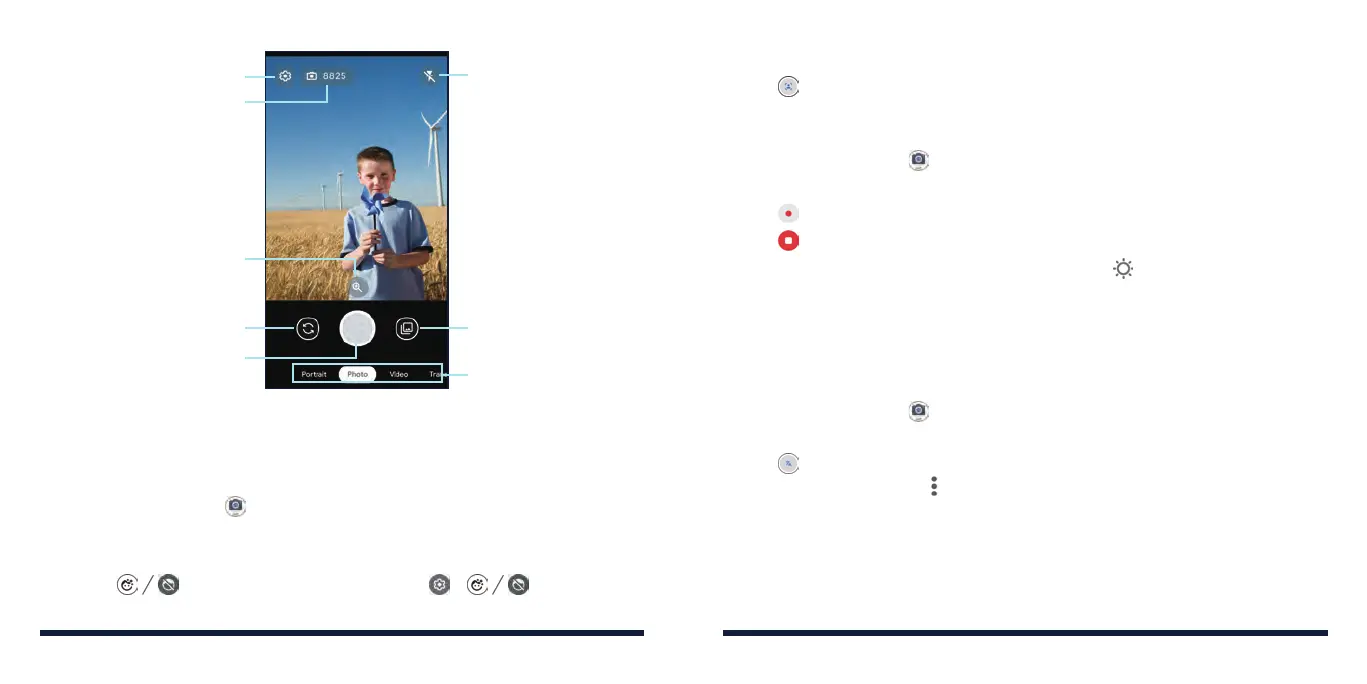
Scroll to switch modes
Change the camera settings
Change the
flash setting
Switch between the
front and back cameras
Capture a photo
Switch between the
front and back cameras
Number of photos you
can take before the
space is full
Adjust the zooming
USING PORTRAIT MODE
You can use the portrait mode to take a picture with people's faces in focus
and the background blurred.
1. Tap the Home Key > > Portrait.
2. Aim the camera at the subject. You can make the following adjustments.
• Tap the area you want to focus.
• Tap when using the front camera or > when using
CAMERA
the back camera to turn face enhancement off or on.
3. Tap to take the photo.
RECORDING A VIDEO
1. Tap the Home Key > > Video.
2. Aim the camera at the subject and make any necessary adjustments.
3. Tap to start recording.
4. Tap to stop recording.
NOTE: Whenever you tap the screen, you can tap
and drag the slider to
adjust the exposure or pinch/spread your fingers on the screen to zoom in or
out.
TRANSLATING TEXT
You can use the camera to capture text for translation.
1. Tap the Home Key > > Translate.
2. Aim the camera at the word you want to translate.
3. Tap . Google Lens will try to recognize the words and show the
translation. You can tap
> Change translation language to choose the
target language.
CAMERA



 To Next Page