9.5. STICK ADJ
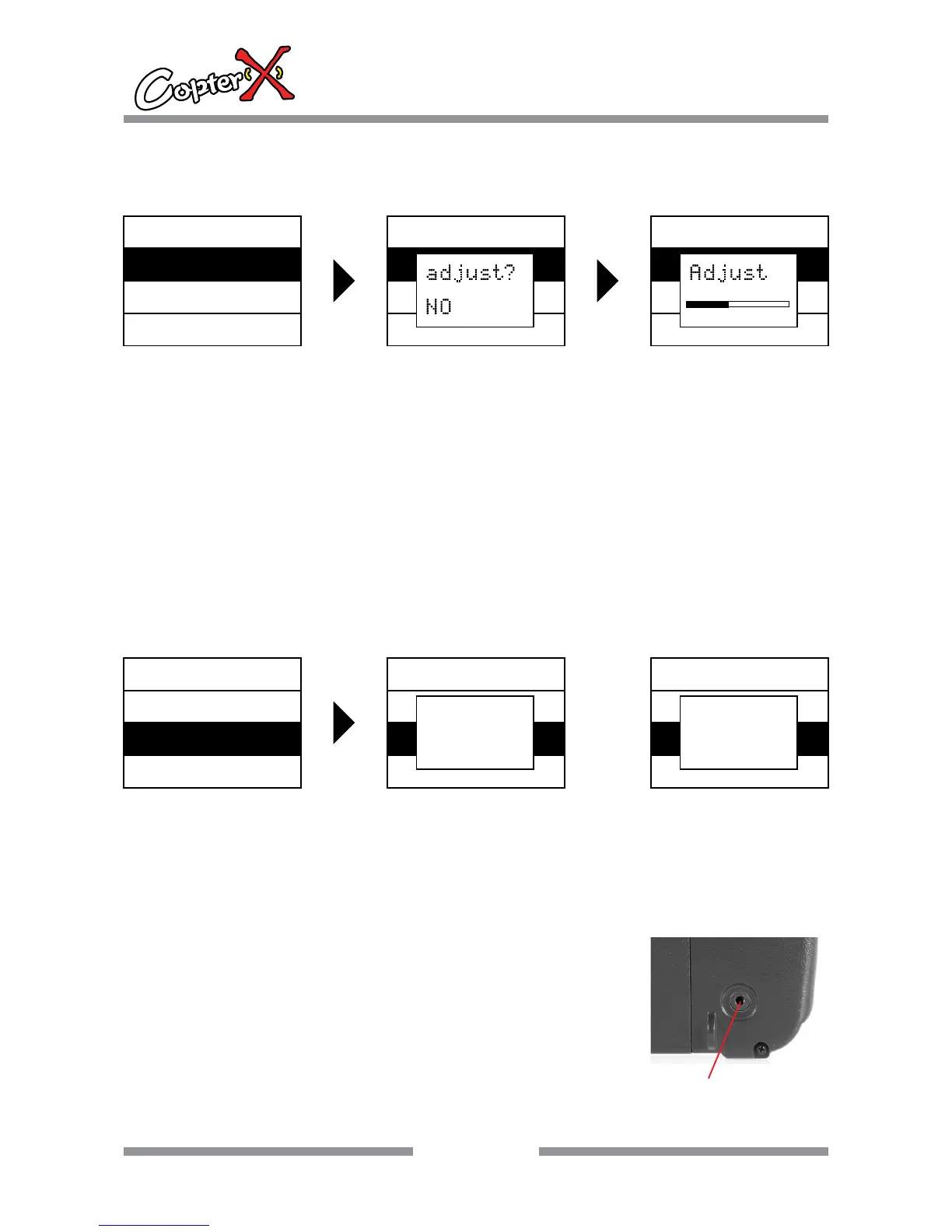
Stick neutral position setting
Operation:
1. Press “ENTER” to come to “STICK ADJ” interface, and now the shadow area is the item that can be
set currently.
2. Before your operation, please be sure that the 4 proportional channels of the sticks are in the
neutral position and the 4 electronic trim buttons are also in the neutral position.
3. Press “ENTER” to enter, and now comes out a dialing box. Press “up” or “down” to select “NO” or
“YES”, and press “ENTER”. When you hear one “beep” sound, the neutral setting is successful.
4. Press “EXIT” to save and leave the setting.
ENTER
13
CX-CT6C
2.4GHz 6 Channel FHSS Technology
Digital Proportional Radio System
ENTER
SYS.MENU
TRAINER
STICK ADJ
SYS.MENU
TRAINER
STICK ADJ
SYS.MENU
TRAINER
STICK ADJ
9.6. TRAINER
Trainer mode selection
Operation:
1. Press “down” to select “SYS.MENU”, and press “ENTER” to come to the interface.
2. Press “up” or “down” to select “NORMAL” or “TRAINER”.
NORMAL: normal fly, TRAINER: simulator software
NOTE
1. This function is for simulator operation in the computer, optional simulator
cable and software require.
2. Please do not connect “Trainer” interface at the back of the transmitter
to any electric equipment or other radio transmitters, or else, we are not
responsible for any damages.
3. This interface does not support training function, it is only for flying
simulation software.
ENTER
SYS.MENU
STICK ADJ
TRAINER
SYS.MENU
STICK ADJ
TRAINER
TRAINER
NORMAL
SYS.MENU
STICK ADJ
TRAINER
TRAINER
TRAINER
Simulating JACK


 To Next Page