20
CX-CT6C
2.4GHz 6 Channel FHSS Technology
Digital Proportional Radio System
IDLE SW
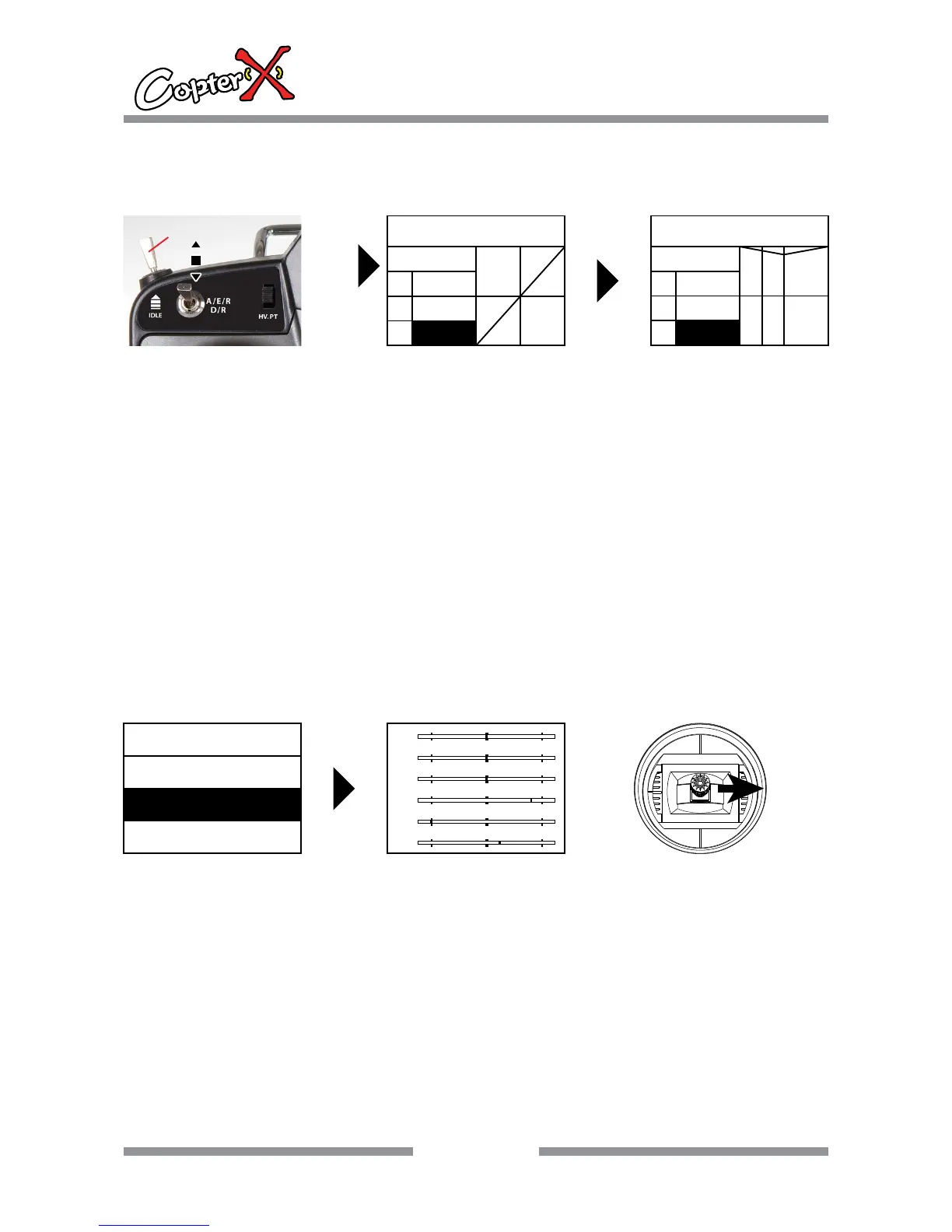
10.8. THRO.CURV
Throttle curve operation
Operation:
1. Press “up” to select “FUN.MENU”, and press “ENTER” to come to the interface.
2. Press “up” or “down” to select “THRO.CURV”, and now the shadow area is the item that can be set
currently. Press “ENTER” to go to the next step.
3. There are three throttle curves to be selected, normal, IDLE 0 and IDLE 1 by the switch at the left
top of the transmitter.
4. Press “up” or “down” to select the throttle curve point. There are 5 points, they are L, 1, 2, 3, H.
Press “INC” or “DEC” to set the corresponding value separately, and the throttle curve will change
accordingly.
5. After you setting, press “EXIT” to save the setting and leave the operation.
Remark: the transmitter can save 3 groups of different throttle curves.
IDLE SW
OFF
0
1
THRO. CURV
NOR
I
O
L
0
0
0
THRO. CURV
IDLE1
I
O
H
20
80
100
10.9. MONITOR
Monitor system
Operation:
1. Press “up” to select “FUN.MENU”, and press “ENTER” to come to the interface.
2. Press “up” or “down” to select “MONITOR”, and now the shadow area is the item that can be set
currently. Press “ENTER” to go to the next step.
3. When you move the sticks or channel switches, you can find the corresponding channel bars will
change accordingly. This function is designed to monitor the working conditions of the transmitter.
4. After your setting, press “EXIT” to save the setting and leave the operation.
Remark: This function helps you adjust the setting, neutral trim as well as channel inspection.
ENTER
FUN.MENU
MONITOR
PIT. CURV
THRO. CURV
1
2
3
4
5
6



 To Next Page