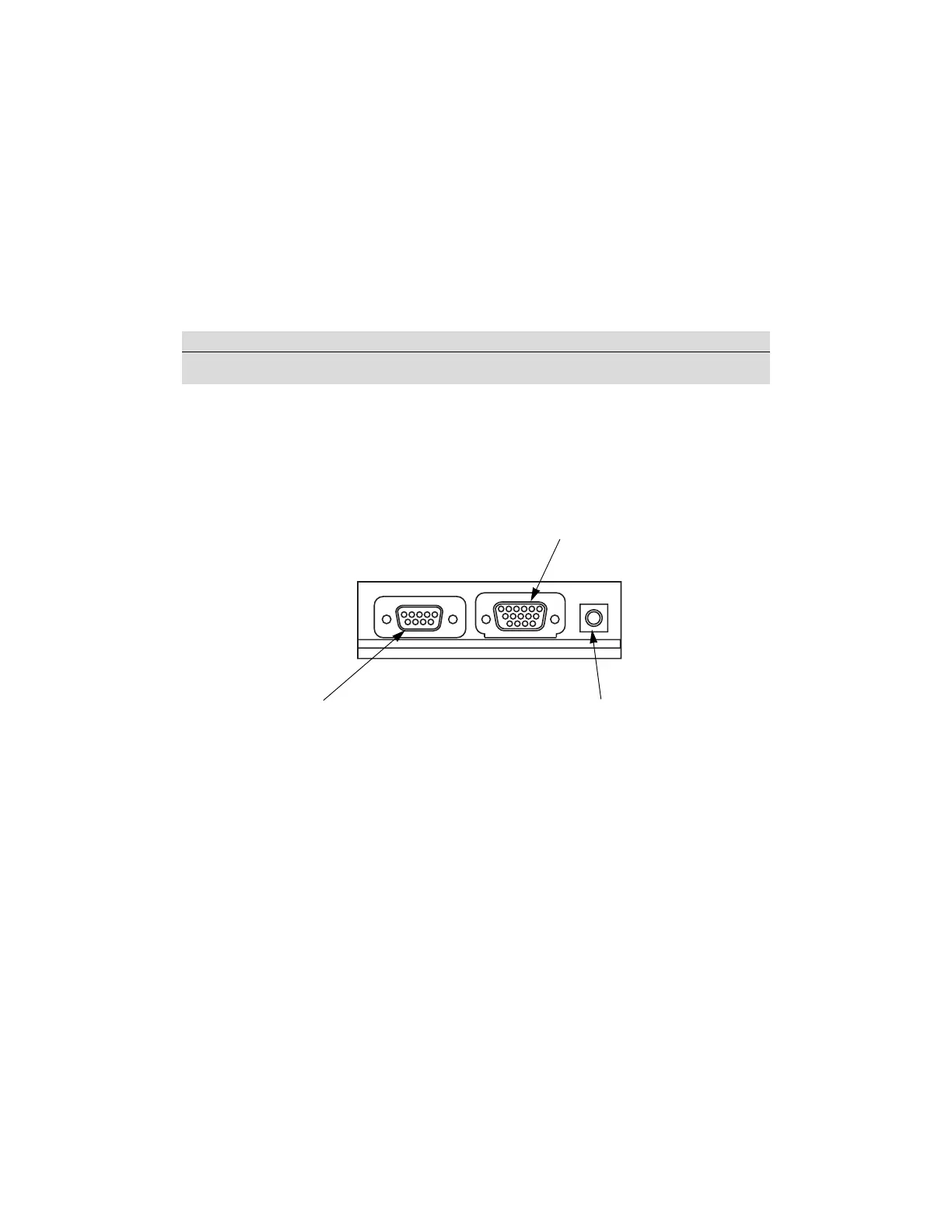
Option Panel
2-12 Force FX Electrosurgical Generator C User’s Guide
Option Panel
A removable plate on the rear panel covers a serial port, an expansion port, and an RF
(radio frequency) activation port. Remove this plate to obtain information through the
RS-232 port or to install a peripheral device such as a Bipolar Current Monitor, but retain
the original cover plate. After obtaining information or removing a peripheral device,
reinstall the original cover plate.
To review the technical specifications for each port, refer to Output Characteristics on
page 9-11.
Notice
Do not operate the Force FX-C generator without an appropriate cover plate in place.
Expansion port
Allows a connected device to receive
information about the RF voltage and
current being generated as well as signal
the generator to halt RF output.
RF activation port
Allows a connected device to receive
information during RF activation of the
generator, which can then generate a
response in the device.
Serial port
Allows connection of a computer to the
generator.
You can obtain information about the
generator using RS-232 communications
protocol or change the default coag
mode from Fulgurate to Desiccate or
Spray.
Refer to the Force FX Electrosurgical
Generator C Service Manual.












 To Next Page