Setting Up the Generator
4-4 Force FX Electrosurgical Generator C User’s Guide
4. Plug the generator power cord into a grounded receptacle.
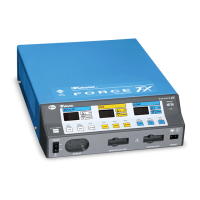
5. Turn on the generator by pressing the power switch on ( | ). Verify the following:
– All visual indicators and displays on the front panel illuminate.
– Activation tones sound to verify that the speaker is working properly.
6. If the self-test is successful, a tone sounds. Verify the following:
– Indicators above the default mode buttons (Standard bipolar, Pure cut, and
Fulgurate coag) illuminate green.
– Each display shows a power setting of 1 watt.
– The REM Alarm indicator illuminates red.
If the self-test is not successful, an alarm tone sounds. A number may momentarily
appear in the Cut display and, in most cases, the generator is disabled. Note the
number and refer to Responding to System Alarms on page 7-10.
Once the self-test is successful, connect the accessories and set the generator controls.
Refer to Preparing for Bipolar or Macrobipolar Surgery on page 4-5, Preparing for
Monopolar Surgery on page 4-7, or Preparing for Ultrasonic Electrosurgery on page 4-
13.
Important
If the coag mode has been optionally changed to default to Desiccate or Spray, that
corresponding indicator illuminates after the self-test is performed successfully.












 To Next Page