10
COWON A2
Before Using this Product
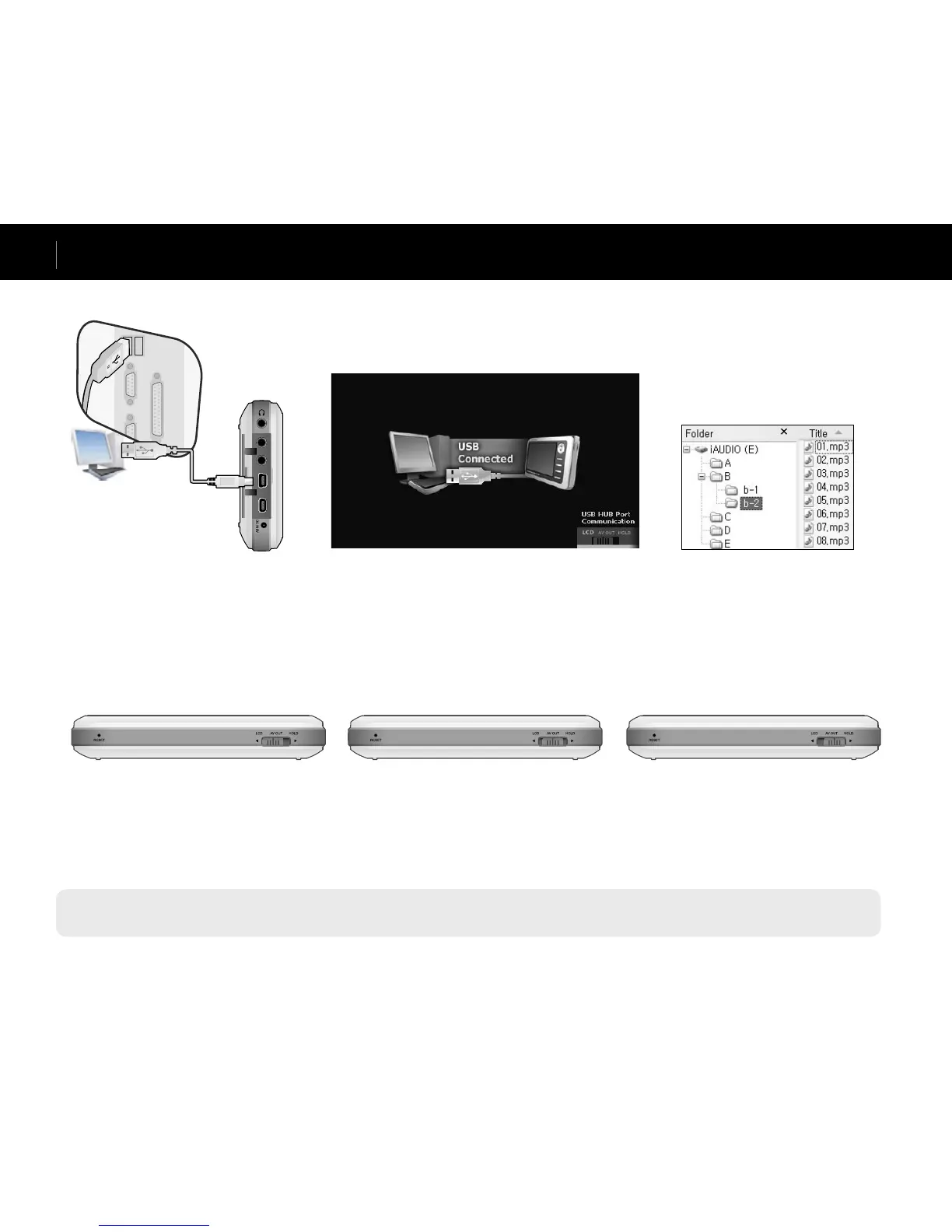
Connecting to your PC
- When using your player as a portable storage device, connect the adapter for stable power supply.
- If the player is connected to an USB hub, the player may not charge properly or malfunction. Be sure that to connect your player to the USB port on the back side of your computer.
Charging with your PC
1. Connect the device’s “USB DEVICE”
and the USB port of the computer with
the provided USB cable.
3. Check the recently added drive from
My Computer and Windows Browser.
2. If properly connected, the following
appears on the LCD.
Connect your computer when the HOLD switch beneath the player is at LCD or AV OUT. The player can be charged through “USB DEVICE” depending
on the HOLD switch position.
If the HOLD switch is at LCD
The player is recognized as a portable
storage device. Battery will be used and
not be charged.
If the HOLD switch is at AV OUT
The player is recognized as a portable storage
device and will be charged. Battery will be
slightly consumed but the recognition delay
will be slow.
If the HOLD switch is at HOLD
The computer will not be able to recognize the
player and will only charge it through the USB
port. Fully charging the player will take about
15 hours.



 To Next Page