25
COWON A2
Setup Features
LCD Brightness
• Adjust brightness of the LCD. Brightness levels range from 1 to 9.
TV Standard
• Set TV output. Select from NTSC and PAL
3. Sound
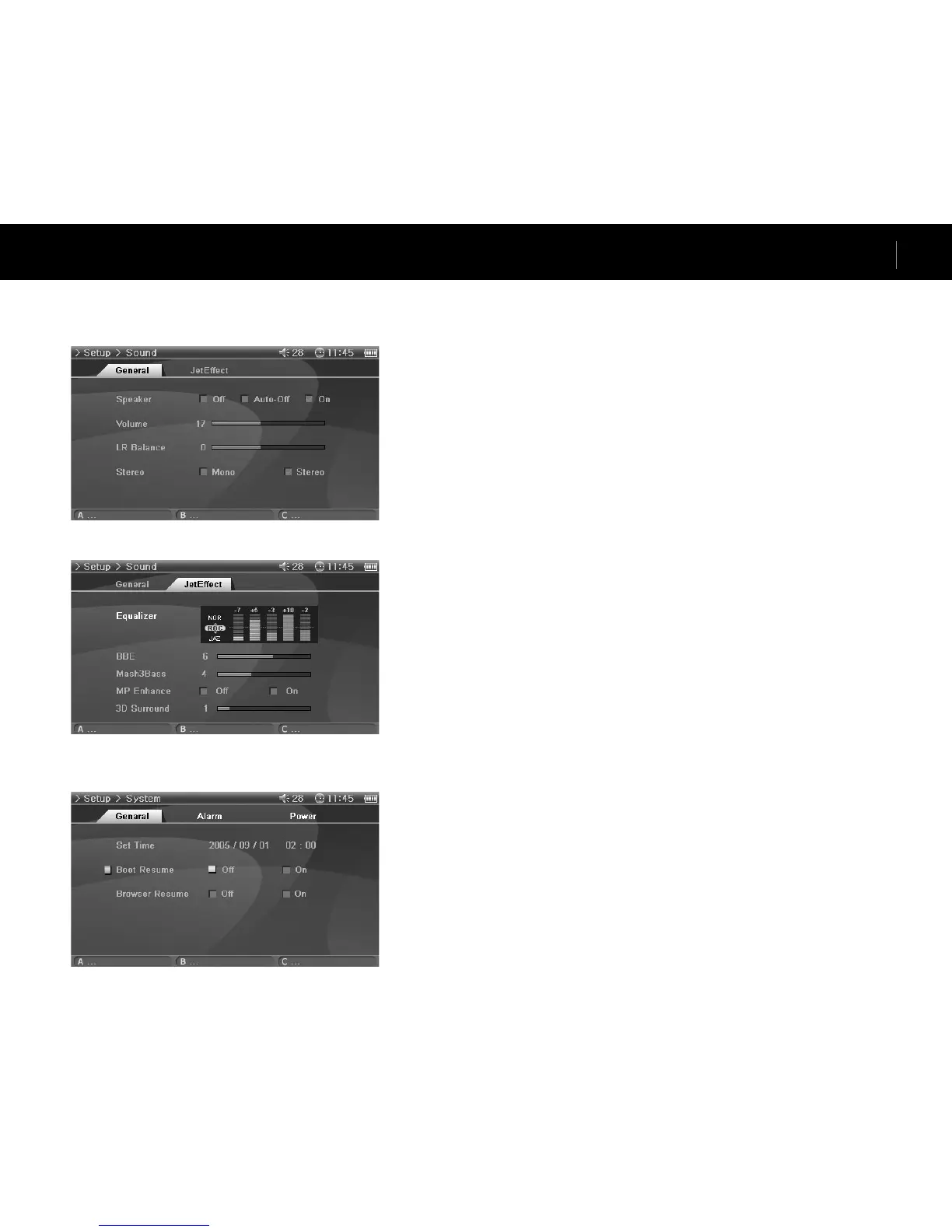
General
Speaker
• Adjust the built-in speaker settings.
• If set to Off, the speaker is turned off. If set to Auto-Off, speaker is quiet only when the ear-
phones are connected. If set to On, the speaker is always turned on.
Volume
• Adjust the volume. Volume levels range from 0 to 40.
• Adjust the volume by moving either +, - in the playback screen.
LR Balance
• Adjust the left and right balance of the speaker and the earphones.
Stereo
• Set to either Stereo or Mono.
JetEffect
Equalizer
• Either choose preset EQ or customizable 5 Band EQ.
BBE
• BBE is the sound field effect that provides clear music.
Mach3Bass
• Mach3Bass is the base booster that enhances the super low-end bass.
MP Enhance
• MP Enhance is the sound field effect that compensate for missing sound segments.
3D Surround
• 3D Surround provides three-dimensional sound effects.
4. System
General
Set Time
• Sets the current time.
Boot Resume
• Automatically continues to resume from the end of the last file played when set to On.
Browser Resume
• Remembers the Browser location and cursor moves to the selected location when re-enabled.


 To Next Page