18
COWON A2
USB Host Connection and Usage
USB Host can copy and delete files and folders in USB compatible devices (digital camera, iAUDIO, etc.).
■ Connecting USB Host
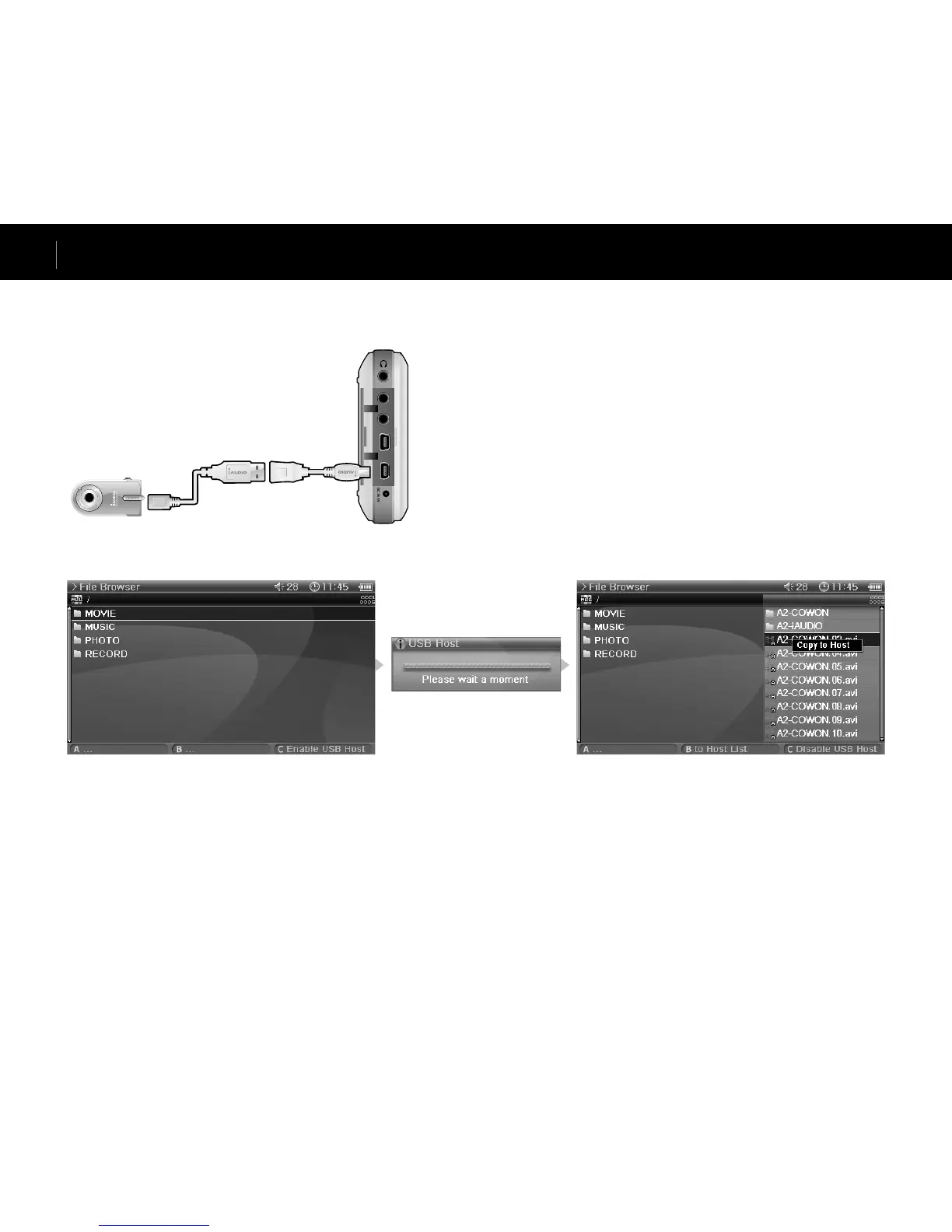
Connect the USB Host cable to the “USB HOST” on your A2 and the USB port of the USB compatible device.
■ Starting USB Host
To start USB Host, press the “C” button in Browser mode after connecting the USB compatible device.
If the device is compatible, list of folders and files in the device will appear on the right of the screen.
Select a folder or file to copy and press the “A” button, then a popup menu will appear and select “Copy”.
Press the “B” button to move between A2 and the USB compatible device list.
Press the “C” button again to end USB Host mode.
■ USB Host Compatible Device
Digital cameras, MP3 players and other UMS supported devices are compatible. For more information on compatible devices, see our product introduction
at www.iAUDIO.com.
Advanced Features



 To Next Page