29
COWON A2
Setup Features
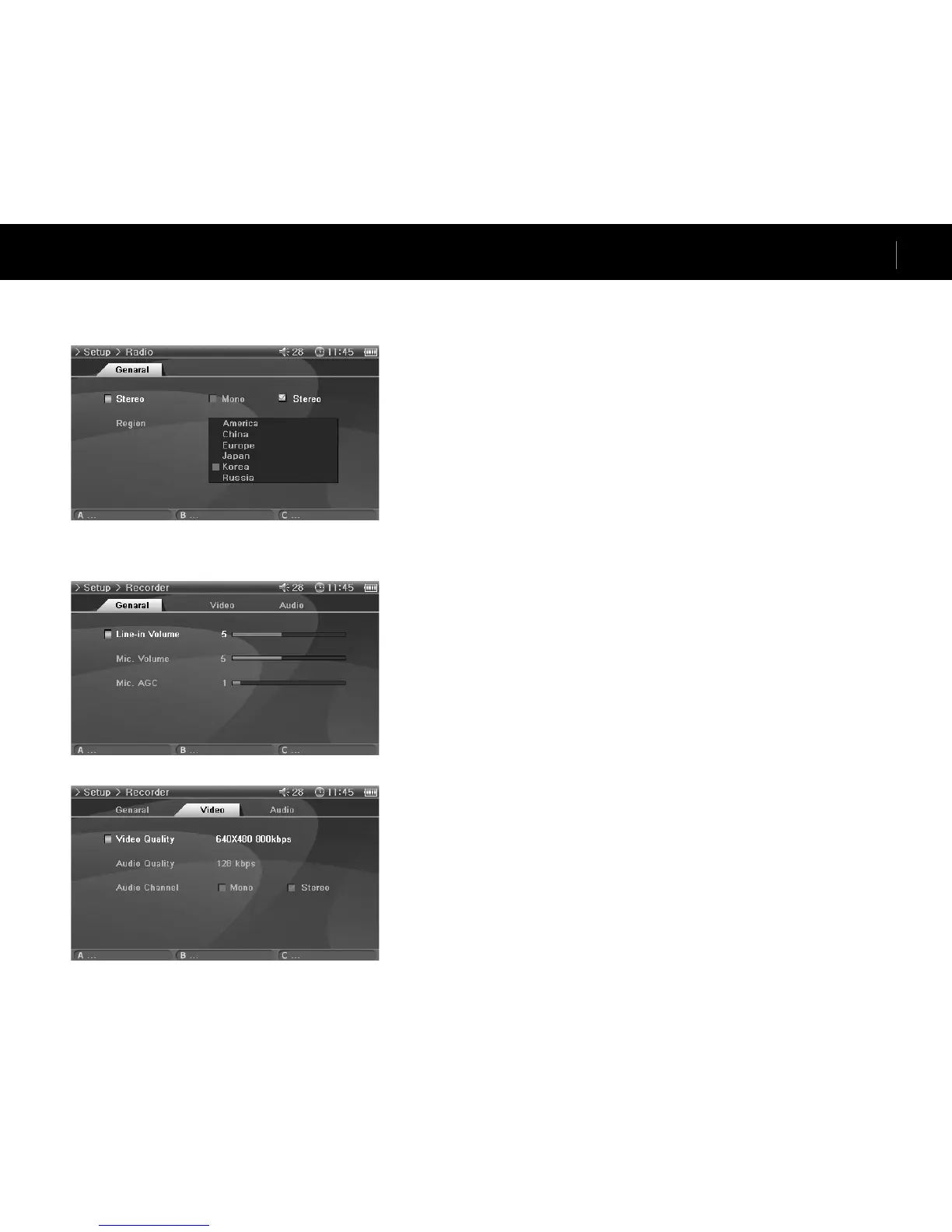
8. Radio
General
Stereo
• Select from Stereo and Mono when listening to FM Radio.
• Radio broadcasts that only support mono, will not support the Stereo feature.
• If set to Stereo, unwanted static noise may be heard. In this case, select and use Mono.
Region
• Choose the appropriate country where you are listening FM radio.
9. Recorder
General
Line-in Volume
• Adjust the volume level coming into the AV IN.
Mic. Volume (Built-in Volumes)
• Adjust the volume level coming into the built-in microphone.
• Sound increases as much as the number goes higher.
Mic. AGC
• Automatically adjust the high and low sounds of the recordings.
• Responses sensitively as the number increases.
Video
Video Quality
• When recording Video, set the quality of the video file recording through the AV IN.
• Higher the bps and resolution is better the quality of video, but the size of the file becomes larger and
more battery power is used.
Audio Quality
• When recording Video, set the quality of the audio file recording through the AV IN.
• Higher the bps is better the quality, but the size of the file becomes larger and more battery power is
used.
Audio Channel
• When recording Video, set the channel of the audio file recording through the AV IN.


 To Next Page