CowTech Ciclop 3D Scanning Guide
Tips for Troubleshooting Camera Connectivity Problems
The steps below are for the Windows OS. If you’re using a different OS or if these steps below do not
help, visit either of the following resources for troubleshooting help:
BQ Ciclop Google Group - https://groups.google.com/forum/#!forum/ciclop-3d-scanner
Horus Github - https://github.com/bqlabs/horus
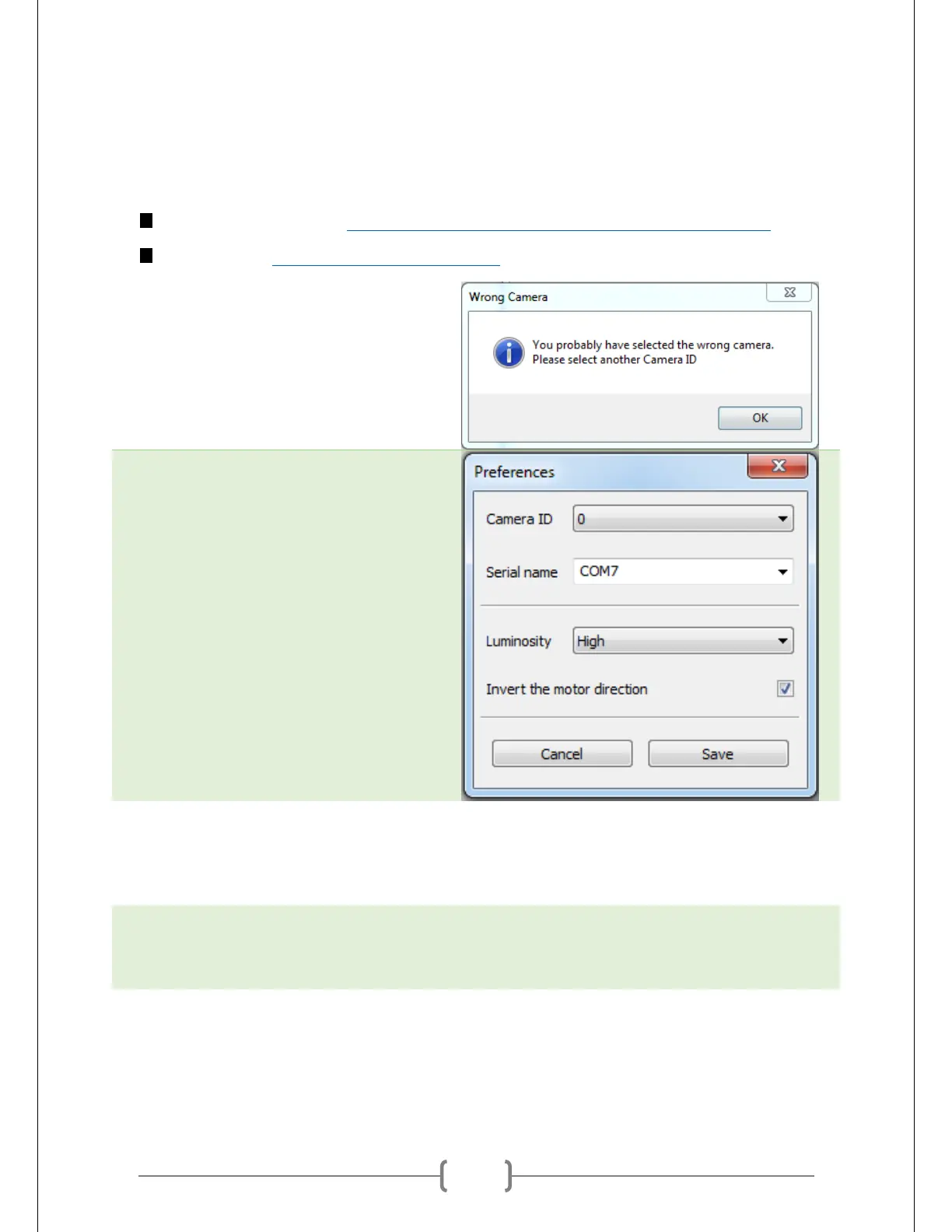
If Horus can’t detect your Logitech C270
Webcam, it may bring up an error window
similar to the one shown at right.
Usually Horus will bring up a menu after you
hit “OK.” It will look similar to the one shown
at right. (Some of the values here might look
different for you, and some fields may be
missing)
First thing to try: Change the values of “Serial Name” and “Camera ID.” If none of the possible
combinations of these fields work, move on. You can use the popup window after the error message or
go to Edit -> Preferences to modify these fields.
Second thing to try: Close Horus, unplug the camera, and plug the camera back in. Open up Horus and
give it a shot. Sometimes this will resolve the issue.



 To Next Page