CowTech Ciclop 3D Scanning Guide
Plugging in the Boards and Components
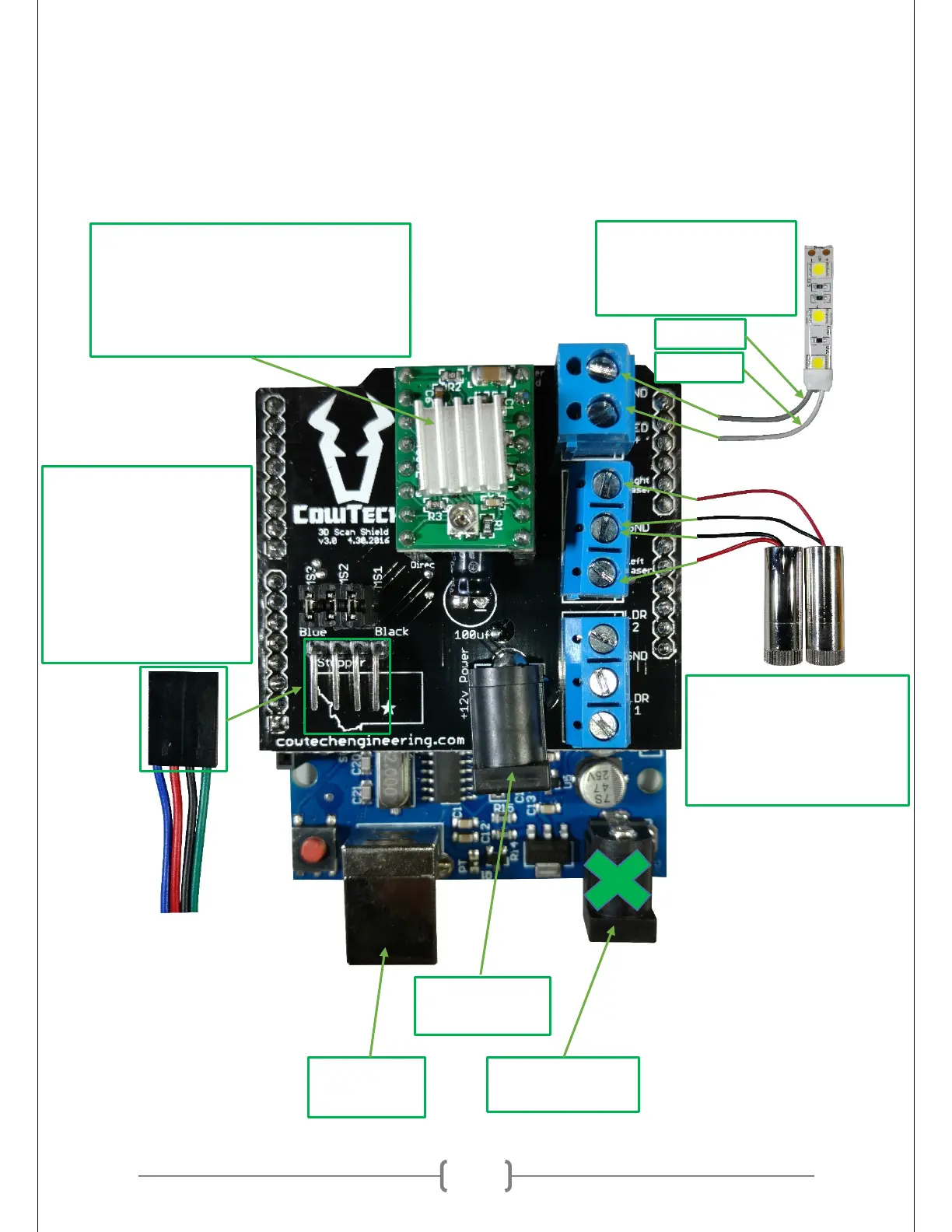
Make sure to plug in the boards and components as shown in the picture below. It is possible to damage
the Stepper Motor Driver if the boards are plugged in incorrectly. The blue connections on the right side
of the board will require a flathead screwdriver to secure in place.
Barrel Plug to
Wall Outlet
LED Strip.
Darker Wire on Top
Lighter Wire on Bottom
Lasers.
Black Wires in the Middle
Red Wires connect as
labeled on the silkscreen.
Stepper Motor.
Make sure the blue wire is
to the left.
The wire on the right may
or may not be black. It’s
fine if the wire is not black
as labeled.
Heat Sink.
The heat sink has an adhesive backing. Peel
off its cover and stick it to the black square
on the middle of the Stepper Motor Driver.



 To Next Page