ResMed Air 10 & S9 Series Devices
15
The steps below must be followed in exact sequence in order to
initiate the voltage conversion process and thus allow the Freedom
TM
CPAP
Battery to power the ResMed Air 10 or S9 series device. After connection
if you are not receiving power to the PAP device unplug all components
and follow the instructions again.
DUAL BATTERY CONNECTION
Dual battery connection will require an additional Freedom
TM
CPAP Battery.
The steps below must be followed in exact sequence!
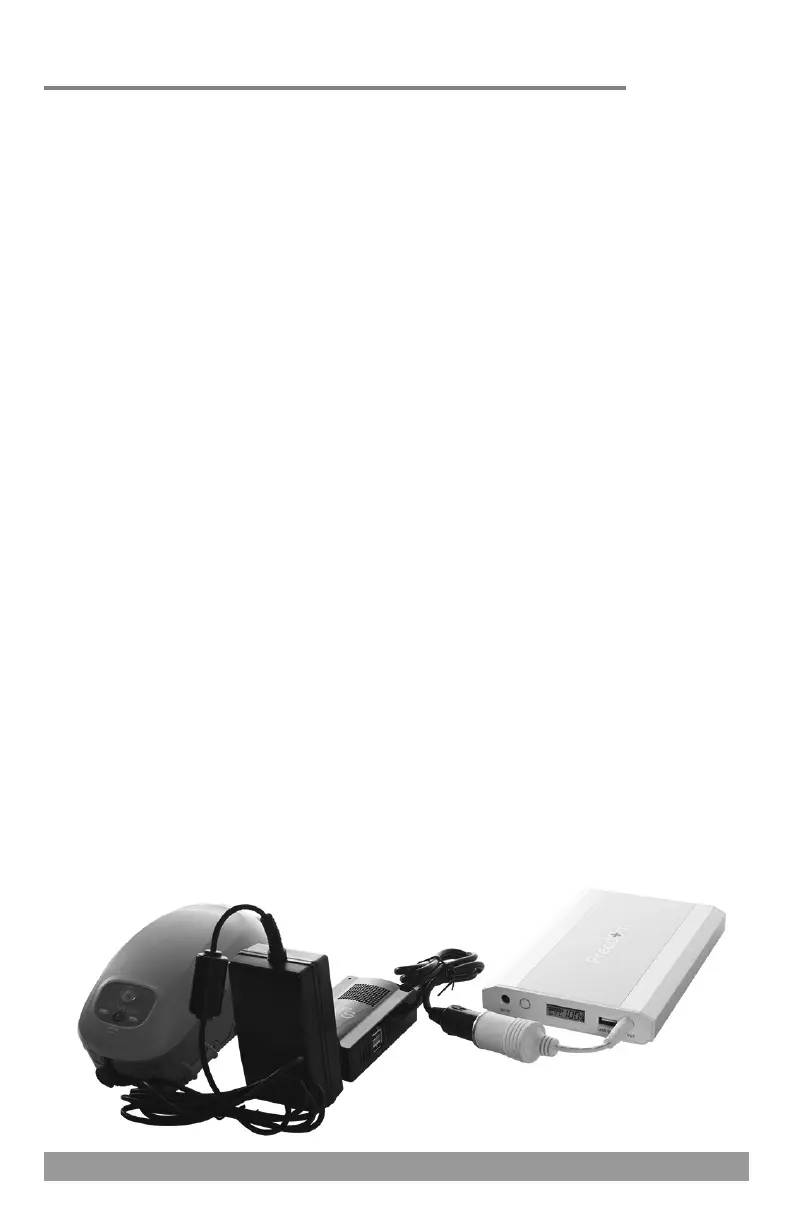
Plug the DC power pigtail cord into the DC OUT jacks of both batteries.
Plug the 24V power converter box into the DC power pigtail cord.
Insert the appropriate output cord for your device (Air 10 or S9) into
the power converter box.
Plug the 24V power converter with appropriate output cord attached
into the DC input port of the PAP device.
Turn the PAP device on and it should begin functioning.
The digital display screen will show the charge level of the battery.
You may press the charge level indicator button to illuminate this
screen. It will stay illuminated for a few seconds at a time.
Somnetics Transcend Series Devices
DC INPUT CORD
DC OUT JACK
150W SINE WAVE
POWER INVERTER
PAP AC
POWER
SUPPLY
20
Somnetics Transcend series devices can be connected to the Freedom™
CPAP Battery via the 150W sine wave power inverter.
REQUIRED COMPONENTS
Freedom
TM
CPAP Battery Kit
150W Sine Wave Power Inverter (power inverter)
Due to the initial power draw required to start the device the connection
instructions below must be followed in exact sequence in order to
prevent “tripping” the internal circuitry of the battery. If the battery does
shut down disconnect all components, press the charge level indicator
button to reset the battery and follow the instructions in exact sequence.
SINGLE BATTERY CONNECTION
Plug the DC input cord into the DC OUT jack of the battery.
Plug the power inverter into the DC input cord.
Plug the AC power supply of the PAP device into the power inverter.
Plug the AC power supply into the PAP device.
Turn the PAP device on and it should begin functioning.
The digital display screen will show the charge level of the battery.
You may press the charge level indicator button to illuminate this
screen. It will stay illuminated for a few seconds at a time.
PAP DC
INPUT
PORT
DC OUT JACKS
DC POWER PIGTAIL CORD
24V POWER
CONVERTER
Image shows connection to a ResMed Air 10 series PAP device.


 To Next Page