The Freedom
TM
CPAP Battery can be charged via a wall outlet using the
included AC power supply in approximately 4 hours (per battery) when the
battery is fully discharged.
CHARGING IN A FOREIGN COUNTRY
The AC power supply of the Freedom
TM
CPAP Battery will operate on any
AC current from 100-240VAC and 50/60 Hz without any adjustment. An
international electrical adapter plug is the only additional component that
is required to charge the battery in a foreign country.
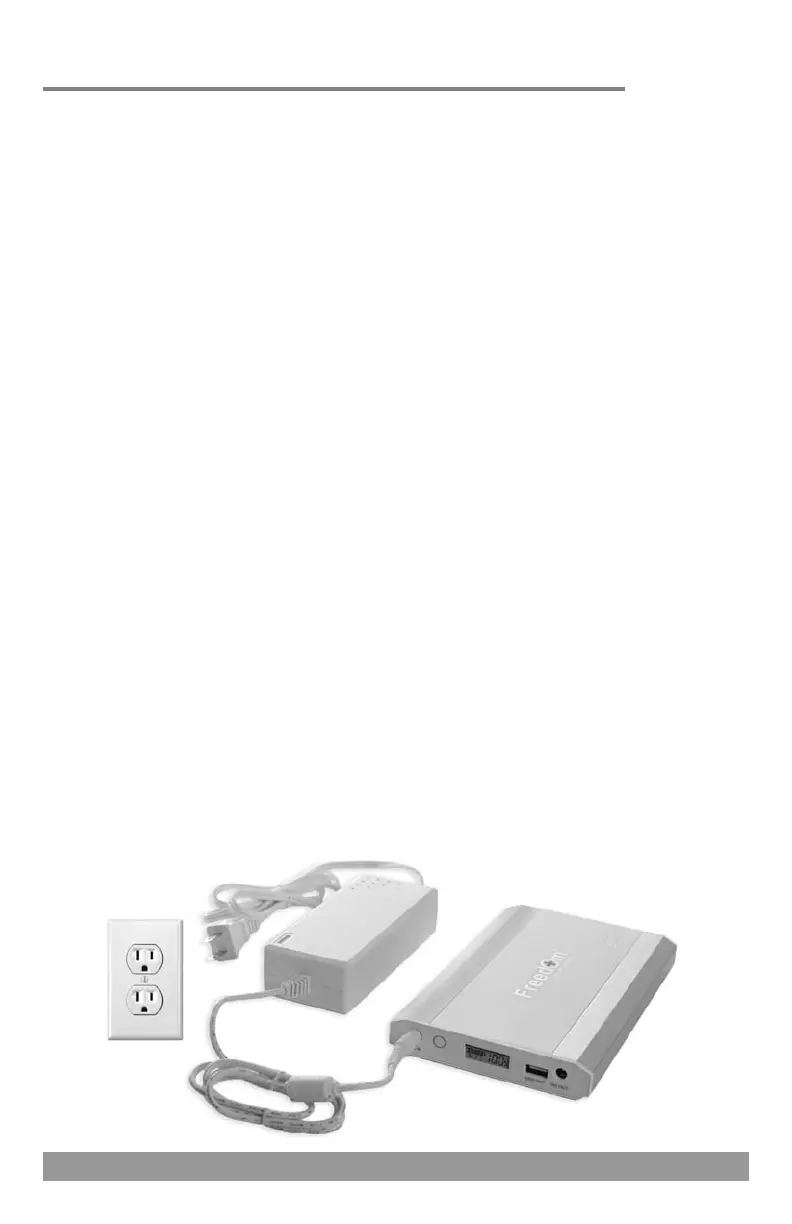
SINGLE BATTERY CHARGING
Connect the AC power cord to the AC power supply.
Plug the AC power supply into the DC IN jack of the battery.
Plug the AC power supply into a wall outlet.
The digital display screen will show the charge level of the battery.
You may press the charge level indicator button to illuminate this screen
for a few seconds at a time.
When charging is complete disconnect the AC power supply from the
wall outlet and the battery.
Note: It is normal for the AC power supply and the battery to be slightly
warm to the touch during the charging process. Do not charge the
Freedom
TM
CPAP Battery on any flammable surface.
Charging the Battery
AC POWER SUPPLY
DC IN JACK
AC POWER CORD
629
Power Backup Usage - Dual Batteries
When using two Freedom
TM
batteries in the power backup scenario
you will need to purchase an additional DC power pigtail cord.
The AC power supply of the battery will be plugged into one of the DC
power pigtail cords and then into the DC IN jacks of both batteries. The
other DC power pigtail cord will be plugged into the DC OUT jacks of both
batteries and then into your PAP device via the appropriate method for
your specific model device as noted in this manual.
RESPIRONICS DREAMSTATION SERIES
Plug the AC power supply of the battery into one of the DC power
pigtail cords and then into the DC IN jacks of both batteries and then
plug the AC power supply into a wall outlet (see page 7).
Plug the 12V power adapter into the other DC power pigtail cord and
then into the DC OUT jacks of both batteries.
Plug the 12V power adapter into the DC input port of the Respironics
DreamStation series PAP device (see page 10).
RESPIRONICS SYSTEM ONE/M & DEVILBISS INTELLIPAP SERIES
Plug the AC power supply of the battery into one of the DC power
pigtail cords and then into the DC IN jacks of both batteries and then
plug the AC power supply into a wall outlet (see page 7).
Plug the other DC power pigtail cord into the DC OUT jacks of both
batteries and insert the appropriate connector tip into that DC power
pigtail cord.
System One 60 Series: Tip with black top labeled “W”
System One 50 & M Series: Tip with yellow top labeled “N”
Plug the DC power pigtail cord with appropriate connector tip attached
into the DC input port of the PAP device (page 12).
*NOTE: DeVilbiss IntelliPAP 2 series devices will connect to the Freedom
TM
CPAP Battery via the 150W Sine Wave Power Inverter (see page 30).


 To Next Page