Respironics System One & M Series Devices
Respironics System One and M series devices can be connected directly
to the Freedom
TM
CPAP Battery using the DC power pigtail cord and the
appropriate connector tip included in the Freedom
TM
CPAP Battery Kit.
REQUIRED COMPONENTS
Freedom
TM
CPAP Battery Kit
SINGLE BATTERY CONNECTION
Plug the DC power pigtail cord into the DC OUT jack of the battery.
Insert the appropriate connector tip into the DC power pigtail cord.
System One 60 Series: Tip with black top labeled “W”
System One 50 & M Series: Tip with yellow top labeled “N”
Plug the DC power pigtail cord with appropriate connector tip attached
into the DC input port of the PAP device.
Turn the PAP device on and it should begin functioning.
The digital display screen will show the charge level of the battery.
You may press the charge level indicator button to illuminate this
screen. It will stay illuminated for a few seconds at a time.
11
DC OUT JACK
DC POWER
PIGTAIL CORD
CONNECTOR TIP
INSERTED INTO PAP
DC INPUT PORT
Image shows connection
to Respironics System One
60 series PAP device.
Other PAP Device Models
150W SINE WAVE
POWER INVERTER
DC INPUT CORD
PAP AC POWER SUPPLY
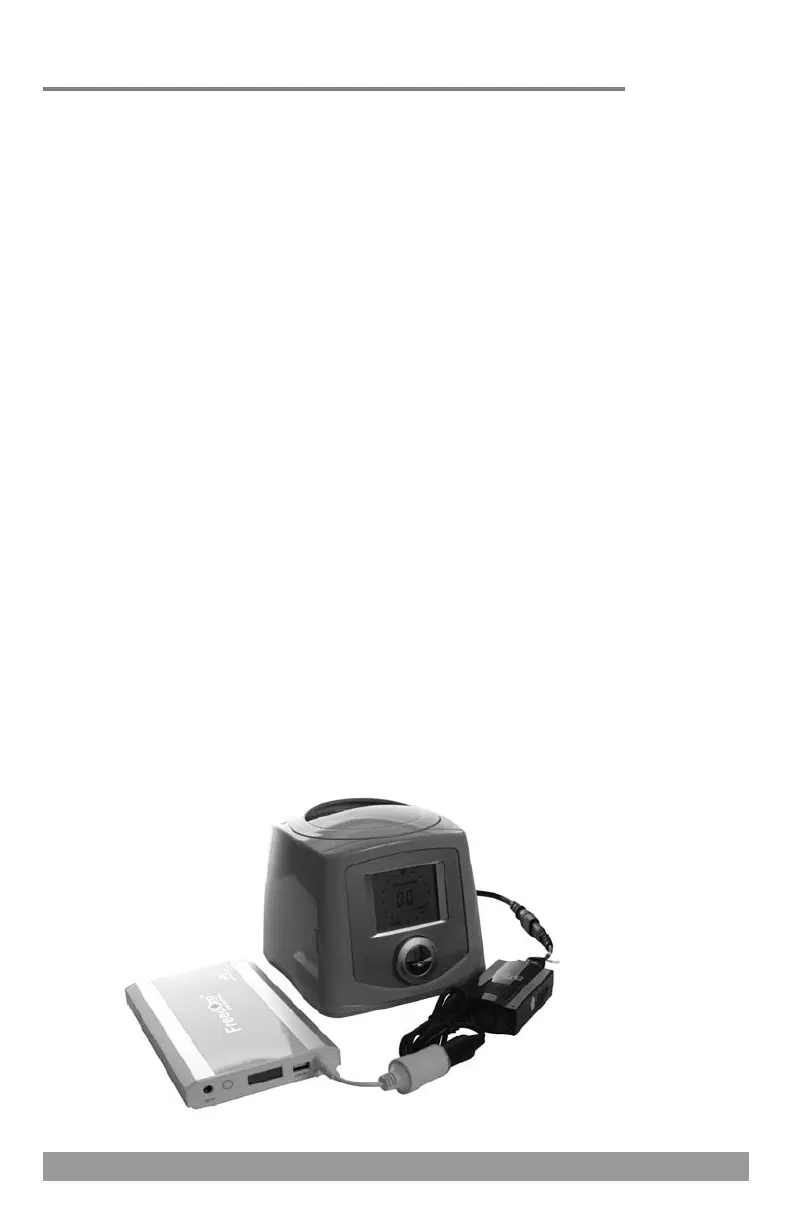
Image shows connection
to Fisher & Paykel ICON
series PAP device.
DC OUT JACK
24
Most other PAP device models including Fisher & Paykel ICON series,
DeVilbiss IntelliPAP 2 series, 3B Medical RESmart and Luna series, and
Apex Medical XT series devices can be connected to the Freedom™ CPAP
Battery via the 150W sine wave power inverter.
REQUIRED COMPONENTS
Freedom
TM
CPAP Battery Kit
150W Sine Wave Power Inverter (power inverter)
SINGLE BATTERY CONNECTION
Plug the DC input cord into the DC OUT jack of the battery.
Plug the power inverter into the DC input cord.
Plug the AC power supply of the PAP device into the power inverter.
Plug the AC power supply into the PAP device.
Turn the PAP device on and it should begin functioning.
The digital display screen will show the charge level of the battery.
You may press the charge level indicator button to illuminate this
screen. It will stay illuminated for a few seconds at a time.


 To Next Page