5
INITIAL BATTERY USAGE
Before using the Freedom
TM
CPAP Battery for the first time be sure to charge
it fully. It may only take a short time for the battery charge level to reach
100% as it is already partially charged before it leaves the factory.
TURNING THE BATTERY ON/OFF
The Freedom
TM
CPAP Battery turns on and off automatically when a device
is connected or disconnected from the DC OUT jack.
When connecting a device via the USB port, the charge level indicator
button must be pressed once the device is connected in order to activate
power output from the USB port. The battery will automatically shut off
when the device is disconnected from the USB OUT port.
If the battery stops functioning press the charge level indicator button to
reset the internal circuitry. See page 35 for additional information.
When not in use disconnect devices from the DC OUT jack or USB OUT
port of the battery to allow the battery to completely shut down.
THE CONTROL BOARD
The Freedom
TM
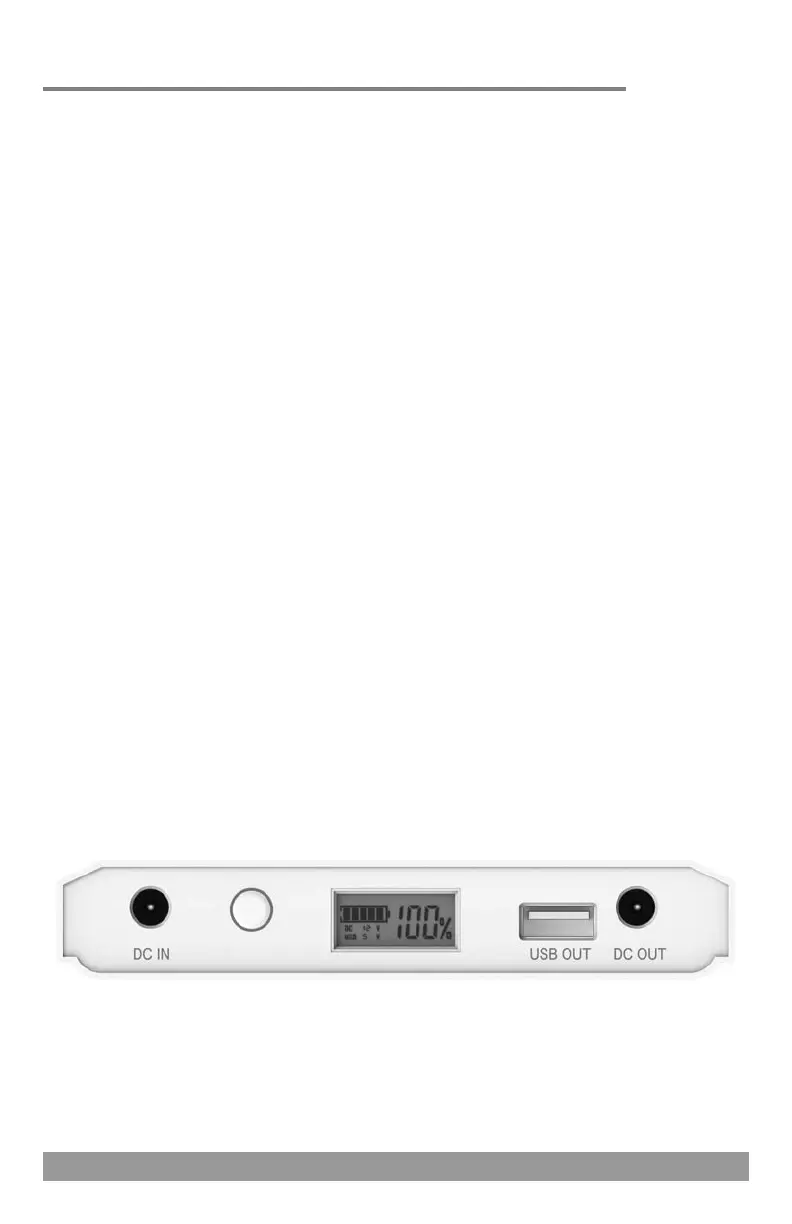
CPAP Battery control board includes the DC IN and
DC OUT jacks, USB OUT port, charge level indicator button, and digital
display screen which displays the current charge level of the battery.
Getting Started
A
(A) DC IN JACK (B) CHARGE LEVEL INDICATOR BUTTON
(C) DIGITAL DISPLAY SCREEN (D) USB OUT PORT (E) DC OUT JACK
E
B
C
D
30
Power Backup Usage - Dual Batteries
When using two Freedom
TM
batteries in the power backup scenario
you will need to purchase an additional DC power pigtail cord.
RESMED AIR 10 & S9 SERIES
Plug the AC power supply of the battery into one of the DC power
pigtail cords and then into the DC IN jacks of both batteries and then
plug the AC power supply into a wall outlet (see page 7).
Plug the other DC power pigtail cord into the DC OUT jacks of both
batteries and then plug the 24V power converter box into that DC power
pigtail cord.
Insert the appropriate output cord for your device (Air 10 or S9) into
the power converter box.
Plug the 24V power converter with appropriate output cord attached
into the DC input port of the PAP device (see page 15).
*NOTE: The instructions for connecting the 24V power converter box to the
Freedom
TM
CPAP Battery must be followed in sequence.
PAP DEVICES CONNECTED VIA 150W SINE WAVE POWER INVERTER
PAP device models including Fisher & Paykel ICON, DeVilbiss IntelliPAP 2 series, 3B
Medical RESmart and Luna, Apex Medical XT, Somnetics Transcend, and HDM Z1 series
devices connect to the Freedom™ battery via the 150W sine wave power inverter.
Plug the AC power supply of the battery into one of the DC power
pigtail cords and then into the DC IN jacks of both batteries and then
plug the AC power supply into a wall outlet (see page 7).
Plug the other DC power pigtail cord into the DC OUT jacks of both
batteries and then plug the DC input cord included with the Freedom
battery kit into that DC power pigtail cord. Now plug the 150W sine
wave power inverter into the DC input cord.
Plug the AC power supply of the PAP device into the 150W sine wave
power inverter and then into the PAP device (see page 17 for example).


 To Next Page