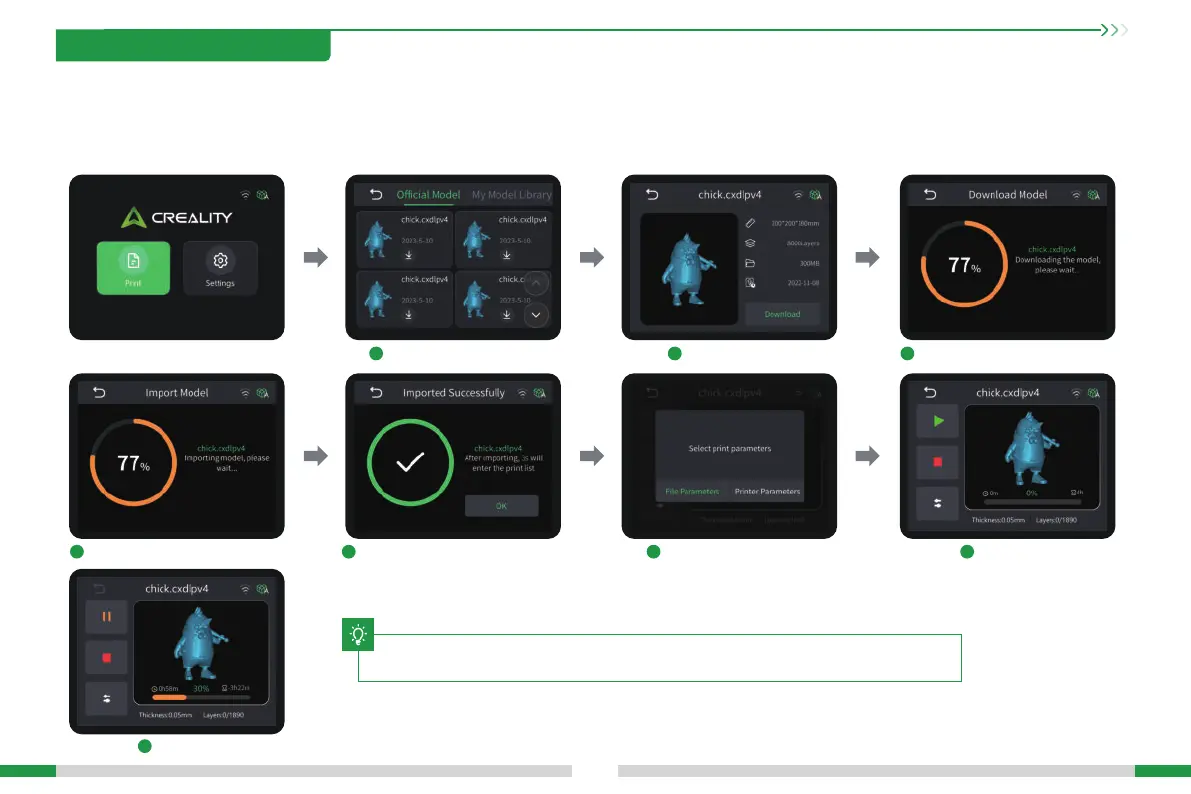
Select model libra model. Waiting for the model to download.
Choos to use parameters. Waiting to print.
Printing...
Waiting for the model to nish loading. After the model is impoed, click "OK".
Click to download.
1
5 6 74
7
2 3
12
9. Creality Cloud Online
Make sure WiFi is correctly connected before using online printing
Steps: Settings → WiFi → Select the corresponding WiFi.
Warm Tips: ① Only 2.4GHz WiFi is applicable to the 3D printer, and it cannot be connect to 5GHz WiFi routers;
② Only WPA-PSK/WPA2-PSK security protocol is applicable to the 3D printer, and other protocols may result in the failure to connect the printer to WiFi properly. To
change the security protocol, users may change it in setting inteace of the router.
T
The current inteace is for reference only. Due to the continuous upgrading of functions,
it shall be subject to the latest software/rmware UI published on the ocial website.





 To Next Page