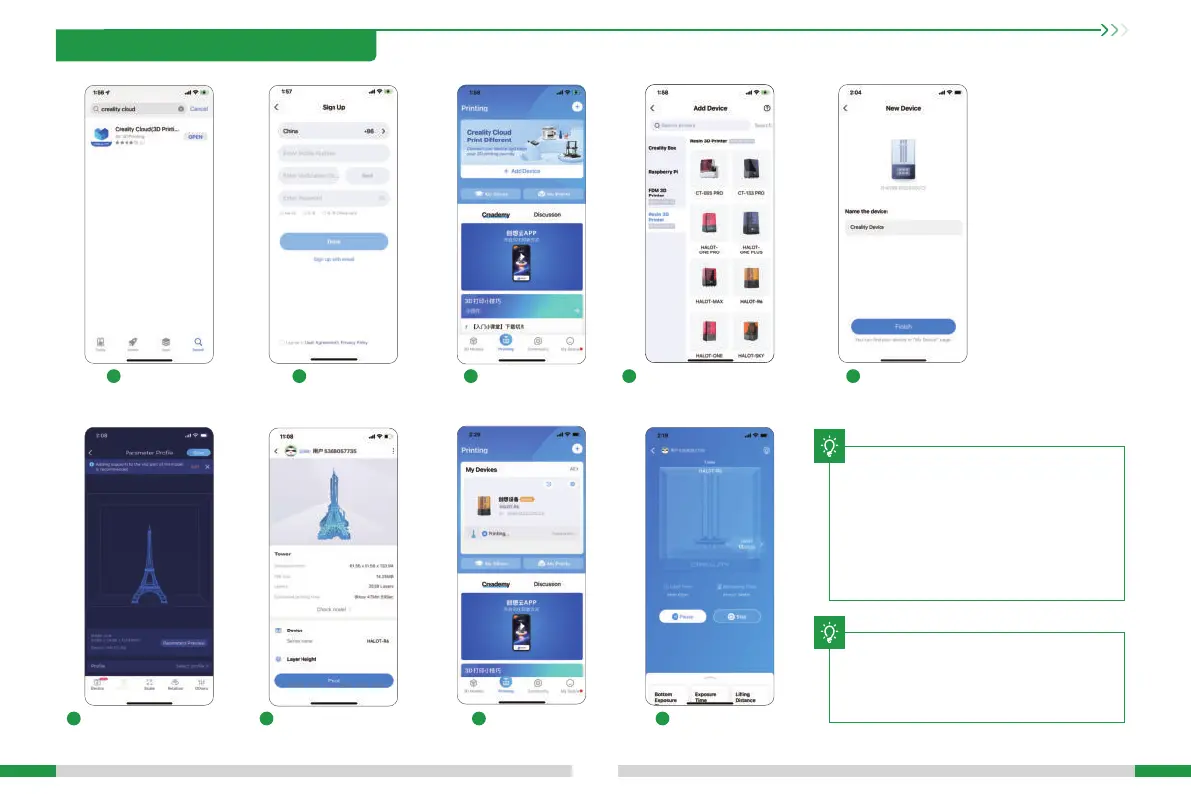
1
6 7 8 9
2 3 4 5
Register Add equipment Device naming
Select device
Download
Select model, set the
printer and parameters,
and click "Slice".
Scan QR CodeSettings
→ Detail → Connect to
Creality Cloud → QR code
Print progressUpon completion of
slicing, click "Printer".
Notes:
1. The steps for adding devices va for
dierent mobile phone operating
systems;
2. Set the correct area in "Settings -
Other Settings - Language and Area".
3.Make sure WiFi is correctly connected
before using online printing.
The current inteace is for reference
only. Due to the continuous upgrading
of functions, it shall be subject to the
latest software/rmware UI published
on the ocial website.
T
13
10. Creality Cloud App Print
T





 To Next Page