8 • CCS-UC-1: Crestron Mercury Tabletop Conference System Supplemental Guide – DOC. 7844E
• Set DHCP Enabled to Off to manually enter the Ethernet parameters. When
set to
Off, the IP address, subnet mask, default gateway, and DNS servers
must be manually entered.
NOTE: Both network adapters must use the same DHCP setting.
3. Click Save Changes to apply any changes. Click Revert to revert back to the
previously used settings.
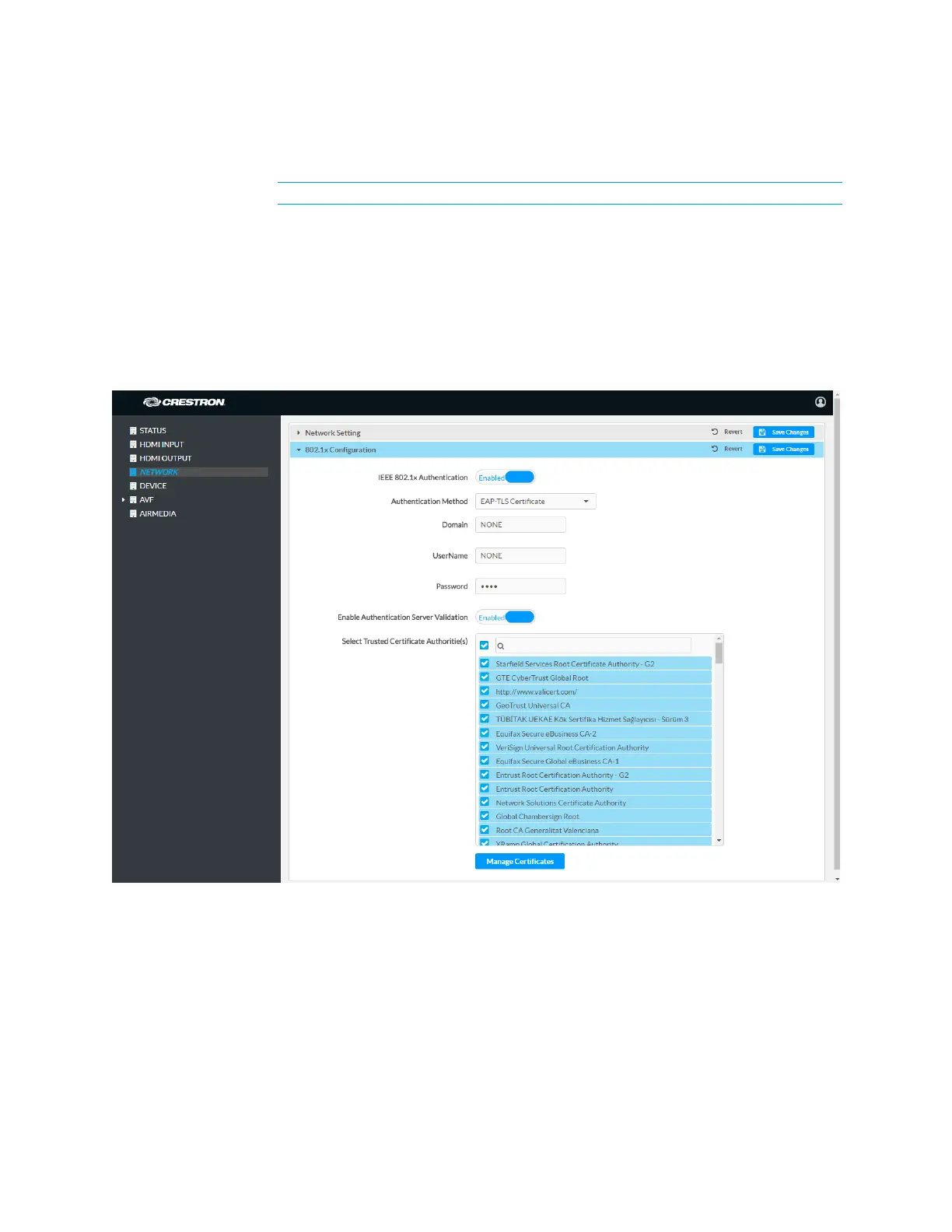
802.1x Configuration
Some networks require devices to use 802.1x port-based network access control for
access to the network.
NETWORK Screen - 802.1x Configuration
To use 802.1x, set IEEE 802.1x Authentication to Enabled and select the desired method
of authentication.
• Certificate Authentication
1. In the Authentication Method field, select EAP-TLS Certificate.
2. Enter the domain name of the authentication server.
3. Upload a machine certificate.
a. Click Manage Certificates to manage certificates for 802.1x
authentication. A list of certificates is displayed.



 To Next Page
 Loading...












