Korinthou 11, 14451 Metamorfosi Τel: 210-8098700, Fax: 210-6122512
Site: www.crypto.gr, Email: crypto@crypto.gr
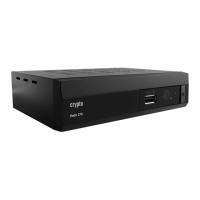
6.6 Parental Lock
This menu allows you to protect the installation menu and channel, and change the Password.
1. In "System Setup" menu, select "Parental Lock" and press "OK" button, you are asked to
input a password (the default password is"0000").
2. After the input of the correct password by pressing numeric buttons, the parental lock menu
appears.
Menu Lock: To l oc k t h e i nstall ation m enu a nd E d i t m enu . W hen y o u want t o e nt er A uto
Scan/Channel Scan menu, you must input the password. You can set menu lock to on/off.
Channel Lock: Off/ AGE 10/AGE 12/AGE 16/AGE 18
New Password: To c h ange the pa s swor d.
Confirm Password: To c o nf i rm t he new password.
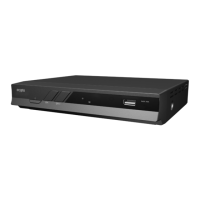
6.7 OSD Setting
This menu allows you to set OSD Timeout, OSD Transparency and load default OSD setting.
OSD Timeout: 1-10
OSD Transparency: To set t he OSD tr a nsparen cy to Off/ 1 0%/20%/ 30%/40%.
Load Default OSD Setting: To cl e ar all O S D setti n g and r e set param eters a s def ault v al ue.


 To Next Page