Korinthou 11, 14451 Metamorfosi Τel: 210-8098700, Fax: 210-6122512
Site: www.crypto.gr, Email: crypto@crypto.gr
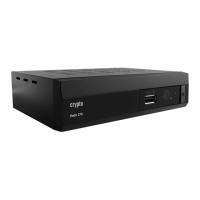
7.5 USB Device
This function allows you to play files from USB port.
1. In "Tools" menu, select "Media+", press "OK" button to enter Media Player menu.
2. Press "UP" or "DOWN" cursor button to select a desired item, and press "OK" button to play
the desired files.
3. Press "EXIT" button to exit.
Key operations
:
· FAV : Put the selected file to play list .
· 0 : All the MP3 files in current directory will be added into MP3 play list .
· 1 : All the Image files in current directory will be added into Image play list.
· 2 :There are four kinds of sorting approaches.
- Name (A-Z): Sorting in Alphabetical descending Order.
- Name (Z-A): Sorting in Alphabetical ascending Order.
- Image 1
st
: Sorting with image as priority
- Music1st: Sorting with Music as priority
- Lock: Collecting all locked channels and list in the bottom of TV
Channel List.
- Default: Return to original setting order.
-


 To Next Page