Chapter 6. Manage / Configure the Switch
105
6.4.4 Port
Th
is section is about configurations for ports. For port speed setting, maximum packet size setting, mirror port setting,
port bandwidth limit, and port statistics.
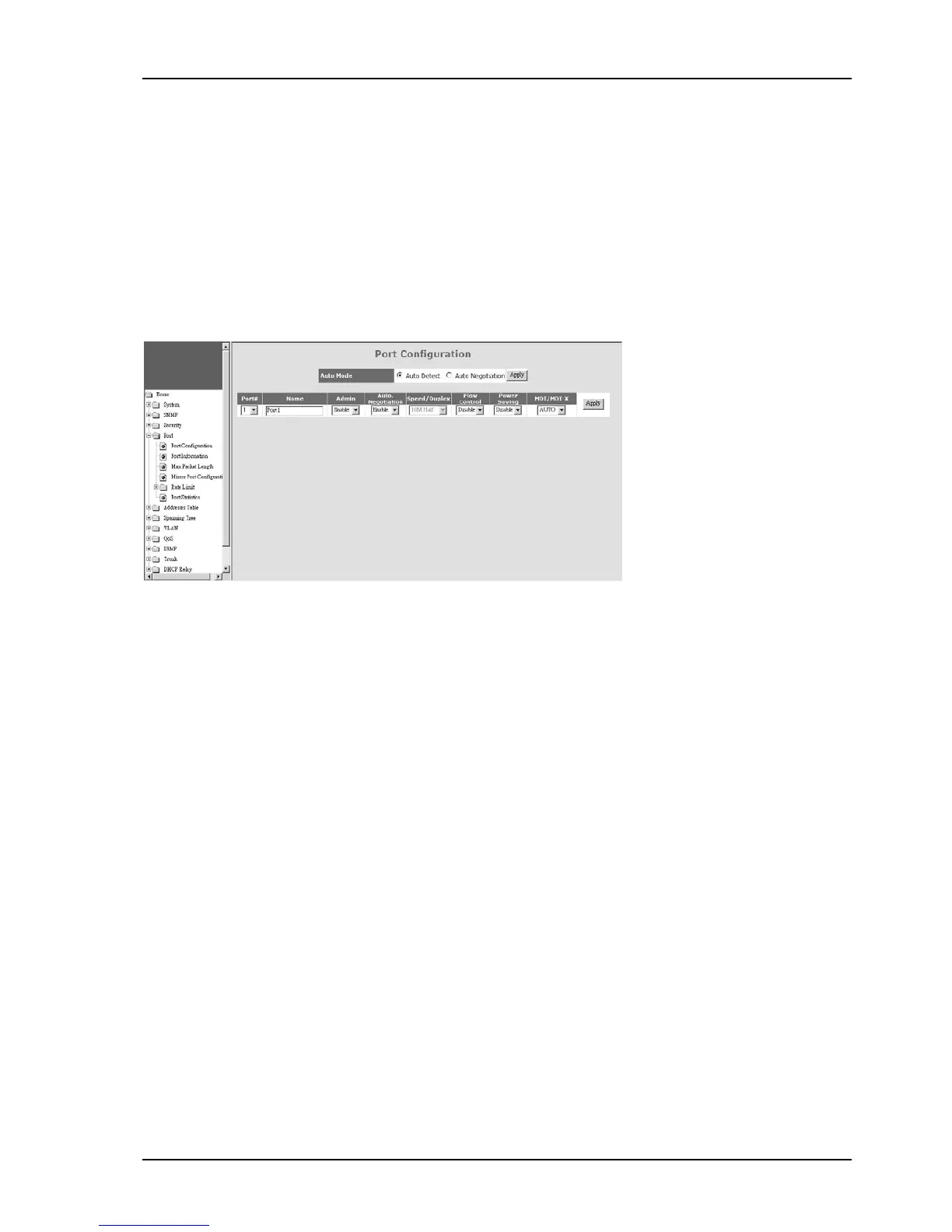
1). Port Configuration
This function is used to configure port settings of the switch. You can enable /disable a port, set it to fixed 10M or
100M or 1000M ... and so on.
Auto Mode : User can select the operation mode of port when “auto” is set to disabled.
For “Auto Negotiation” mode, the switch will do port auto-negotiation function ON/OFF when the auto function of port
(in Port Configuration setting) is enabled/disabled.
For “Auto Detect” mode, the switch will always keep port auto-negotiation function ON but just modify its attribution if
auto function of port (in Port Configuration setting) is disabled.
For applications, you should select “Auto Detect”mode if the connected device is auto-negotiation enabled. (For
example, customer’s PC is auto-negotiation enable and you want to set his network connection to work at 10Mbps.)
And you can select “Auto Negotiation”mode if the connected device is auto-negotiation disabled (it is called forced
mode, sometimes). Some of old TX-FX Converters needs to work in this mode because FX supports 100/Full forced
mode only.
For most applications, “Auto Detect” mode is OK.


 To Next Page
 Loading...