© CUB CAMPERS • C16 OWNER’S MANUAL • REVISION 1 - 6/02/2023 PAGE 21 of 59
13. RED-VISION TVMS
Click for REDARC Red-Vision Quick Start Guide
Click for REDARC Red-Vision User Manual
The C16 is fitted with Red-Vision by REDARC TVMS (Total Vehicle Management System) as
follows. For safety information and manufacturer instructions refer to the REDARC –
RedVision User Manual provided. There is also a RedVision App that replicates MOST of the
display and switching features of the Display available in the Google Play Store or the Apple
App Store.
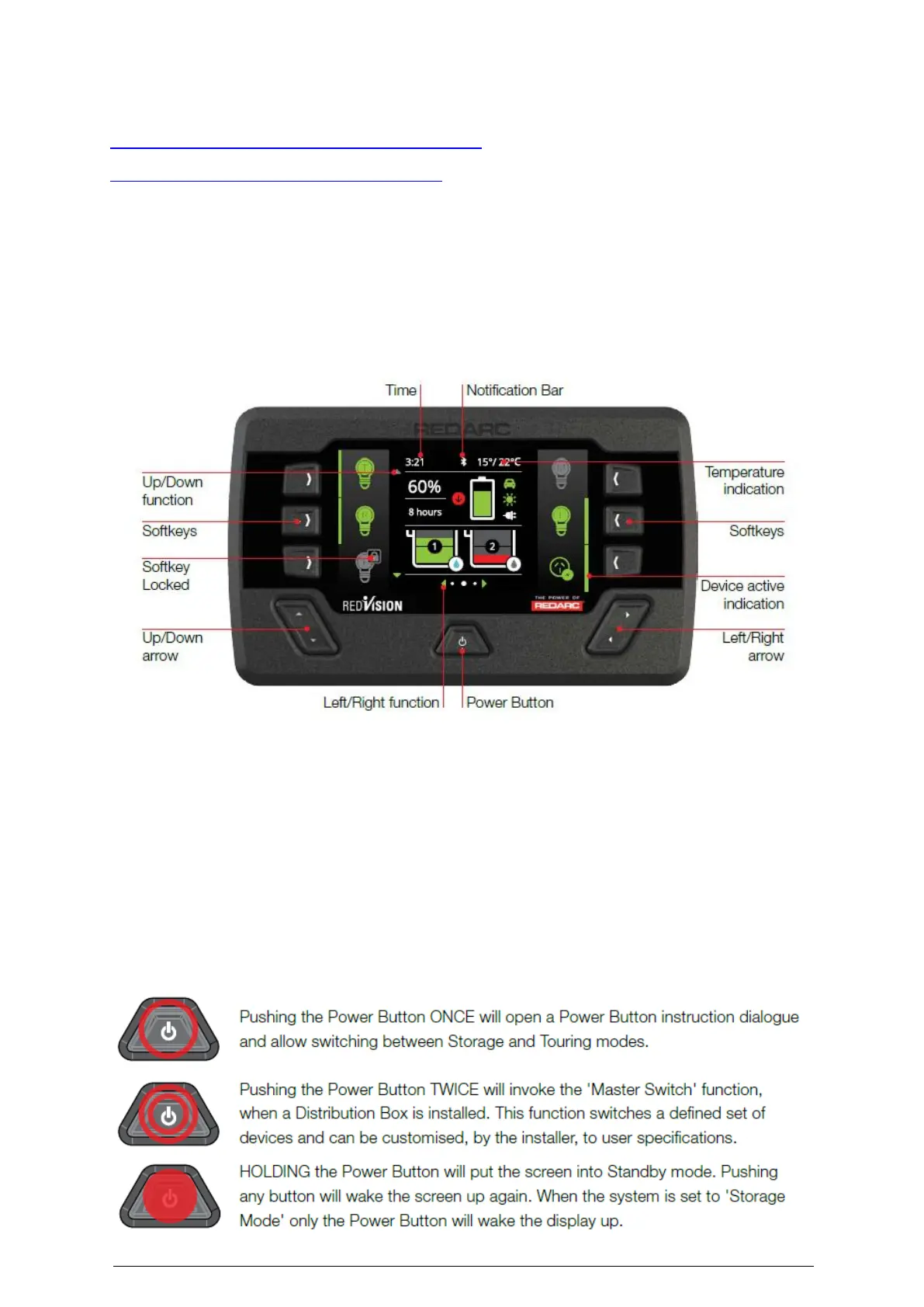
Once your C16 is all set up, go to the Red Vision TVMS, and push the Power Button to power
up your caravan.
NAVIGATION
• The Left/Right buttons are used to navigate the pages on the centre of the screen
• The Up/Down buttons are used to navigate through options found on other pages
• The Left/Right and Up/Down functions are indicated on the screen.
SOFT KEYS
The Soft Keys functions will be indicated by an icon and these functions will change
depending on the screen. The Soft Keys are used to toggle devices on/off (e.g., Lights, Water
Pump) Softkeys may also be conditionally locked, for example to prevent a shower pump
being accidentally operated while the vehicle ignition is on.



 To Next Page