© CUB CAMPERS • H16 OWNER’S MANUAL • REVISION 1 – 31/10/2023 PAGE 21 of 53
12. REDARC REDVISION
Click for REDARC RedVision Quick Start Guide
Click for REDARC RedVision User Manual
The H16 comes standard with a REDARC RedVision Management System. For safety
information and manufacturer instructions refer to the REDARC – RedVision User Manual
provided. There is also a RedVision App that replicates MOST of the display and switching
features of the Display available in the Google Play Store or the Apple App Store.
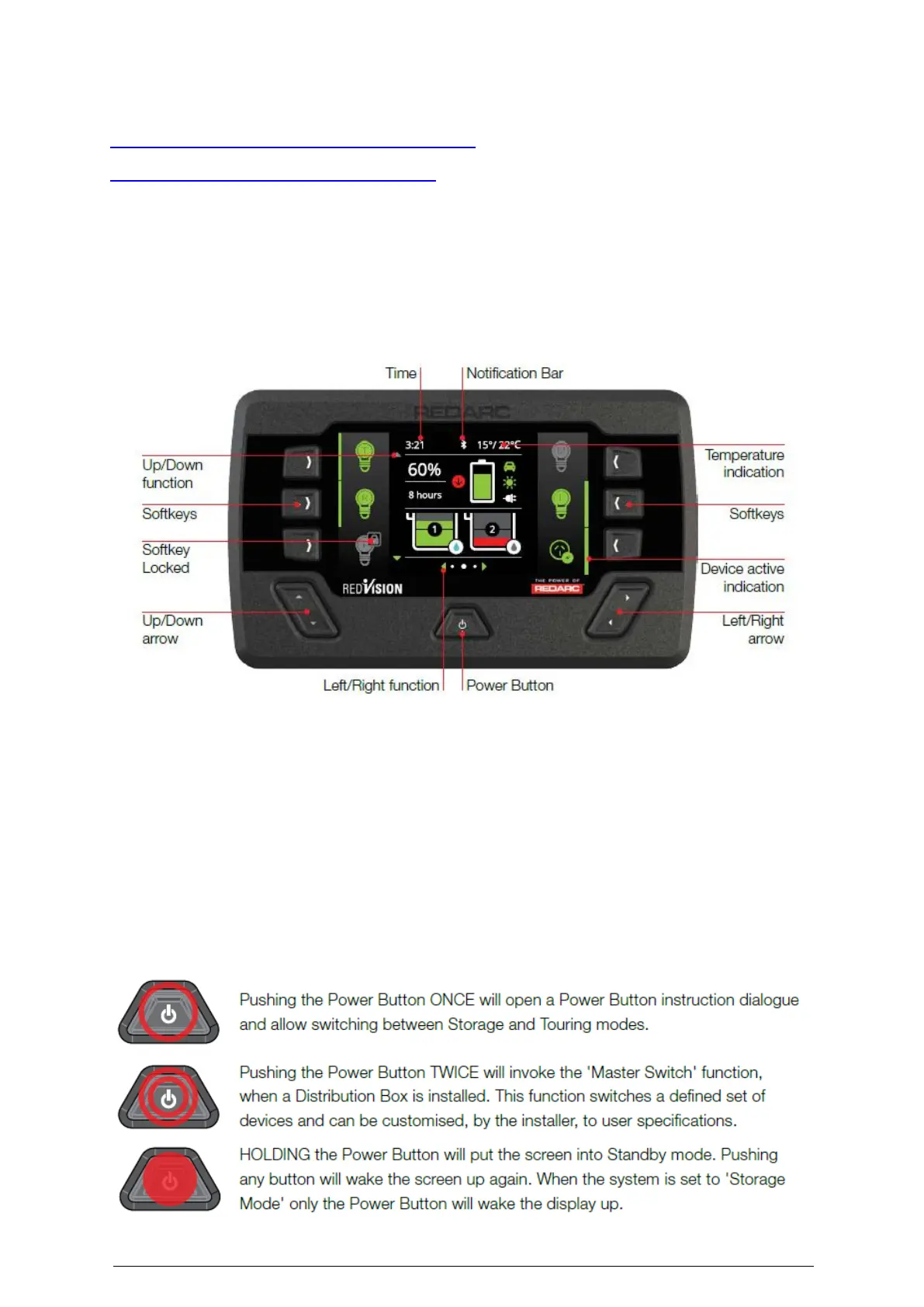
Once your H16 is all set up, go to the Red Vision control panel, and push the Power Button to
power up your caravan.
NAVIGATION
• The Left/Right buttons are used to navigate the pages on the centre of the screen
• The Up/Down buttons are used to navigate through options found on other pages
• The Left/Right and Up/Down functions are indicated on the screen.
SOFT KEYS
The Soft Keys functions will be indicated by an icon and these functions will change
depending on the screen. The Soft Keys are used to toggle devices on/off. Softkeys may also
be conditionally locked, for example to prevent a shower pump being accidentally operated
while the vehicle ignition is on.



 To Next Page