User Guide DDOC0199-000-A9
1-Slot Data Transport System (CSfC) 3 - 5 Overview
© 2024 Curtiss-Wright Defense Solutions Revision 2.0
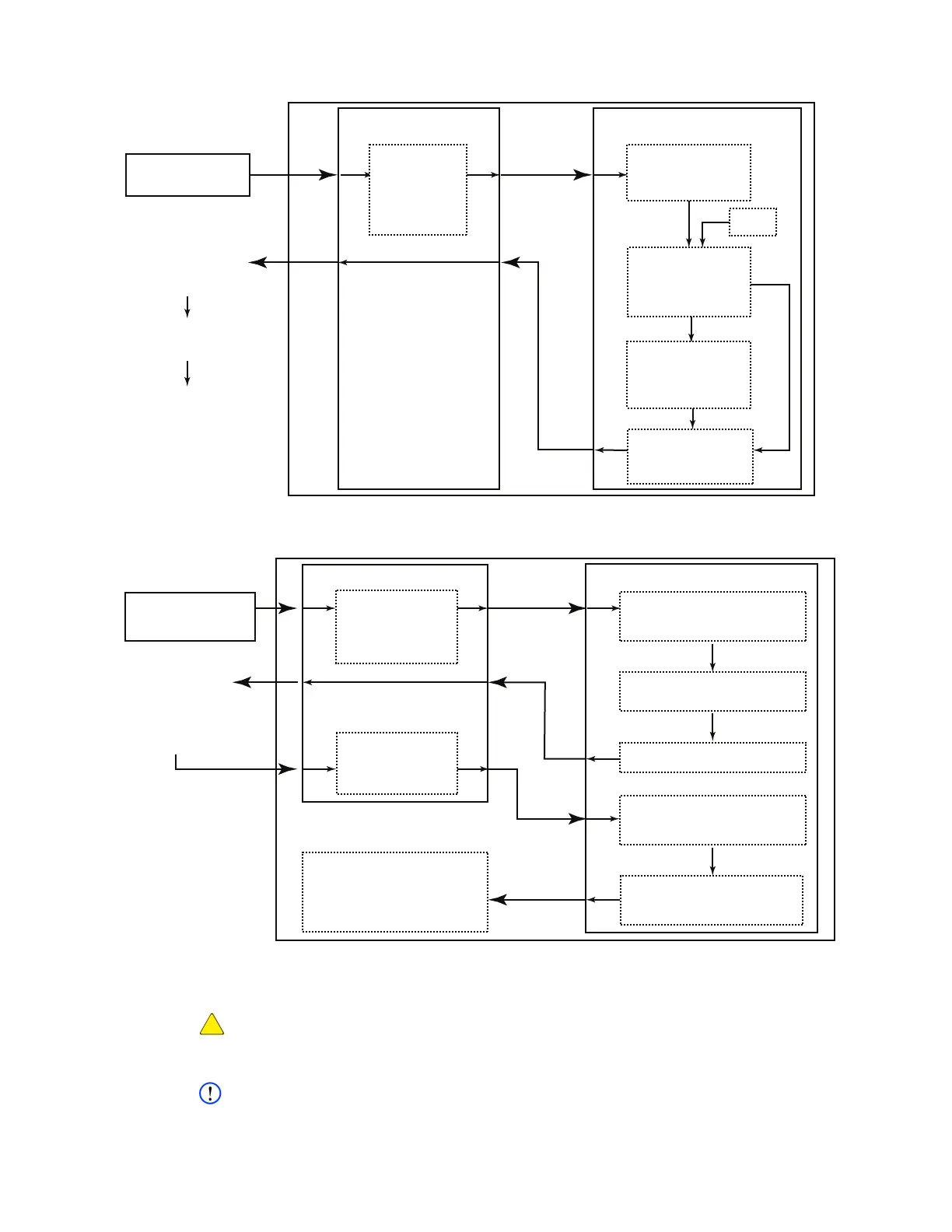
Figure 3.6 Hardware Encryption Layer Account Creation
Figure 3.7 Hardware Encryption Layer Account Login
3.3.2 Software Encryption Layer
CAUTION
DATA LOSS. If the software encryption key / passphrase is lost, the RMC module will be rendered
unusable.
NOTE
Refer to paragraph 6.4 Software Layer Encryption for information regarding the actual
commands and procedures used to create and log into the software encryption layer
TERMINAL / PC
DTS1+ CSfC
CLI
HARDWARE
CRYPTO LAYER
Internally Generate
32-byte User
Token Key
PSK Keywraps
User Token
Key (AES256
Keywrap)
PSK
Generate
HMAC
(User Token
Key and PSK)
Send Encrypted
User Token
Key and HMAC
Login / Create
Account on
Hardware
Encryption
Layer
Validate HMAC (Use
PSK and Encrypted
User Token Key)
User Token Key is
Now a Specific-User
Token Key Tied to
Account
Decrypt User Token
Key (Use PSK )
DDOC0199-0017
TERMINAL / PC
DTS1+ CSfC
CLI
HARDWARE CRYPTO LAYER
Check / Verify End-User
Name / Password
Against Account Information
Generate Random One-Time
Use 64-byte Key (Nonce)
Send Nonce
Generate HMAC (Nonce
and Specific-User
Token Key)
Compare User HMAC
and Hardware Encryption
Layer HMAC
Log Into
Previously
Created
Account
Send
User-Generated
HMAC
User Generates
HMAC via 3rd-Party
Software (Use Specific
User Token Key
and Nonce)
If Comparison Passes,
User is Logged In
If Comparison Fails,
User is Denied Access
DDOC0199-0018



 To Next Page