User Guide DDOC0199-000-A9
1-Slot Data Transport System (CSfC) 7 - 3 Quick Start
© 2024 Curtiss-Wright Defense Solutions Revision 1.0
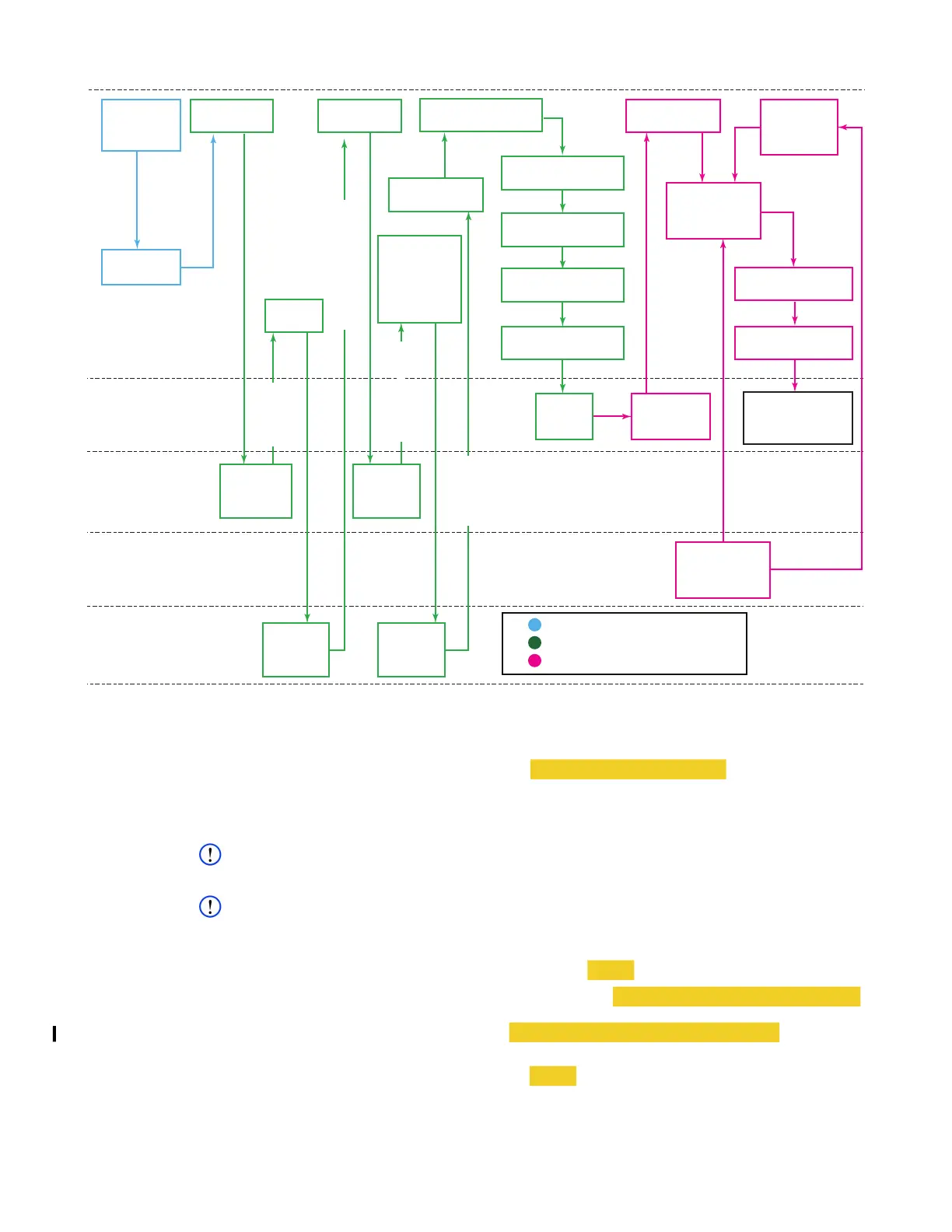
Figure 7.1 Initialization Overview Flowchart
4. Generate HMAC string using challenge generated in step 3 as input MESSAGE and unencrypted user
token from step 2 as KEY.
5. Log into crypto module. Type cmlogin -M generated HMAC string and press E
NTER.
6. Verify successful login. Type cmlogin and press E
NTER.
CMLOGIN: state=login init=1 login=1 status=OK
NOTE
<loc> refers to location (0 through 31) where key will be stored.
NOTE
The DEK is a user-generated 64 byye (128 hex character) string. There are no requirements other
than being able to remember it.
7. Create / save encryption key. Type cmkey --save <loc> -d -p and press ENTER.
• User is prompted to enter user-generated DEK. Type <User-generated DEK string>
and press ENTER.
• User is prompted to enter PSK. Type <64 hex character PSK string> and press
E
NTER.
8. Load encryption key. Type cmkey --load <loc> -s 0 and press ENTER.
DTS1+
CSfC
Hardware
Encryption
Software
Encryption
3rd-Party
Application
User
Prepare
DTS1+ CSfC
Generates
User
Token
Generates
Challenge
String
Decrypts
User
Token
Generates
HMAC
String
1 Obtain
User Token
2 Enter
PSK
4 Enter
Challenge
String and
Decrypted
User Token
3 Generate
Challenge
5 Log Into
Crypto Module
12 Initialize
SWFDE
Connect /
Log Into
DTS1+ CSfC
RMC with
CSfC Encryption
Accessible
RMC Ready
For SWFDE
14 & 17 Enter
Password /
Passphrase
SWFDE
Container
Created
16 Open
SWFDE
Container
18 Format / Mount
RMC
11 Check RMC
Status
19 Check RMC
Status
Provide
RMC
Status
8 Load
HWFDE Key
7 Create / Save
HWFDE Key
9 Partition RMC
10 Assign Services
to RMC
Legend
Connections / Preparations
Hardware Encryption (HWFDE)
Software Encryption (SWFDE)
USER TOKEN
DECRYPTED USER TOKEN
CHALLENGE STRING
HMAC STRING
DDOC0199-0048



 To Next Page