User Guide DDOC0199-000-A9
1-Slot Data Transport System (CSfC) 8 - 3 Operation
© 2024 Curtiss-Wright Defense Solutions Revision 2.0
3. Configure PuTTY as follows:
• Connection type: Serial
• Serial line: COM1 (example - any computer serial port can be utilized)
• Speed: 9600
4. Click Open button.
A terminal screen should activate.
5. Click Enter button.
A login prompt should activate.
6. Log into CLI as follows:
a. At the login prompt type admin.
b. At the password prompt type istrator.
8.2.1.2 Ethernet
This section explains setting up communications using secure shell (SSH) and a PuTTY terminal
emulator.
1. If not previously accomplished, download a copy of PuTTY terminal emulator and install on
computer.
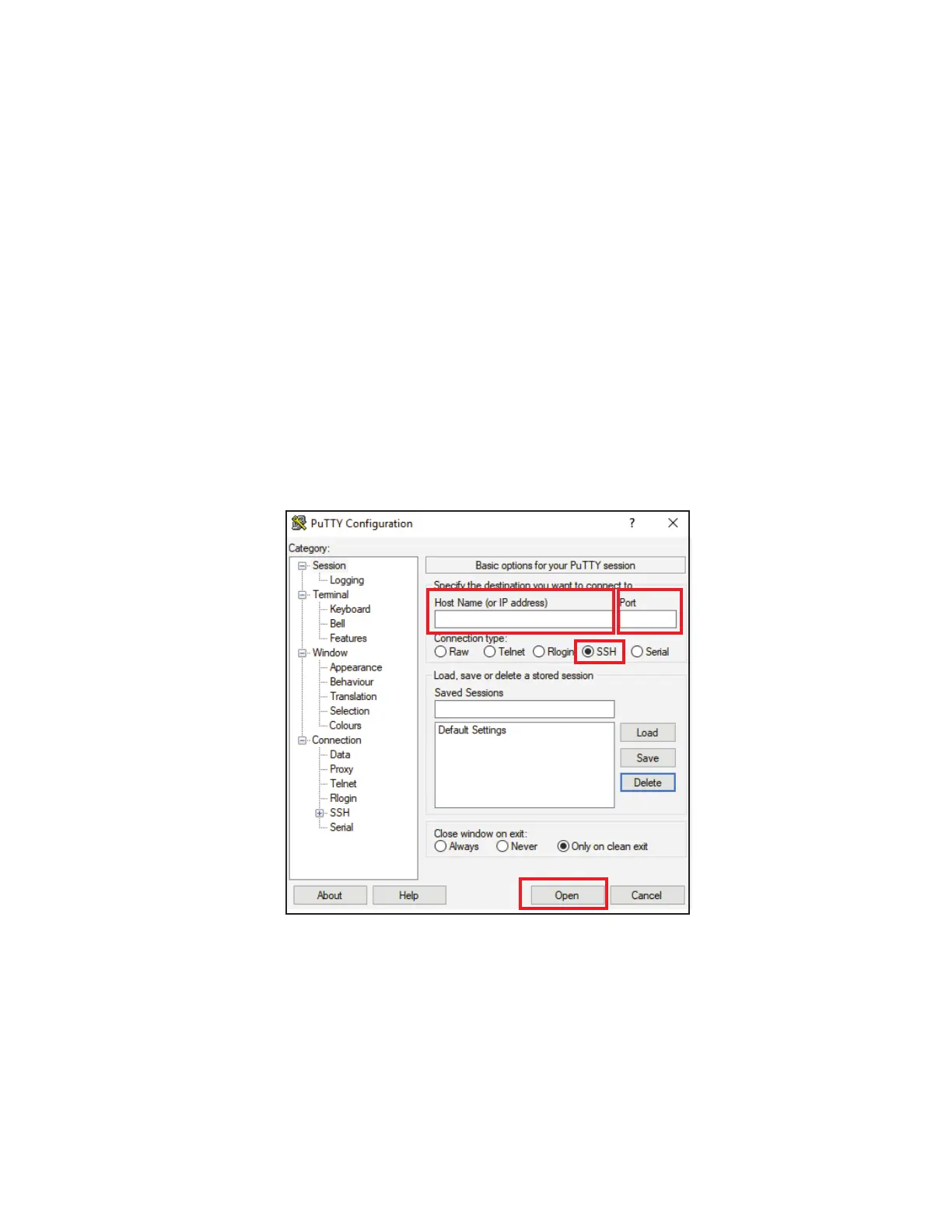
2. Open PuTTY terminal emulator (Figure 8.3).
Figure 8.3 PuTTY Terminal Emulator (SSH)
3. Configure PuTTY as follows:
• Connection Type: SSH
• Port: 22
• Host Name (or IP Address): see Table 8.1
4. Click Open button.
A terminal screen should activate.
5. Click Enter button.
A login prompt should activate.



 To Next Page