16
TRUSCULPT OPERATOR MANUAL
D1395, REV. K, 02/18
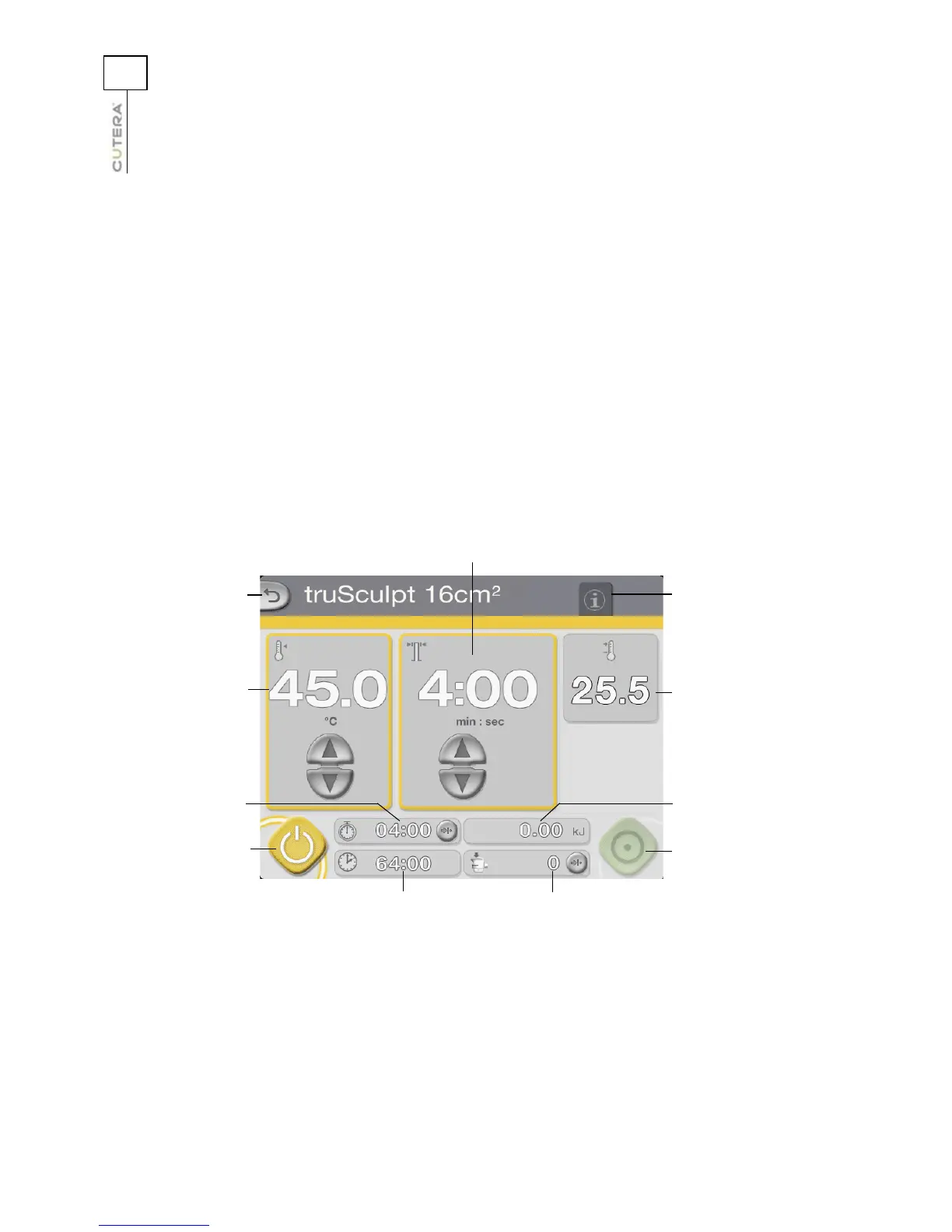
RF Handpiece Control Screen
After touching the “New Treatment” or “Resume Treatment” button on the Select screen, the RF
Handpiece Control screen displays. From the RF Handpiece Control screen, you can:
• select the target temperature of the skin
• select the pulse duration
• monitor the real-time temperature feedback of the skin
• monitor the pulse duration timer, total “RF on” time, total delivered energy, and pulse counter
• reset the pulse duration timer, pulse counter, and total delivered energy
• select STANDBY or READY mode
• go to the Select or Info & Adjustment screen
RF Handpiece Control Screen (STANDBY Mode shown)
Go to Select Screen
Target temperature
display and controls
Pulse duration timer
and reset button
Standby button
Pulse duration display
and controls
Total “RF on” timer
Pulse counter and
reset button
Go to Info &
Adjustment screen
Total delivered
energy
Real-time temperature
display
Ready button



 To Next Page