
EasyManua.ls Logo

Cyber Controller - User Manual

Cyber Controller
31 pages
Print Icon
To Next Page IconTo Next Page
Loading...
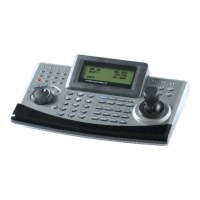
Cyber Controller
INSTRUCTION MANUAL
Please read this manual thoroughly before use and keep it handy for future reference.

Questions and Answers

Cyber Controller Specifications

General IconGeneral
BrandCyber
ModelController
CategoryController
LanguageEnglish

Summary

Warnings and Cautions

Warnings

Safety warnings to reduce risk of fire or electric shock.

Cautions

Precautions for safe operation, avoiding electric shock and damage.

Important Safeguards

Installation & Configuration

Basic Configuration of DVR & Cyber Controller

Illustrates the basic connection setup between DVR and Cyber Controller.

Basic Configuration of Matrix System & Cyber Controller

Shows the basic connection setup for a Matrix System with Cyber Controller.

Operating Controls

Operation by Part

Explains the function of various parts like LEDs, DVR Function keys, and buttons.

Operation

Power

Instructions for powering on the controller and junction box.

DVR, Camera ID & Monitor NO. Selection

How to select DVR, Camera, and Monitor IDs and numbers.

System Setup

Overview of the system setup menu options.

System Info

Displays controller information like Serial Number, ID, Hardware, and Software versions.

Password Setup

Procedure for changing the controller's password.

Camera Setup

Configuration of Camera ID Range, Protocol, Baud Rate, and Output Port.

DVR Setup

Configuration of DVR ID Range, Protocol, Baud Rate, and Output Port.

Lock

How to lock the controller to prevent unauthorized operation.

Specification

Appendix B - The List of GLB(Short) Key

Appendix B - Trouble Shooting