39D-Link DIR-878 User Manual
Section 4 - Conguration
Auto Detection (continued)
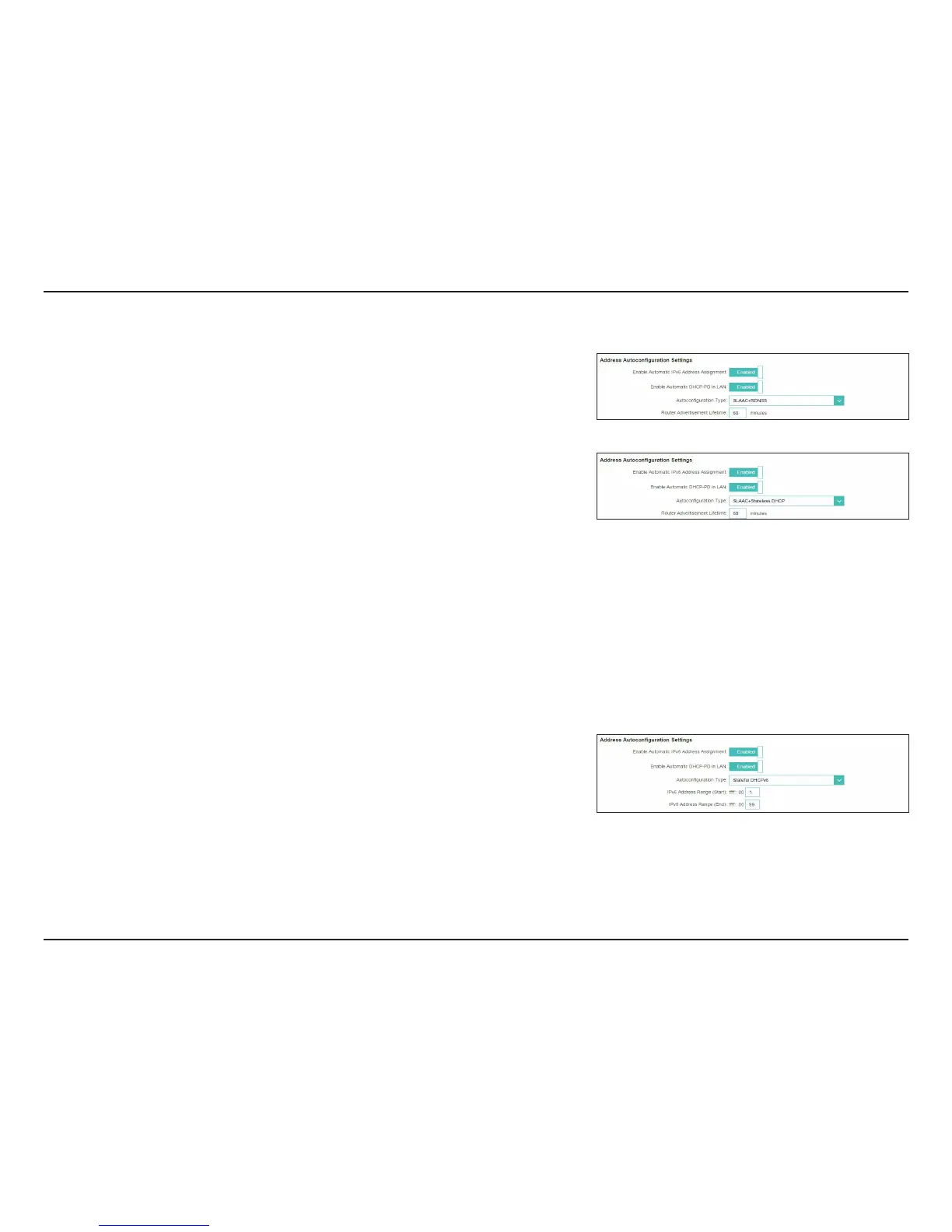
Advanced Settings - Address Autoconguration Settings
Enable Automatic
IPv6 Address
Assignment:
Enable or disable the Automatic IPv6 Address Assignment feature.
Enable Automatic
DHCP-PD in LAN:
Enable or disable DHCP-PD for other IPv6 routers connected to the
LAN interface.
Note: This feature requires a smaller subnet prex than /64 (i.e. allowing
for a larger address allocation), such as /63. Contact your ISP for more
information.
Autoconguration
Type:
Select 4-""$3%/444-""$4UBUFMFTT%)$1or Stateful DHCPv6.
If you selected 4-""$3%/44 or4-""$4UBUFMFTT%)$1as the Autoconguration Type:
Router
Advertisement
Lifetime:
Enter the router advertisement lifetime (in minutes).
If you selected Stateful DHCPv6 as the Autoconguration Type:
IPv6 Address
Range (Start):
Enter the starting IPv6 address for the DHCP server’s IPv6 assignment.
IPv6 Address
Range (End):
Enter the ending IPv6 address for the DHCP server’s IPv6 assignment.
Click Save when you are done.









 To Next Page