54D-Link DIR-878 User Manual
Section 4 - Conguration
6rd
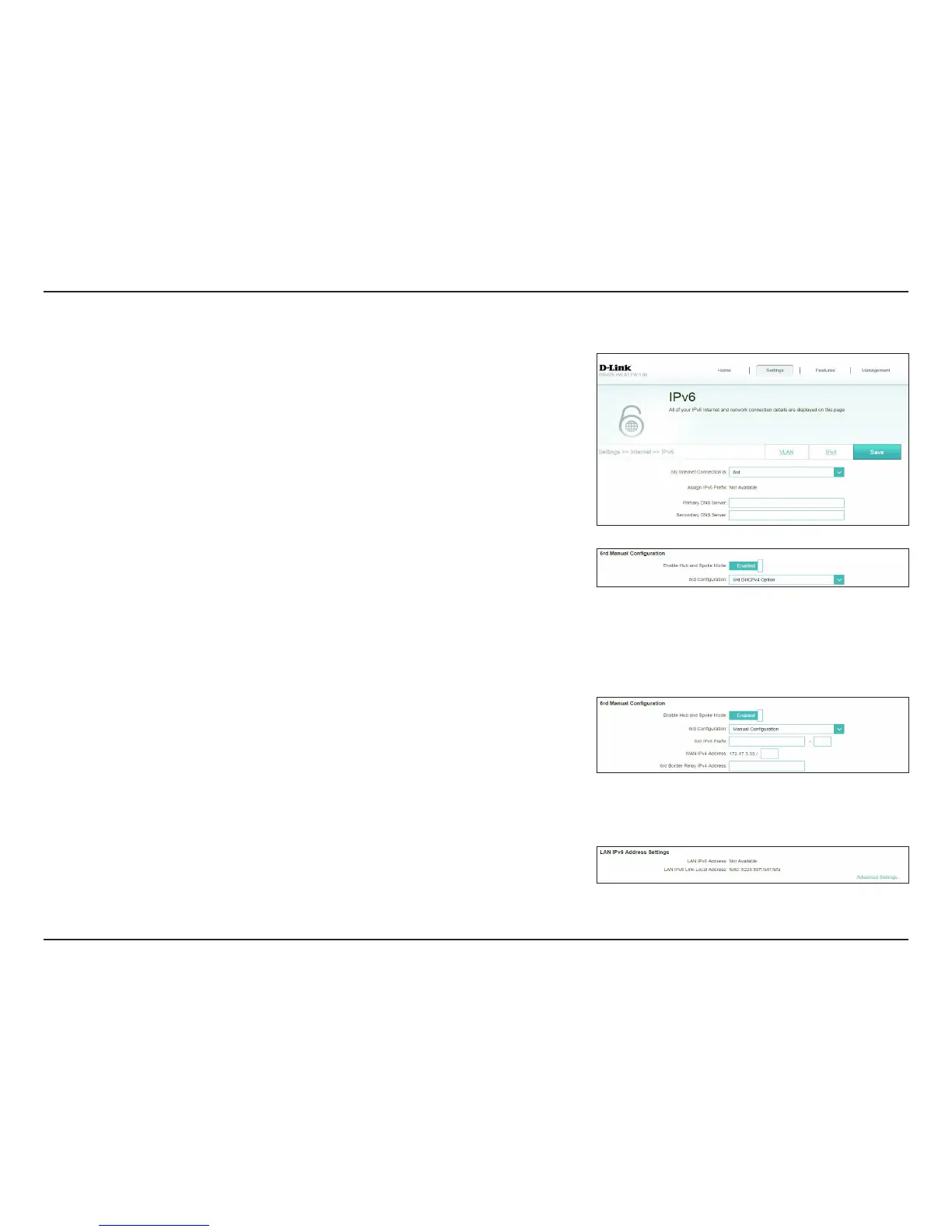
In this section the user can congure the IPv6 6rd connection settings.
Assign IPv6 Prex: Currently unsupported.
Primary DNS
Server:
Enter the primary DNS server address.
Secondary DNS
Server:
Enter the secondary DNS server address.
6rd Manual Conguration
Enable Hub and
Spoke Mode:
Enable if you want to minimize the number of routes to the destination
by using a hub and spoke method of networking.
6rd Conguration: Choose the 6rd DHCPv4 Option to automatically discover and
populate the data values, or Manual Conguration to enter the
settings yourself.
If you selected Manual conguration
6rd IPv6 Prex: Enter the 6rd IPv6 prex and mask length supplied by your ISP.
WAN IPv4 Address Displays the router’s IPv4 address.
6rd Border Relay
IPv4 Address:
Enter the 6rd border relay IPv4 address settings supplied by your ISP.
LAN IPv6 Address Settings
LAN IPv6 Address: Displays the router’s LAN IPv6 Address link-local address.
LAN IPv6 Link-
Local Address:
Displays the router’s LAN link-local address.









 To Next Page