46D-Link DAP-1650 User Manual
Section 3 - Conguration
Advanced
This section allows you to congure the advanced parameters of your DAP-1650. There will be dierent advanced features
available for conguration based on the mode in which your device is operating. The instructions below are listed according
to operation mode.
Access Point Mode
Access Control
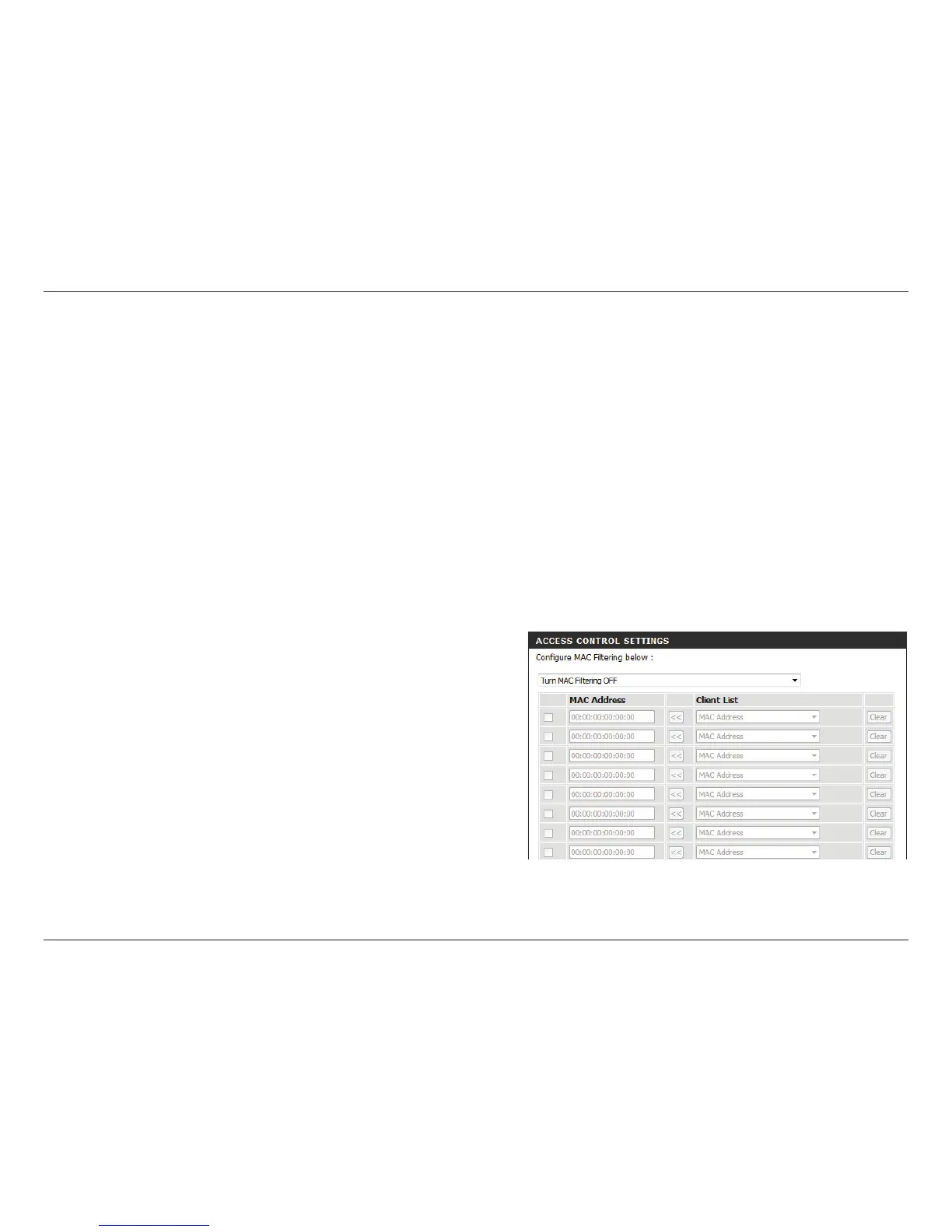
MAC ltering allows you to control wireless access to your network according to clients’ MAC addresses.
Congure MAC
Filtering:
Checkbox:
MAC Address:
Use the drop-down menu to select your desired MAC ltering
method:
Turn MAC Filtering OFF - No MAC ltering will be implemented.
Turn MAC Filtering ON and ALLOW - MAC ltering will be
turned on, and only MAC addresses listed in the table below
will be allowed access.
Turn MAC Filtering ON and DENY - MAC ltering will be turned
on, and only MAC addresses listed in the table below will be
denied access.
Check the box to include this MAC address in the MAC ltering
rules.
Enter the MAC address of the client that you wish to lter. If
the client is currently connected to the access point, you can
select it from the Client List drop-down menu, and click << to
automatically populate the eld.
Click Clear to clear all elds. Click Save Settings at the bottom
of the page to save the current conguration.


 To Next Page