lxviiiD-Link DAP-1650 User Manual
Section 3 - Conguration
Firmware
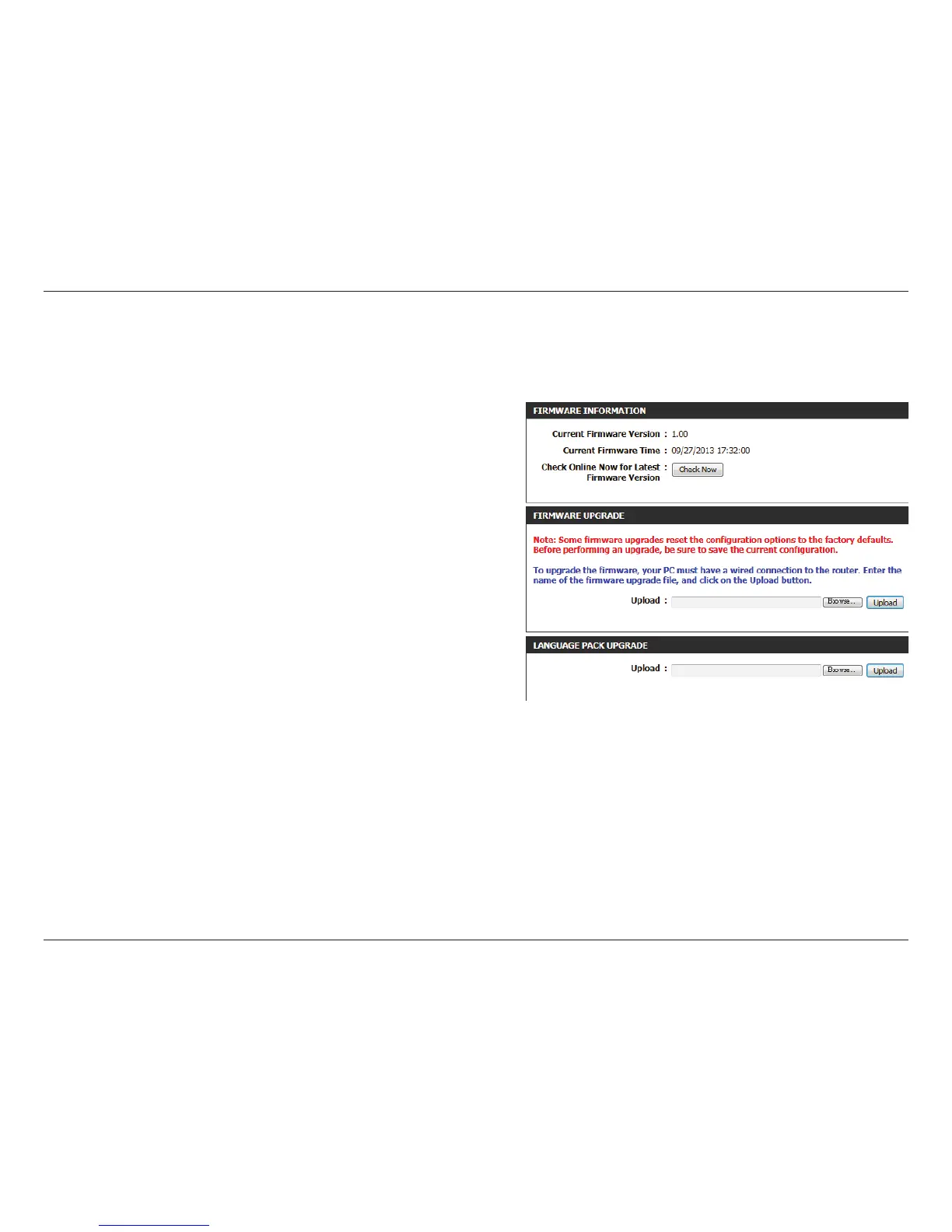
This section displays information about the device’s current
rmware and language pack.
Note: The access point must have an active Internet connected
to check for rmware and language pack updates.
If the above check for rmware detected updates, the details
will displayed here. Click Download to download the update
les to your computer.
Click Browse to locate a rmware le on your computer. Once
located, click Upload to commence the rmware upgrade
process. It is recommended that you save your current router
configuration using the system page before you begin a
rmware upgrade.
Warning: You must use a wired connection to the access point
to update the rmware.
Click Browse to locate a language pack le on your computer.
Once located, click Upload to commence the language pack
upgrade process.
Use the rmware page to update the device’s rmware, and add or remove language packs.
Firmware
Information:
Check the Latest
Firmware and
Language Pack
Versions:
Firmware
Upgrade:
Language Pack
Upgrade:


 To Next Page