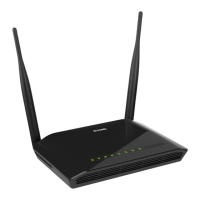
DAP-300P Wireless N300 PoE Access Point / Router
User Manual
Contents
Chapter 1. Introduction.........................................4
Contents and Audience.......................................................4
Conventions.................................................................4
Document Structure..........................................................4
Chapter 2. Overview.............................................5
General Information.........................................................5
Specifications..............................................................6
Product Appearance.........................................................11
Upper Panel..............................................................11
Back Panel...............................................................12
Delivery Package...........................................................13
Chapter 3. Installation and Connection.........................14
Before You Begin...........................................................14
Connecting to Mobile Device with D-Link Assistant Application..............15
Connecting to PC...........................................................19
PC with Ethernet Adapter.................................................19
Configuring IP Address in OS Windows 7...................................20
Configuring IP Address in OS Windows 10..................................25
PC with Wi-Fi Adapter....................................................29
Configuring Wi-Fi Adapter in OS Windows 7................................30
Configuring Wi-Fi Adapter in OS Windows 10...............................33
Connecting to Web-based Interface..........................................36
Web-based Interface Structure..............................................38
Summary Page.............................................................38
Home Page................................................................40
Menu Sections............................................................41
Notifications............................................................42
Chapter 4. Configuring via Web-based Interface.................43
Initial Configuration Wizard...............................................43
Selecting Operation Mode.................................................45
Changing LAN IPv4 Address................................................48
Wi-Fi Client.............................................................49
Configuring WAN Connection...............................................51
Static IPv4 Connection.................................................52
Static IPv6 Connection.................................................53
PPPoE, IPv6 PPPoE, PPPoE Dual Stack,
PPPoE + Dynamic IP (PPPoE Dual Access) Connections.....................54
PPPoE + Static IP (PPPoE Dual Access) Connection.......................55
PPTP + Dynamic IP or L2TP + Dynamic IP Connection......................56
PPTP + Static IP or L2TP + Static IP Connection........................57
Configuring Wireless Network.............................................58
Configuring LAN Port for IPTV/VoIP.......................................60
Changing Web-based Interface Password....................................62
Connection of Multimedia Devices...........................................64
Statistics.................................................................67
Network Statistics.......................................................67
DHCP.....................................................................68
Clients and Session......................................................69
Multicast Groups.........................................................70
Routing Table............................................................71
Page 2 of 175



 To Next Page