42D-Link DCS-5000L User Manual 42
Section 3 - Conguration
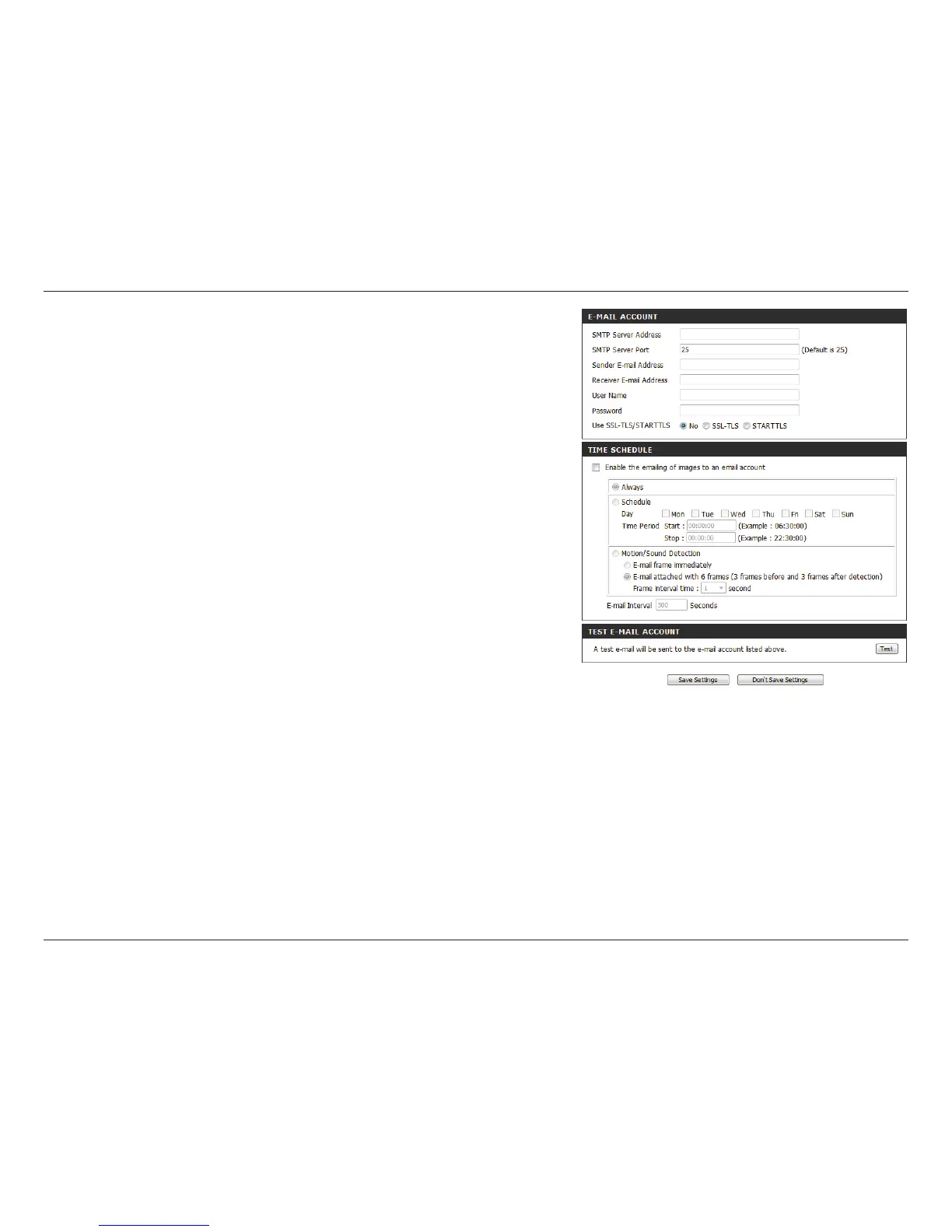
Enable the
e-mailing
of images
to an e-mail
account:
Enabling this will allow snapshots to be e-mailed to you in
dierent ways:
• Choosing Always will e-mail snapshots continuously
based on the E-mail Interval specified.
• Choosing Schedule will allow you to schedule when
to start and stop the e-mailing of snapshots.
• Select Motion/Sound Detection if you would like
the camera to e-mail images only when motion or
sound is detected. You can choose whether to e-mail a
snapshot immediately, or e-mail 6 snapshots together,
with 3 frames before and after motion/sound was
detected. You can also set the Frame interval time
to specify how far apart the snapshots should be.
Step 4 - Enter the destination e-mail address in Receiver
E-mail Address.
Step 5 - Enter the user name required to access the SMTP
server.
Step 6 - Enter the password required to access the SMTP
server.
Step 7 - Select SSL-TLS and then click Save Settings.
Step 8 - Click the Test button to send a test e-mail to the
account listed above.
Note: You can also use STARTTLS, which will use SMTP
server port number 587.
Note: If you want to use a Yahoo SMTP server, the SMTP
server address will be dierent between each registered
region, and only SMTP port 465 is supported for SSL-TLS.















 To Next Page